Disclosure: This post contains affiliate links. If you buy through these links, I may earn a small commission at no extra cost to you.
Paying full price on Steam while the same game sits at 60% off elsewhere? That stings. Once you know how to compare game key prices, you’ll never overpay again.
The good news: three free tools do all the work. You type a game name, hit search, and they scan 50+ stores in seconds. This guide shows you how each tool works, compares real prices for three popular games, and helps you pick the right one.
Why You Should Compare Game Key Prices Before Every Purchase
Here’s a quick reality check. While writing this article, I looked up three games. The price gap between the highest and lowest listing was eye-opening.
| Game | Steam Price | Cheapest Key | You Save |
|---|---|---|---|
| Baldur’s Gate 3 | $59.99 | ~$49.08 | 18% ($11) |
| Skyrim Legendary Edition | $14.33 | $6.38 | 55% ($8) |
| Elden Ring | $59.99 | ~$38.50 | 36% ($21) |
Prices checked June 18, 2026. Key prices fluctuate daily.
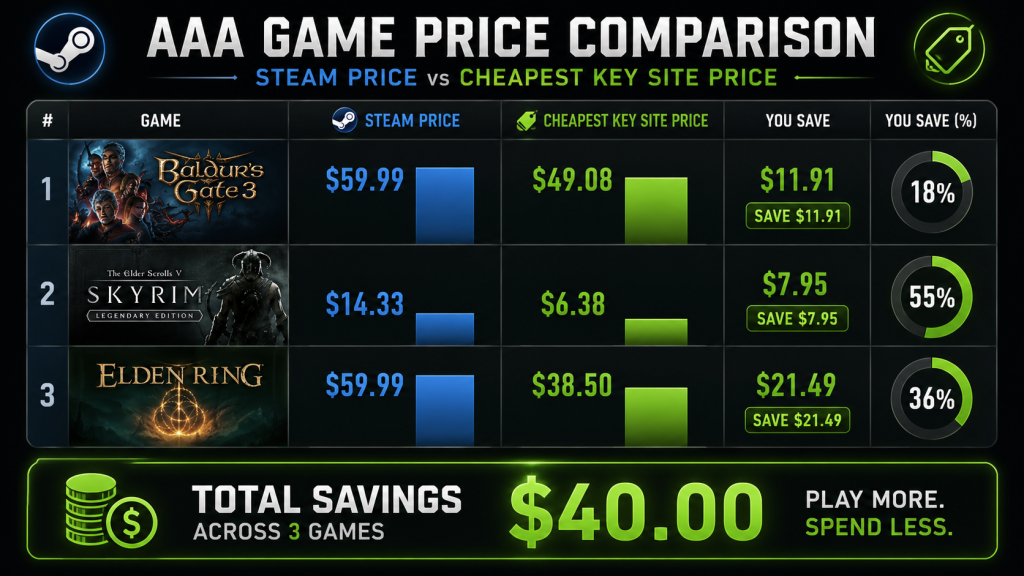
Add it up and you get $40 in savings across just three games. Best part? The whole comparison took under two minutes. If you buy even five games a year, comparing prices before checkout saves you $50-$100 annually. That’s zero extra effort for real money back in your pocket.
The Three Best Tools to Compare Game Key Prices
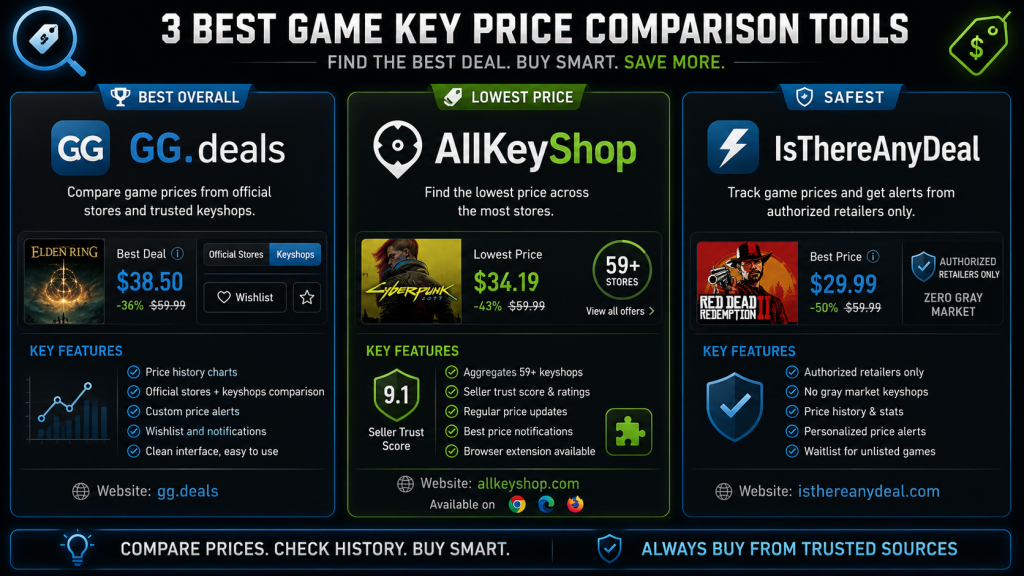
Not all comparison tools are equal. Some hide keyshop listings by default. Others mix in risky sellers without warning. Here’s what you actually need.
GG.deals — Best Overall
GG.deals is the gold standard. Clean interface, detailed price history charts, and a clear split between official stores and keyshops.
What makes it stand out:
- Price history for every game — so you can see if that “deal” is actually a deal
- Keeps keyshops hidden until you opt in (safer for beginners)
- Voucher codes listed per store — stacks extra savings on top
- Price alerts — set a target and get emailed when it hits
- Wishlist that tracks prices across all stores
If you only use one tool, pick this one.
AllKeyShop — Best for Absolute Lowest Price
AllKeyShop leans harder into the keyshop side. As a result, it lists keyshop prices by default and usually finds slightly lower prices than GG.deals.
What makes it stand out:
- Searches 59+ stores at once
- Seller trust scores and community reviews
- Browser extension for deal alerts while you browse
- Newsletter with weekly top deal roundups
- Rewards program (earn entries for gift cards and hardware)
The catch? It’s easier to accidentally land on a sketchy seller. Always check the seller rating before clicking through.
IsThereAnyDeal — Best for Safety-First Buyers
IsThereAnyDeal takes the opposite approach. Every store listed is manually vetted. No gray market sellers or keyshops, period. Zero surprises.
What makes it stand out:
- Zero risk of revoked or fraudulent keys
- Clean wait/recommend alerts based on price history
- Shows bundle appearances across Humble and Fanatical
- Less overwhelming for first-time key buyers
The trade-off, however, is that prices run slightly higher because you’re only seeing authorized retailers. For a lot of people, the peace of mind is worth the extra few dollars.
How to Compare Game Key Prices: Step-by-Step
Here’s the exact workflow I use every time I buy a game.
Step 1: Open Two Tabs
Open GG.deals and AllKeyShop side by side. And no, one tool isn’t always enough — I’ve seen GG.deals miss a deal that AllKeyShop caught, and the other way around. Two tabs take five extra seconds.
Step 2: Search and Compare
Type the game name into both sites. Then look at three things:
- The spread between highest and lowest price. If it’s more than $15, the low price is probably from a keyshop — expect some risk.
- Where the lowest price sits. On GG.deals, check if it’s under “Official Stores” or “Keyshops.” On AllKeyShop, check the seller’s rating (stick to 95%+).
- The historical low. Both tools show this. If the current “best” price is $10 above the all-time low, wait for a sale.
Step 3: Check for Voucher Codes
Before clicking through, scroll GG.deals for active voucher codes. Many keyshops run permanent 3-5% off codes that the comparison tools don’t factor into the listed price.
Step 4: Verify the Region
Click through to the seller’s page. Before adding to cart, confirm the key region matches your account. “Global” and “ROW” work anywhere. “EU” and “NA” do not cross over.
Step 5: Buy and Activate
Use PayPal if the seller offers it — you get buyer protection if the key doesn’t work. Once you’ve got the key, activate it immediately. Don’t let keys sit in your inbox. If something’s wrong, you want to know the same day.
Real Example: Skyrim Legendary Edition
To show you the difference these tools make, let me walk through a real comparison.
For example, Skyrim Legendary Edition sits at $14.33 on Steam. Not terrible for hundreds of hours of content. But after running it through both tools, here’s what came back:
| Store | Price | Type |
|---|---|---|
| Steam | $14.33 | Official |
| G2A | $6.38 | Keyshop |
| Kinguin | $7.15 | Keyshop |
| Eneba | $7.42 | Keyshop |
That’s $6.38 — less than a fast food meal — for a game that still has 30,000+ active players on Steam as of 2026. Meanwhile, the comparison took 30 seconds and saved $7.95. Multiply that by every game you buy this year and the savings add up fast.
Which Tool Should You Actually Use?
It depends on how you buy games.
If you buy 1-2 games a year and want zero hassle: Use IsThereAnyDeal. Everything is safe. You won’t save quite as much, but you’ll never have to think about revoked keys.
If you buy 5-10 games a year and want the best balance: Use GG.deals as your main tool, keyshops enabled. Check seller ratings before buying. Stick to stores with 95%+ positive feedback.
If you’re buying a dozen games and want every last dollar of savings: Use AllKeyShop alongside GG.deals. Cross-check both. Buy from the cheapest seller with a decent rating. And accept that once every couple of years, a key might not work — the cumulative savings more than cover one bad key.
As for me, I use GG.deals for everything and fire up AllKeyShop when GG.deals shows limited listings. Two tabs, 30 seconds, done.
Common Mistakes When You Compare Game Key Prices
Mistake 1: Sorting by price and clicking the cheapest link without checking anything else.
That $3 listing from a seller with 12 reviews and a 67% rating? Skip it. Filter by seller rating first, then sort by price.
Mistake 2: Forgetting to check the platform.
AllKeyShop and GG.deals list Xbox, PlayStation, and PC keys mixed together by default. Use the platform filter before comparing.
Mistake 3: Ignoring the edition.
A $25 “Elden Ring” listing might be the Standard Edition while a $35 listing includes the DLC. Always click into the listing to confirm which edition you’re buying.
Mistake 4: Buying a key and not activating it for weeks.
Keys can get revoked. Sellers can disappear. Therefore, activate the moment you buy. If there’s a problem, you want to catch it while the seller still cares about their rating.
Quick Reference: Compare Game Key Prices in 30 Seconds
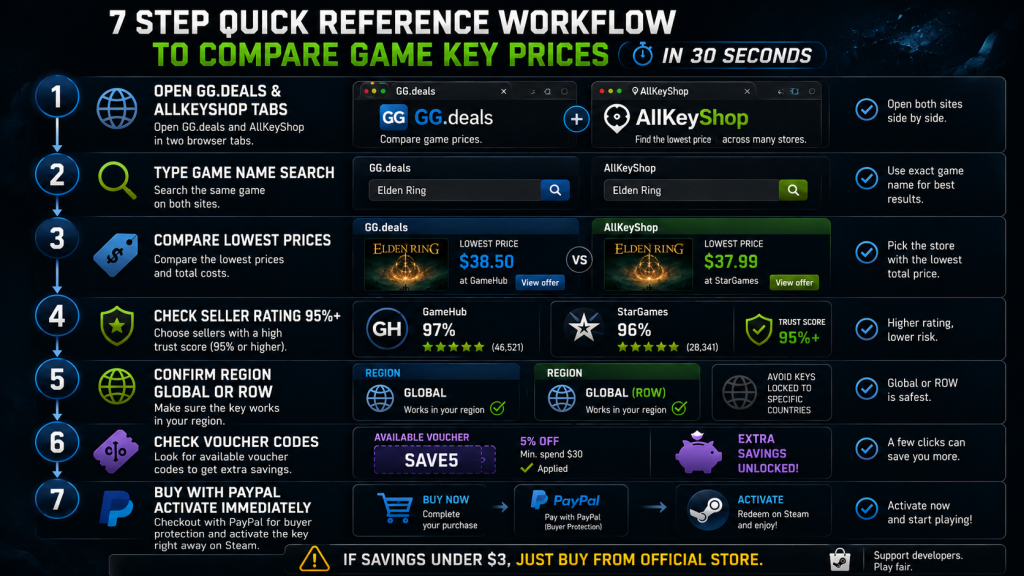
- Open GG.deals + AllKeyShop
- Type the game name in both
- Check the lowest price on each — note which store it’s from
- Check seller rating (95%+ or skip)
- Confirm region (Global/ROW = safe)
- Check for voucher codes on GG.deals
- Buy with PayPal, activate immediately
The rule: if the savings are under $3, just buy from an official store. The peace of mind is worth three dollars.
What’s Next?
Now you know how to compare game key prices across every major store in under a minute. The three tools in this guide — GG.deals, AllKeyShop, and IsThereAnyDeal — cover every need, from budget hunting to buying with zero risk.
If you haven’t read the rest of this series, start here:
- Part 1: How to Buy PC Games Cheap — Key Sites Ranked — which stores to trust
- Part 2: Game Key Scam Signs — 10 Red Flags — how to spot a bad seller
- Part 3: How to Activate Game Keys on Steam, Epic & GOG — activate your first key
Next in Part 5: G2A vs Kinguin vs Eneba — the three biggest keyshops go head to head. Prices, fees, refunds, and which one actually treats buyers right.
As an Amazon Associate we earn from qualifying purchases. PSN Gift Cards | Xbox Gift Cards | Steam Gift Cards