Disclosure: This post contains affiliate links. If you buy through these links, I may earn a small commission at no extra cost to you.
Learning how to activate game keys is the final step after buying cheap PC game codes online. The email arrived, the key is sitting in your inbox. However, unlike buying directly from Steam, there’s no cart and no checkout page — just a string of letters and numbers. So where do you actually paste it?
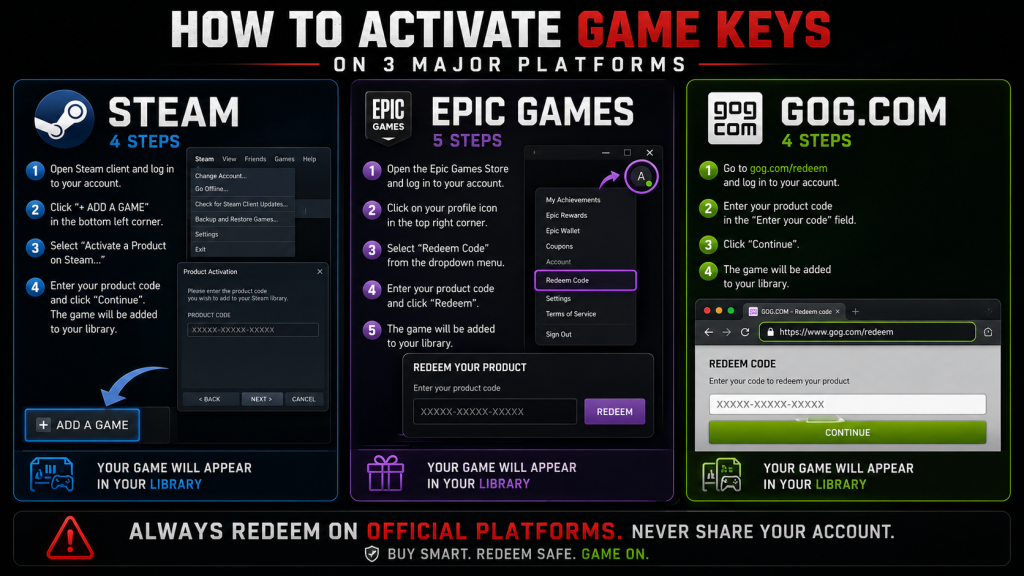
Throughout this guide, we’ll walk through how to activate game keys on Steam, Epic Games, and GOG, step by step. In addition, we’ll cover the 5 most common errors, what they really mean, and how to fix them fast.
Before You Activate Game Keys: Three Quick Checks
Before typing anything, do these three checks first. They take about 10 seconds and will stop 90% of activation problems before they happen.
1. Which platform is this key for?
Take a look at the purchase email. Typically, it will say “Steam Key,” “Activates on Epic,” or “GOG Code.” Keep in mind that a Steam key won’t work on Epic, and an Epic key won’t work on Steam. If the platform isn’t clear, contact the seller before you try to activate the game key.
2. What region is your account in?
Keys come with region locks. For example, a EU key won’t let you activate game keys on a US Steam account. Meanwhile, most key sites display the region right on the product page — look for “Global,” “EU,” “NA,” or “ROW” (Rest of World). Global keys work anywhere, while regional keys must match your account.
3. Copy-paste, don’t type.
Key codes use characters that are painfully easy to confuse: 0 vs O, 1 vs I, 5 vs S. Because of this, you should always copy the code directly from the seller’s email. If you absolutely must type it, paste into Notepad first to check for extra spaces. In fact, typing errors are the #1 reason people fail to activate game keys on the first try.
How to Activate Game Keys on Steam
Steam is where most third-party keys end up. Here’s exactly how to activate game keys on Steam, using two different methods.
Steam Desktop App: Activate Game Keys Step by Step
- First, open the Steam client and log in.
- Next, look at the bottom-left corner and click the “+ ADD A GAME” button.
- Then select “Activate a Product on Steam…”
- After that, click Next on the pop-up window.
- Read the Steam Subscriber Agreement (or skim it — then click “I Agree”).
- Now paste your key into the “Product Code” field.
- Click Next to continue.
- Steam shows you which game the key unlocks. Once you confirm it’s the right game, click Finish.
- Finally, the game appears in your Library. You’ve now activated your game key.
The key is permanently tied to your account from this point forward. As a result, you cannot transfer it to another account, and you cannot get a refund through the key seller once revealed.
Alternative path: You can also click “Games” in the top menu → “Activate a Product on Steam…” — same result, just a different route.
Steam Website: Activate a Game Key Without the Client
Of course, if you’re away from your gaming PC, you can still activate game keys through any browser.
- First, go to store.steampowered.com/account/registerkey
- Then log into your Steam account.
- Next, paste the key into the field.
- Click Continue to finish.
- The game is now added to your account. You can install it later from the Steam client whenever you’re ready.
Note: The Steam mobile app does not support key activation. Instead, use a browser or the desktop client.
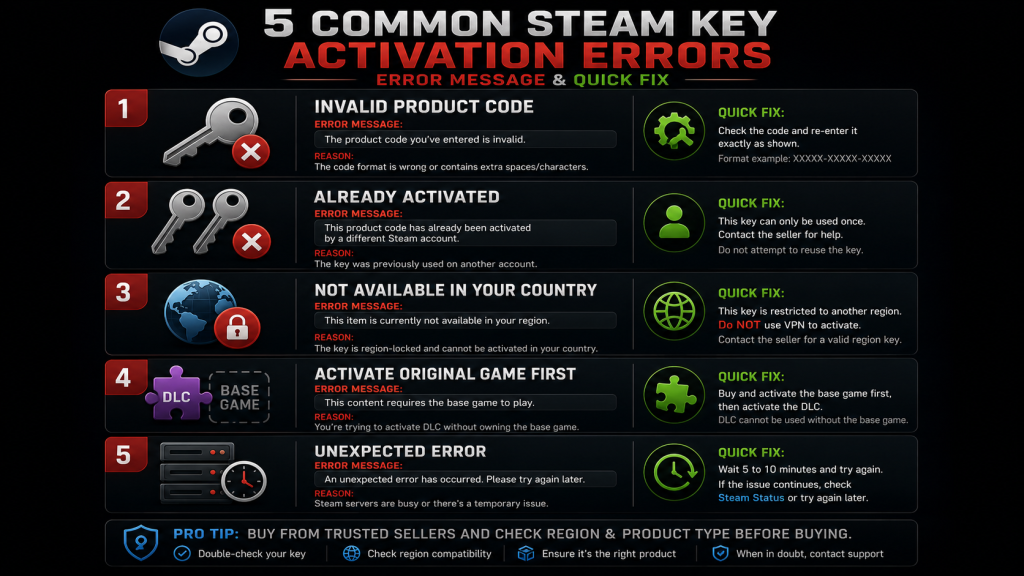
Common Steam Errors When You Activate Game Keys
| Error | What It Means | What To Do |
|---|---|---|
| “Invalid Product Code” | Wrong key format, or it’s an Epic/GOG key not a Steam key | Paste again carefully. Also, double-check the email — is this actually a Steam key? Try pasting into Notepad first, then re-copy. |
| “Already Activated” | The key was already used — by you, a family member, or resold to multiple buyers | First, check your Library and Steam license history (Account → View licenses and product key activations). If it’s not there, contact the seller with a screenshot. |
| “Not Available in Your Country” | Region lock mismatch — you’re trying to activate a game key locked to another region | Above all, do NOT use a VPN — this breaks Steam’s terms and can get your account banned. Instead, contact the seller for a region-matched replacement. |
| “Activate Original Game First” | You’re trying to activate a DLC key without owning the base game | Buy and activate the base game first. Additionally, confirm the product page says it’s DLC — some sellers aren’t clear about this. |
| “Unexpected Error” | Temporary Steam server hiccup | Wait 5-10 minutes and try again. If the problem keeps happening, clear your download cache: Steam → Settings → Downloads → Clear Download Cache. Then restart Steam. |
How to Activate Game Keys on Epic Games
Epic Games offers two ways to activate game keys — either through the launcher or through the website.
Epic Games Launcher: Redeem Your Code
- First, open the Epic Games Launcher and log in.
- Next, click your profile icon in the top-right corner.
- Then select “Redeem Code” from the dropdown menu.
- Paste your key and click “Redeem.”
- That’s it — the game lands in your Epic Library right away.
Epic Games Website: Activate Without Installing
- Head to epicgames.com/account/code-redemption
- Log into your Epic Games account.
- Paste the code and click “Redeem.”
Tip: Epic keys use the XXXXX-XXXXX-XXXXX-XXXXX format. By the way, you can paste with or without dashes — the system accepts both.
Epic Games Errors When You Activate Game Keys
| Error | What It Means | What To Do |
|---|---|---|
| “Code Already Used” | The key was redeemed on another Epic account | First, check your own Epic library. If you don’t see it there, contact the seller with an error screenshot. |
| “Code Not Valid” | Wrong format or wrong platform (for instance, a Steam key entered into Epic) | Double-check the platform in your purchase email. Also, copy-paste instead of typing. |
| “Not Available in Your Region” | Region lock mismatch | Just like Steam — don’t use a VPN. Contact the seller for a replacement instead. |
| “Redemption Failed” | Server-side issue or rate limiting | Wait a few minutes. If the launcher keeps failing, try the website method as a backup. |
How to Activate Game Keys on GOG
GOG keys are less common but simpler to activate. Because GOG is DRM-free, once you activate a game key, it’s yours forever — no client required.
GOG Website: The Easiest Way to Activate
- First, go to gog.com/redeem
- Then log into your GOG account.
- Next, paste your key and click “Continue.”
- Confirm the game shown is correct, then click “Redeem.”
- Done — the game is instantly in your GOG library.
GOG Galaxy Client: Alternative Method
- Open GOG Galaxy.
- Click “+ Add games & friends” near the top.
- Select “Redeem GOG code.”
- Finally, paste your key and click “Continue.”
GOG Activation Errors and Fixes
| Error | What It Means | What To Do |
|---|---|---|
| “Code Not Found” | Invalid format or already used | Paste again carefully. If it still fails, contact the seller. |
| “Region Mismatch” | Key and account region don’t match | Contact the seller for help. As an extra step, GOG support can confirm which region a key is locked to. |
Steam Gift vs Steam Key — Know the Difference
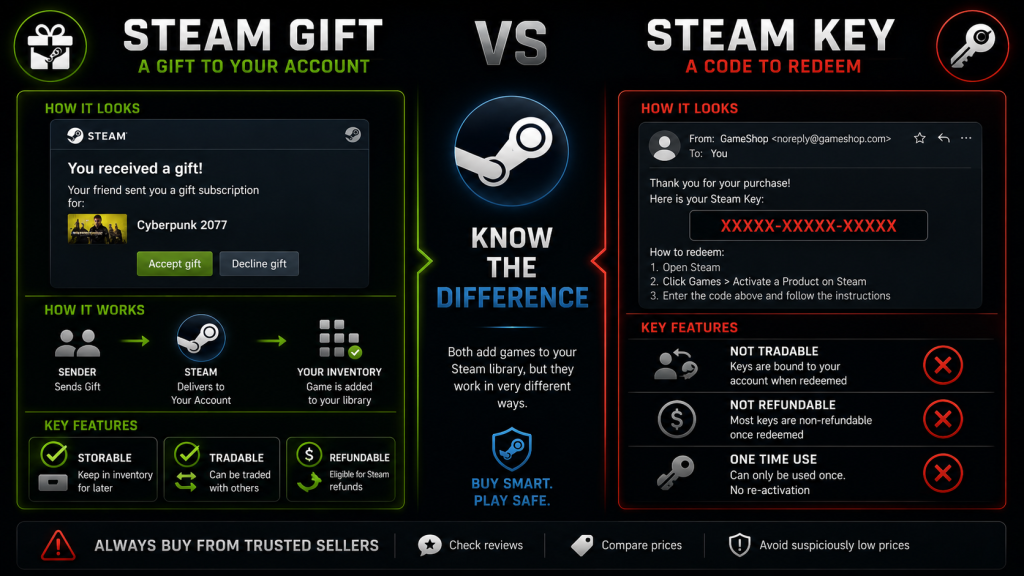
This trips up a lot of first-time buyers who are learning how to activate game keys. They are definitely not the same thing.
| Steam Gift | Steam Key (CD Key) | |
|---|---|---|
| How you get it | Through Steam directly — notification or email from Steam | A string of characters from the seller, not Steam |
| How to activate | Click “Accept Gift” in Steam | Use “Activate a Product on Steam” |
| Can you store it? | Yes — sits in your Steam inventory until redeemed | No — use it or lose it once revealed |
| Can you trade it? | Yes — send to friends through Steam | No — tied to whoever activates it first |
| Refundable? | Yes, if the sender agrees | Almost never once revealed |
So here’s the practical difference: “Steam Gift” means you get a link to accept through Steam. On the other hand, “Steam Key” or “CD Key” means you get a code to paste. Gifts are safer because they move through Steam’s own system, which means zero chance of a revoked key. However, they’re rarer and usually cost a bit more.
After You Activate Game Keys: Confirm Your DLC
You activated a key that included a game plus DLC. The game showed up right away. But what about the DLC?
On Steam:
- Head to your Library first.
- Right-click the game → Properties → DLC tab.
- Every DLC you own is listed with “Installed” or “Not Installed.”
- If DLC you paid for is missing, the key may not have included it. Contact the seller right away.
On Epic Games:
- Open your Library from the launcher.
- Click the three dots under the game → Manage Add-Ons.
- Owned DLC shows “Owned.” Unowned DLC shows a price instead.
On GOG:
- Navigate to your Library on the website or in Galaxy.
- Click the game → scroll to “Goodies” and “DLC” sections.
- Everything you own is listed and ready to download.
The golden rule: Check DLC as soon as you activate game keys. If something is missing, contact the seller the same day. The longer you wait, the harder it gets to sort out.
What If You Can’t Activate Your Game Key?
If you’ve tried every fix above and still can’t activate game keys, here is the escalation path to follow:
- Contact the seller first. This is the seller’s problem, not the platform’s. A good seller will check the key and offer a replacement or refund. Make sure you have your order number, purchase date, and a screenshot ready.
- If the seller won’t help, use buyer protection. Did you pay with PayPal? Open a dispute. Credit card? Request a chargeback. This is exactly why Part 1 tells you to never buy from sites without PayPal.
- As a last resort, contact the platform. Steam, Epic, or GOG support can confirm when a key was activated and in which region. They can’t issue a replacement, but their response gives you proof for your payment dispute.
- Warn other buyers, too. Post on Reddit or Trustpilot about what happened. Name the seller, show the error, and share how they responded. Your report could save the next person from the same trap.
Quick Reference: How to Activate Game Keys
Steam: “+ ADD A GAME” (bottom-left) → “Activate a Product on Steam” → paste key
Epic Games: Profile icon (top-right) → “Redeem Code” → paste key
GOG: gog.com/redeem → paste key
Copy-paste keys. Never type them.
Check DLC immediately after you activate game keys.
Errors? Screenshot first, contact seller second, dispute third.
As an Amazon Associate we earn from qualifying purchases. External SSD 1TB | Steam Gift Cards
Also read:
- How to Buy PC Games Cheap — Key Sites Compared, Ranked & Tested
- Game Key Scam Signs: 10 Red Flags You Should Never Ignore
- Cloud Gaming in 2026: Every Platform Compared