Disclosure: This post contains affiliate links. If you buy through these links, I may earn a small commission at no extra cost to you.
I set a stopwatch. Opened GeForce Now Free. Clicked “Play.” Then I waited.
Nine minutes. Not terrible. Still, not great either.
I got 47 minutes into Cyberpunk 2077 before the session ended. The timer warned me at 10 minutes, then 5, then 1. At zero, the screen went black. I was back in the queue.
This is the reality of free cloud gaming in 2026. You can play real games without paying a cent. But you’re trading your time and patience instead of money. Whether that trade makes sense depends on which service you pick and what you expect from it.
I tested the three actual free options — GeForce Now Free, Xbox Cloud Gaming (Fortnite), and Amazon Luna Prime — plus tried some “free” services that turned out to be anything but. Here’s what works, what doesn’t, and who each one is actually for.
Free Cloud Gaming: At a Glance
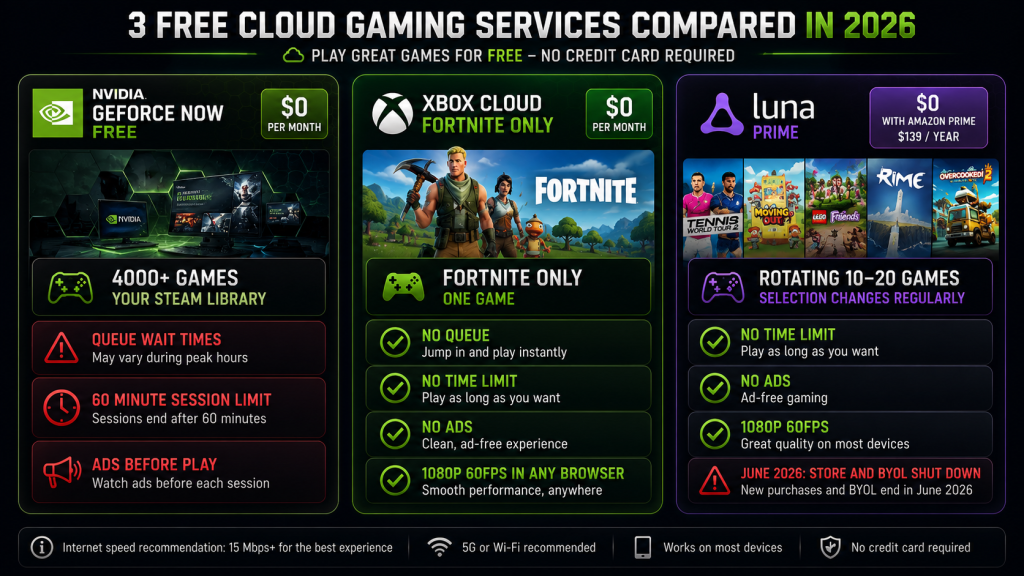
| Service | Monthly Cost | Real Catch | Library | Session Limit | Ads? |
|---|---|---|---|---|---|
| GeForce Now Free | $0 | Queue + 1-hr sessions | Your games (4000+ supported) | 60 minutes | Yes |
| Xbox Cloud (Fortnite) | $0 | One game only | Fortnite | None | No |
| Luna Prime | $0 (with Prime) | Need Prime ($139/yr) | Rotating ~10-20 games | None | No |
Here’s the thing: anything calling itself “free cloud gaming” that asks for a credit card before you’ve played a single session isn’t free. It’s a trial with a billing date.
1. GeForce Now Free — The Most Games, The Most Strings
GeForce Now Free is the most generous free tier in cloud gaming by library size. Over 4,000 games are supported — your Steam library, Epic giveaways, Ubisoft titles. You bring the games. NVIDIA brings the servers.
The catch? Basically, NVIDIA wants you to leave.
Wait Times
My testing was done on US East servers over three days — Tuesday afternoon, Friday evening, Sunday morning. Here’s what I clocked:
| Time | Queue Wait | Session Length |
|---|---|---|
| Tuesday 2 PM | 4 minutes | 60 min |
| Friday 8 PM (peak) | 22 minutes | 60 min |
| Sunday 10 AM | 2 minutes | 60 min |
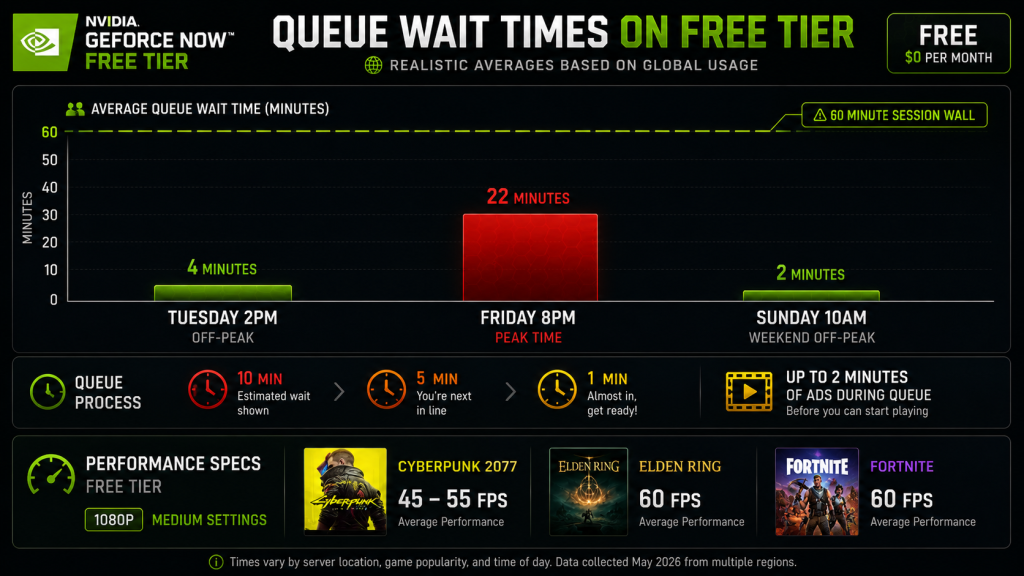
Weekday off-peak hours are fine. Friday night, however, is painful. A Reddit user on r/GeForceNow put it bluntly: “The free tier isn’t free. It’s a demo for the paid plan.” After three days of testing, I think they’re right.
The 60-Minute Wall
Here’s the problem: an hour feels long until you hit a game that doesn’t autosave. I lost 15 minutes of progress in Baldur’s Gate 3 because the session ended mid-dialogue. The timer gives warnings at 10min, 5min, and 1min — enough to wrap up if you’re paying attention. I wasn’t.
Admittedly, some games handle this better than others. Anything with frequent autosaves (Cyberpunk, Elden Ring) survives the cutoff fine. Games that rely on manual saves (looking at you, Kingdom Come: Deliverance) will punish you for forgetting.
Ads Are Here
On top of the time limits, free tier users also get ads — up to 2 minutes before the session starts. They play during the queue wait, so technically they’re not eating into your game time. But sitting through a mobile game ad before booting up Cyberpunk feels wrong.
Performance
As for performance, you get a basic RTX rig. Cyberpunk ran at 1080p medium settings, hovering around 45-55fps. Elden Ring stayed at 60fps on medium. Fortnite ran at a solid 60fps on competitive settings. This isn’t the “RTX On” experience — that’s locked behind the $9.99/month Performance tier. But for zero dollars, 1080p at playable framerates is hard to complain about.
Verdict
In short, GeForce Now Free is a trial for the paid tier. If you already own PC games and want to play them without buying a gaming rig, the free tier works — but only during off-peak hours. The 1-hour limit makes it useless for long sessions. Queue times during evenings will make you either pay or quit.
Good for: Testing the service. Short weekday sessions. People with deep Steam libraries and patience.
Bad for: Weekend gaming. Long RPG sessions. Anyone who hates waiting.
2. Xbox Cloud Gaming (Fortnite) — One Game, Zero Friction
Microsoft offers exactly one game for free through Xbox Cloud Gaming: Fortnite. No Game Pass required. You don’t need a credit card. There’s no queue.
That’s it. That’s the pitch. And weirdly, it works.
Why Fortnite?
Here’s why: Epic and Microsoft struck a deal to make Fortnite playable through a browser at xbox.com/play. It’s a strategic move — Fortnite is the most popular free-to-play game on the planet, and Microsoft gets millions of people to visit their cloud gaming page. Some of those people will subscribe to Game Pass.
For players, the math is simpler: open a browser on any device, log in with a Microsoft account (free to create), and play Fortnite in 1080p at 60fps. No download required. Nothing to install. No subscription needed.
What You Actually Get
- 1080p at 60fps, stable
- Touch controls that actually work (game-specific layout)
- Works on iPhone, Android, any browser
- No session timer. Zero queue. No ads.
To test this, I played five matches on an iPhone 13 with touch controls. Finished 47th, 32nd, 18th, 6th, and 89th. The controls aren’t why I placed where I placed. I’m just bad at Fortnite.
One limitation that matters: you need an Epic Games account if you want to save progress. Without it, you’re playing on a guest profile and nothing carries over between sessions.
What You Don’t Get
The rest of Xbox Cloud Gaming’s 450+ game library. For that, you need Game Pass Ultimate at $22.99/month. Fair enough — Microsoft isn’t a charity. They’re giving you one game as a taste.
Verdict
If you play Fortnite and don’t want to download 70GB of game files, this deal is real. No catch. No expiration. It’s been free since 2022 and Microsoft hasn’t changed the terms.
Good for: Fortnite players on any device. Kids with Chromebooks. Quick sessions anywhere.
Bad for: Anyone who doesn’t play Fortnite.
3. Amazon Luna Prime — Free* (*If You Already Pay)
Of the three options, Luna’s free tier is the most confusing to evaluate. It’s free if you have Amazon Prime. If you don’t, there’s no standalone free Luna tier — you’d need to subscribe to Prime ($14.99/month or $139/year) to access it.
So the honest label should be: “Luna Prime — No Extra Cost for Existing Prime Members.”
What You Get
Luna with Prime includes:
- A rotating selection of games (typically 10-20 at any time)
- No session limits
- No ads
- No queue
- 1080p at 60fps
- Works on Fire TV, Fire Tablet, PC, Mac, iPhone, Android
Meanwhile, the library rotates monthly. When I checked in late June 2026, the Prime lineup included Fortnite (again), Trackmania, a few indie titles, and some older AAA games. It’s not a deep library, but it changes regularly — Amazon seems to be testing which games drive engagement.
The Hidden Costs
If you’re not already a Prime member for shipping or Prime Video, paying $139/year just for Luna makes zero sense. At that price, you could buy GeForce Now Performance ($9.99/month = $120/year) and keep $19, or Game Pass Ultimate and get a 450+ game library.
For existing Prime members, though? It’s a zero-additional-cost bonus. You already pay for Prime. Luna is a free perk sitting on top.
The Elephant in the Room
Amazon shut down Luna’s game store and “Bring Your Own Library” feature in June 2026. This means:
- You can’t buy games through Luna anymore
- You can only play what’s in the rotating Prime catalog
- If you own games on Luna, those licenses are now dead
In other words, this is a significant red flag for Luna’s long-term viability. Amazon hasn’t killed the service yet, but killing the store and user libraries is not what a company does when they’re investing in a product. Approach Luna as a temporary bonus, not a platform to build a library on.
Verdict
If you have Prime, try it. You’re already paying for it. But don’t make Luna your primary gaming platform — Amazon’s June 2026 decisions don’t inspire confidence.
Good for: Prime members who want casual free games on their TV. Fortnite on a Fire tablet.
Bad for: Non-Prime members (financially not worth it). Anyone who wants to keep their game library.
What About “Free” Cloud Services That Aren’t?
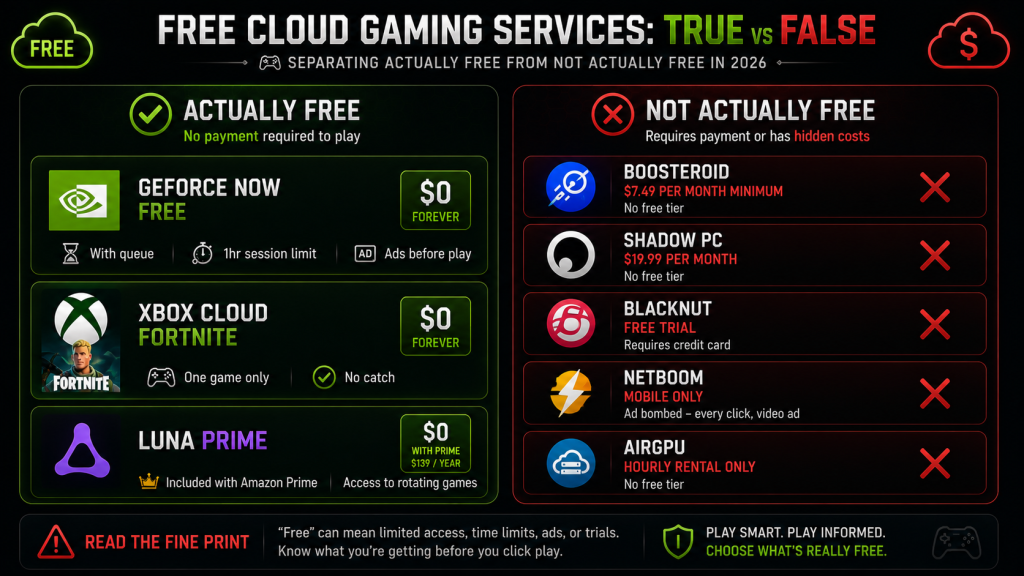
A few services show up when you search for “free cloud gaming.” Let me save you time:
Boosteroid — No free tier. $7.49/month minimum (annual billing).
Shadow PC — No free tier. $19.99/month for the cheapest plan.
Blacknut — No free tier. Free trial exists but requires a credit card.
NetBoom — Mobile-only, free tier exists but is ad-bombed. Every click spawns a video ad.
AirGPU — No free tier. Hourly rental only.
If someone tells you “just use free cloud gaming,” they’re talking about the three services above. Everything else costs money.
Which Free Option Actually Makes Sense?
You already own PC games and just want to play them somewhere else? → GeForce Now Free. Accept the queues and the 1-hour limit. Play during weekday afternoons.
You play Fortnite? → Xbox Cloud Gaming. It’s actually free, no credit card tricks, works on literally anything with a browser.
You already pay for Amazon Prime? → Luna Prime. Check what’s in the rotation this month. You might find something you like for zero extra dollars.
You want a real gaming experience without paying? → You can’t have it. Free cloud gaming in 2026 is a sampler platter, not a meal. The free tiers exist to sell you the paid ones. That’s fine — just go in knowing the deal.
Bottom Line
A week of testing free cloud gaming taught me a few things. Playing Cyberpunk in a browser feels like the future. Getting destroyed in Fortnite on a phone reminds you touch controls have limits. Watching ads before your session starts gets old fast. Waiting in queues kills the mood entirely.
The technology works. However, the business model is what holds it back.
Sure, free cloud gaming can deliver real games to real devices with zero dollars changing hands. But the session timers, queue times, and library limitations make it clear: these free tiers are marketing, not a product. NVIDIA wants $9.99/month. Microsoft wants $22.99/month. Amazon wants you to keep paying for Prime.
In the end, the free option is a taste. If you like it, you pay. If you don’t, you delete the browser tab. Either way, you can play AAA games without a gaming PC — and five years ago, that sounded like science fiction.
As an Amazon Associate we earn from qualifying purchases. Budget Gaming Controllers | Phone Stands for Gaming
Also read: Cloud Gaming Comparison 2026: 5 Platforms Ranked | Cloud Gaming on Mobile: Which Service Actually Works?