Disclosure: This post contains affiliate links. If you buy through these links, we may earn a small commission at no extra cost to you.
Most people worry about internet speed for cloud gaming. But there is a second question that matters just as much: cloud gaming data usage. How much data does cloud gaming actually consume?
Speed determines whether the stream looks smooth. However, data usage determines whether your ISP cuts you off at 1.2TB or your mobile hotspot runs dry after a week. And the numbers are larger than most players expect. In fact, cloud gaming at 1080p burns through data faster than 4K Netflix streaming.
A 5G phone plan with 100GB sounds generous until you realize it gives you roughly 10 hours of cloud gaming. Meanwhile, an ISP plan with a 1.2TB monthly cap sounds unlimited until two people in the house start streaming at 4K.
This guide breaks down exactly how much data each cloud gaming service uses, what you can do about it, and how to stop your data cap from killing your gaming sessions.
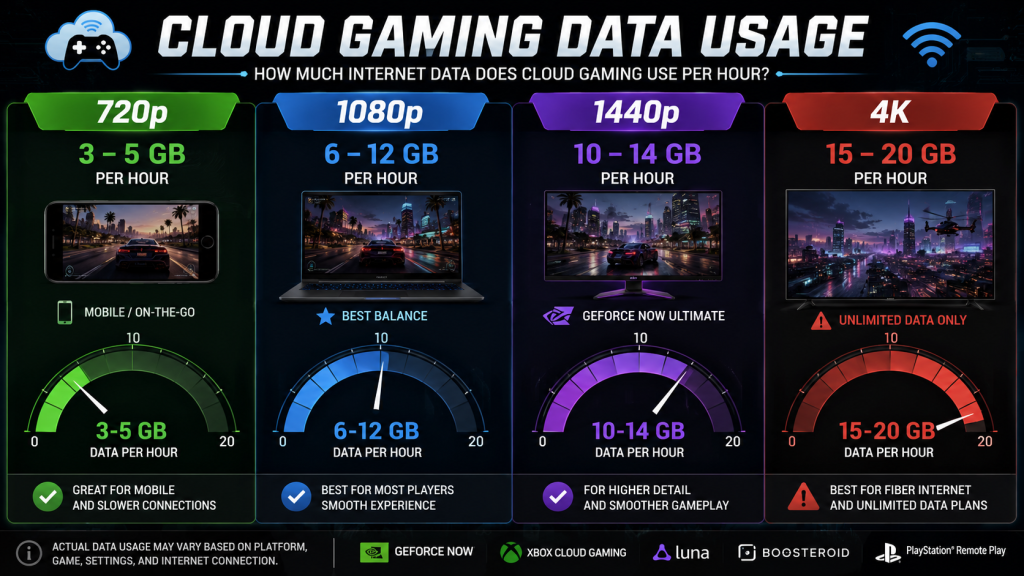
Quick Answer: Cloud Gaming Data Usage at a Glance
| Resolution | Data Per Hour | Best For |
|---|---|---|
| 720p | 3–5 GB | Mobile, slow internet, data caps |
| 1080p | 6–12 GB | Most players, best balance |
| 1440p | 10–14 GB | GeForce Now Ultimate, large screens |
| 4K | 15–20 GB | Fiber, unlimited data plans only |
Most people underestimate how quickly cloud gaming data usage adds up. One hour at 1080p equals roughly two HD movies on Netflix. One hour at 4K equals an entire day of web browsing, email, and YouTube combined.
Cloud Gaming Data Usage by Platform
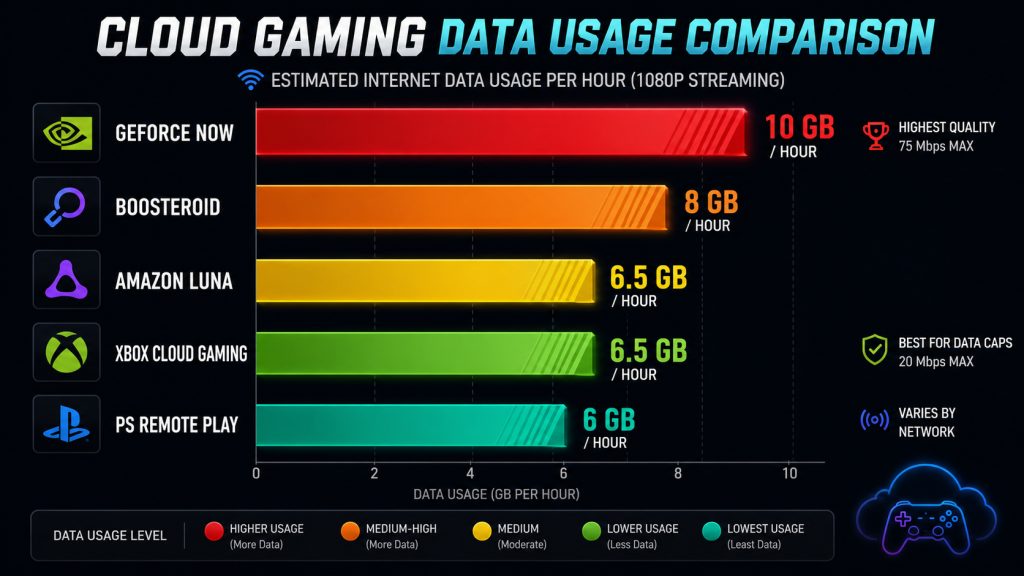
Not all cloud services consume data at the same rate. GeForce Now streams at a higher bitrate than Xbox Cloud Gaming. As a result, one hour on GeForce Now can use nearly double the data of one hour on Xbox Cloud Gaming, even at the same resolution.
| Platform | 1080p Per Hour | 4K Per Hour | Max Bitrate |
|---|---|---|---|
| GeForce Now | 8–12 GB | 15–20 GB | 75 Mbps |
| Boosteroid | 6–10 GB | Not available | 60 Mbps |
| Amazon Luna | 5–8 GB | Not available | 30 Mbps |
| Xbox Cloud Gaming | 5–8 GB | Not available | 20 Mbps |
| PS Remote Play | 4–8 GB | Not available | 15 Mbps (remote) |
Sources: Official bitrate settings from NVIDIA, Microsoft, Amazon, Boosteroid, and Sony support pages. Data per hour calculated at each service’s maximum bitrate for the listed resolution. All data accessed July 2026.
Why GeForce Now Uses the Most Data
GeForce Now streams at up to 75 Mbps. That is nearly four times Xbox Cloud Gaming’s maximum of 20 Mbps. However, that higher bitrate is not wasted. It delivers better image quality, fewer compression artifacts, and more consistent frame pacing. On the other hand, if your ISP enforces a strict data cap, GeForce Now at 4K will burn through it faster than any other service.
Xbox Cloud Gaming: The Data Saver
Xbox Cloud Gaming caps its stream at roughly 20 Mbps for 1080p. The image quality takes a hit compared to GeForce Now, especially in dark scenes where compression artifacts become visible. But the trade-off is clear: less data consumption per session. For someone on a 1TB monthly cap, Xbox Cloud Gaming stretches each gigabyte further.
Data Usage by Resolution: What Each Tier Costs You
720p: The Data Saver
720p at 60fps uses roughly 3–5 GB per hour. On a 14-inch laptop screen, the visual difference between 720p and 1080p is often smaller than people expect. For mobile cloud gaming on a 6-inch phone screen, 720p is perfectly playable. And if you are on a metered connection, dropping from 1080p to 720p cuts your data consumption nearly in half.
1080p: The Sweet Spot
1080p at 60fps uses 6–12 GB per hour depending on the service. This is the resolution most cloud gamers should use. It looks sharp on laptop and monitor screens up to 24 inches, and the data consumption is manageable on most home internet plans. GeForce Now at 1080p 60fps on the Performance tier runs closer to 10 GB per hour because of its higher bitrate cap.
1440p: The Middle Ground
1440p at 120fps, available on GeForce Now Ultimate, uses roughly 10–14 GB per hour. This tier makes sense for competitive players on a 27-inch monitor who want the smoothness of 120fps without the full data drain of 4K. So if 4K feels wasteful but 1080p feels limiting, 1440p is the practical compromise.
4K: Only With Unlimited Data
4K at 60fps or 120fps uses 15–20 GB per hour. At two hours per day, that adds up to roughly 1TB per month. Meanwhile, most US internet plans have a 1.2TB cap. If you game at 4K and anyone else in your household streams Netflix or works from home over Zoom, the cap will break before the month ends. Therefore, 4K cloud gaming only makes sense on a fiber connection with truly unlimited data.
How Much Data Per Month? The Real Math
One hour of cloud gaming at 1080p burns 6 to 12 GB. But gaming sessions rarely last exactly one hour. In fact, a two-hour evening session is far more common, and weekend sessions often stretch longer.
Here is what that looks like over a full month:
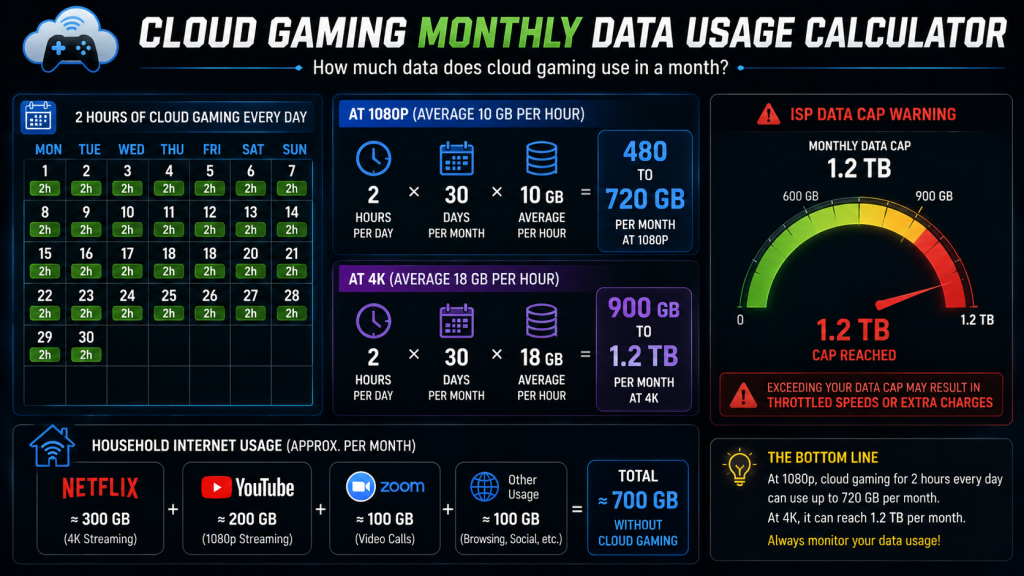
| Daily Playtime | 1080p Per Month | 4K Per Month |
|---|---|---|
| 1 hour/day | 180–360 GB | 450–600 GB |
| 2 hours/day | 360–720 GB | 900 GB–1.2 TB |
| 3 hours/day | 540 GB–1.1 TB | 1.4–1.8 TB |
| 4 hours/day (weekend heavy) | 720 GB–1.4 TB | 1.8–2.4 TB |
For context, a typical US household already uses 400–600 GB per month on streaming video, social media, and general browsing before adding any cloud gaming. Add two hours of 1080p cloud gaming per day, and the total easily crosses 1TB. However, most ISP data caps sit at 1.2TB. After that, overage fees kick in or speeds get throttled.
In short, cloud gaming data usage at 1080p is manageable on a 1.2TB cap if you keep sessions reasonable. But 4K cloud gaming plus normal household internet use will exceed almost every capped plan.
Mobile Hotspot and 5G: A Different Problem
Using cloud gaming over a mobile hotspot is tempting. A 5G connection often delivers 100–300 Mbps with 20–30ms ping. That is more than enough for a good experience. Because of this, the speed is rarely the problem. The data cap is.
Most US carriers advertise “unlimited” 5G plans. But the fine print tells a different story. Premium data is capped at 50GB or 100GB per month. After that, speeds drop to 1–3 Mbps, which is too slow for even a 720p cloud gaming stream.
| 5G Plan Limit | 1080p Cloud Gaming | 720p Cloud Gaming |
|---|---|---|
| 50 GB | 5–8 hours | 10–16 hours |
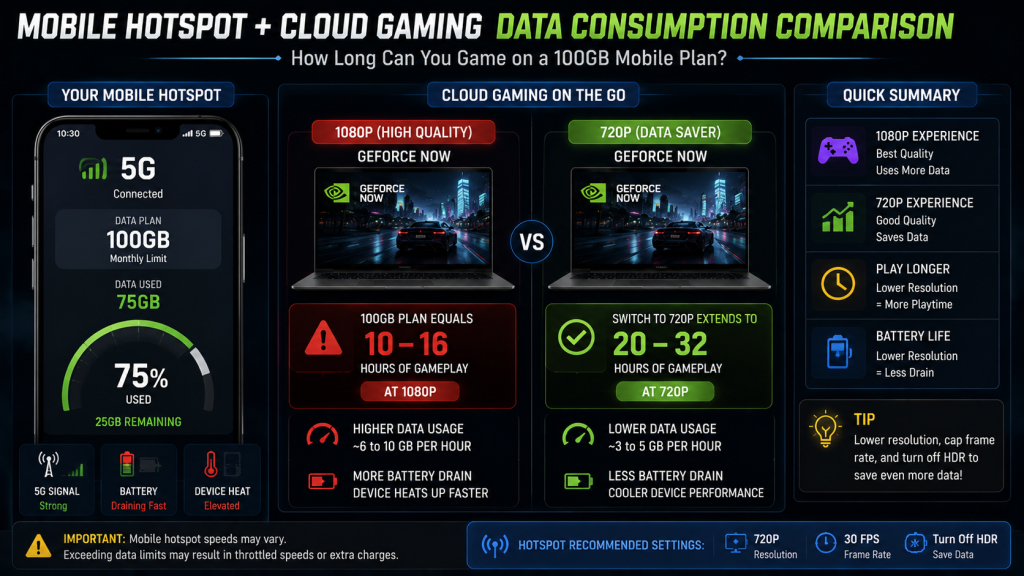
| 100 GB | 10–16 hours | 20–32 hours |
| 200 GB (highest premium tier) | 20–33 hours | 40–66 hours |
A 100GB plan sounds like a lot until you realize it translates to roughly 10 to 16 hours of 1080p cloud gaming. That is less than one hour per day over a month. For a casual mobile gamer, 720p at 3–5 GB per hour stretches the same 100GB to 20–32 hours. Still tight, but usable for short daily sessions.
If cloud gaming on mobile is your primary use case and you need to track cloud gaming data usage on a limited plan, our cloud gaming on mobile guide covers which services handle 5G connections best.
Tips to Reduce Cloud Gaming Data Usage
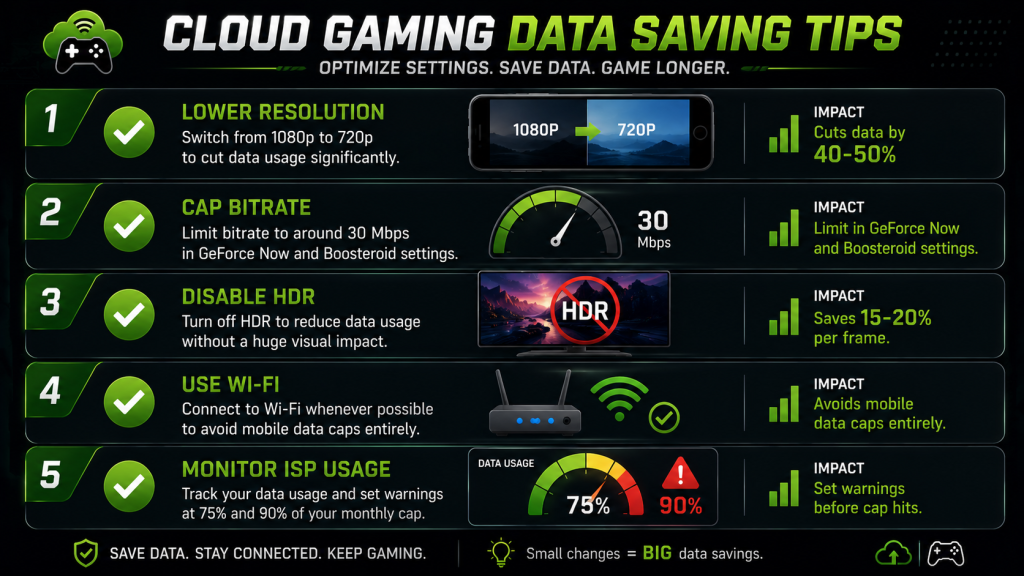
Data caps do not have to end your cloud gaming sessions. However, you need to be intentional about which settings you use. Because small changes add up fast. Dropping from 1080p to 720p alone can cut data consumption by 40 to 50 percent.
Lower Your Resolution
The single biggest lever for cloud gaming data usage. 720p uses 3–5 GB per hour, while 1080p uses 6–12 GB. On phone screens and smaller laptops, the visual trade-off is often worth it. Switch in your cloud gaming app’s settings menu, not in Windows display settings.
Cap the Bitrate
GeForce Now lets you set a maximum bitrate in the app settings (Settings → Streaming Quality → Max Bit Rate). Xbox Cloud Gaming does not expose a bitrate slider but automatically adjusts based on connection quality. Boosteroid offers a bitrate setting in the desktop app. Lowering the cap from 75 Mbps to 30 Mbps reduces 1080p data usage without changing resolution.
Disable HDR
High Dynamic Range adds roughly 15–20% more data per frame because it encodes additional color and brightness information. If your monitor supports HDR, your cloud gaming client may enable it by default. Turn it off in the app’s display settings when data matters more than visuals.
Stick to Wi-Fi
5G and LTE connections often trigger higher compression on the server side to compensate for variable signal. In addition, most mobile plans have much lower data caps than home internet. If you have a choice, always cloud game on Wi-Fi.
Monitor Your ISP Usage
Most ISPs provide a data usage meter in their account dashboard or mobile app. Set a usage alert at 75% and 90% of your monthly cap. If you hit the 90% warning halfway through the month, drop to 720p for the remaining days. For more on the connection side, our cloud gaming internet speed guide covers what speed you actually need.
FAQ
Is 100GB Enough for Cloud Gaming?
No, not for regular use. At 1080p, 100GB gives you roughly 10 to 16 hours of cloud gaming. Spread across a month, that is about 20 to 30 minutes per day. At 720p, the same 100GB stretches to 20–32 hours. However, if you also use that 100GB for video streaming and general browsing, cloud gaming will drain it within days.
Does GeForce Now Use More Data Than Xbox Cloud Gaming?
Yes. GeForce Now streams at up to 75 Mbps at 4K and roughly 30–40 Mbps at 1080p on the Performance tier. Xbox Cloud Gaming caps at approximately 20 Mbps for 1080p. As a result, GeForce Now uses about 50–60% more data per hour at the same resolution. However, GeForce Now also delivers noticeably better image quality, especially in fast-motion scenes. For a full platform comparison, see our cloud gaming platforms guide.
Does Lowering FPS Reduce Bandwidth?
It helps, but not as much as lowering resolution. Dropping from 60fps to 30fps reduces data consumption by roughly 15–20%. Meanwhile, dropping from 1080p to 720p cuts it by 40–50%. Resolution is the bigger lever. If you must stay at 1080p but want to save data, cap both the bitrate and the frame rate.
How Much Data Does Cloud Gaming Use on 5G?
The same as on Wi-Fi at the same resolution and bitrate. The 5G connection does not change the amount of data being streamed. It only changes how fast that data arrives. So 1080p cloud gaming on 5G still uses 6–12 GB per hour. The difference is that your 5G plan likely has a much smaller data cap than your home internet.
Bottom Line
Cloud gaming data usage is the hidden cost most new players overlook. Everyone checks their internet speed. Almost nobody checks their data cap.
At 1080p and two hours per day, expect cloud gaming to consume 360–720 GB per month. That number fits inside a typical 1.2TB ISP cap, but it leaves less room for Netflix, YouTube, and everything else your household does online. At 4K, two hours per day pushes past 900 GB. Combined with normal household internet use, it will break most capped plans.
Before upgrading to a higher resolution tier, check what your ISP actually allows. And if you are gaming on a mobile hotspot, stick to 720p unless your plan provides at least 200GB of premium data. For more on getting the right setup, read our guides on cloud gaming on a budget laptop and the best controllers for cloud gaming.
Also read: Cloud Gaming Comparison 2026: 5 Platforms Ranked | Cloud Gaming Internet Speed Guide | Free Cloud Gaming 2026: What’s Actually Free and What’s a Trap | Cloud Gaming on Mobile: Which Service Actually Works? | Cloud Gaming on a Budget Laptop | Best Controllers for Cloud Gaming
As an Amazon Associate we earn from qualifying purchases. Wi-Fi 6 Routers | Gaming Monitors | 5G Mobile Hotspots