Disclosure: This post contains affiliate links. If you buy through these links, we may earn a small commission at no extra cost to you.
Cloud gaming handles the hardware. You do not need a $2,000 PC or a $500 console. But once the server starts rendering your game, one thing becomes painfully clear: picking the best cloud gaming controllers matters more than most people expect.
Touchscreen controls feel wrong for anything beyond a five-minute session. Meanwhile, a keyboard and mouse work fine for strategy games but fall apart on the couch. And a cheap Bluetooth controller from five years ago adds enough input lag to undo every millisecond the cloud server saved.
A good controller is not a luxury for cloud gaming. Picking the best cloud gaming controllers for your setup is the difference between the experience feeling like a real console and fighting your own hardware. The right gamepad tightens the gap between pressing a button and seeing the result on screen. The wrong one widens it.
This guide covers the five best controllers for cloud gaming across every platform and budget. No filler. Just what actually works.
Quick Answer
| Controller | Best For | Platform Support | Price |
|---|---|---|---|
| Xbox Wireless Controller | Best Overall | GeForce Now, Xbox Cloud, Luna, Boosteroid | $59.99 |
| Backbone One | Best Mobile | iPhone, Android, all cloud platforms | $99.99 |
| Razer Kishi Ultra | Premium Mobile | iPhone, Android, all cloud platforms | $149.99 |
| 8BitDo Ultimate | Best Budget | PC, mobile, all cloud platforms | $49.99 |
| DualSense Wireless | PS Remote Play | PlayStation, limited PC/cloud | $69.99 |
Why the Best Cloud Gaming Controllers Matter
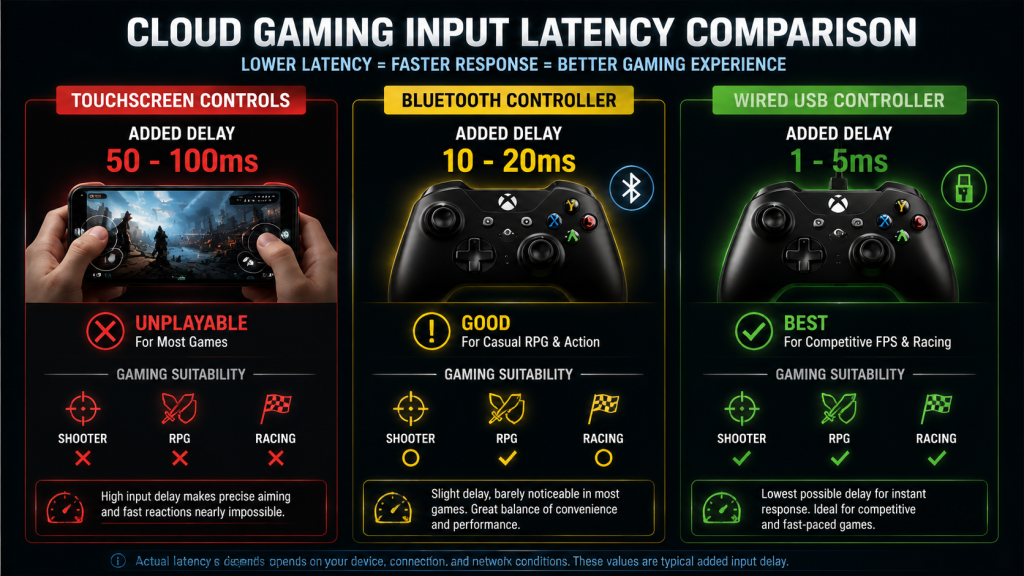
Input latency is the silent killer of cloud gaming. Your internet might deliver 15ms ping to the data center, and the server might render frames in 8ms. However, a bad controller adds noticeable Bluetooth lag on top of everything else. As a result, your total input delay stacks up fast, and shooting feels like aiming through soup.
Touchscreen vs Physical: Why It Matters
Touchscreen controls are worse than most people realize. A glass surface gives you zero physical feedback. Your thumbs drift off the invisible joystick. The on-screen buttons cover a third of the game world. For a two-minute check-in on a mobile game, touch controls work. For an hour of Cyberpunk 2077 through GeForce Now, they are unusable. In fact, you will quit before the session timer runs out.
Comfort for Long Sessions
Cloud gaming sessions tend to run longer than mobile gaming sessions precisely because the games are better. A controller designed for human hands, with textured grips and properly tensioned sticks, makes a two-hour session feel fine. A flat phone screen makes your hands cramp after 20 minutes.
A real example: playing Halo Infinite through Xbox Cloud Gaming on a phone. With touch controls, you will lose most gunfights because aiming with your thumb on glass is significantly slower and less precise than with a physical stick. Connect an Xbox controller over Bluetooth, and suddenly you are competitive. Nothing else changed: same internet connection, same phone, same stream. Just a different input device.
Best Overall: Xbox Wireless Controller
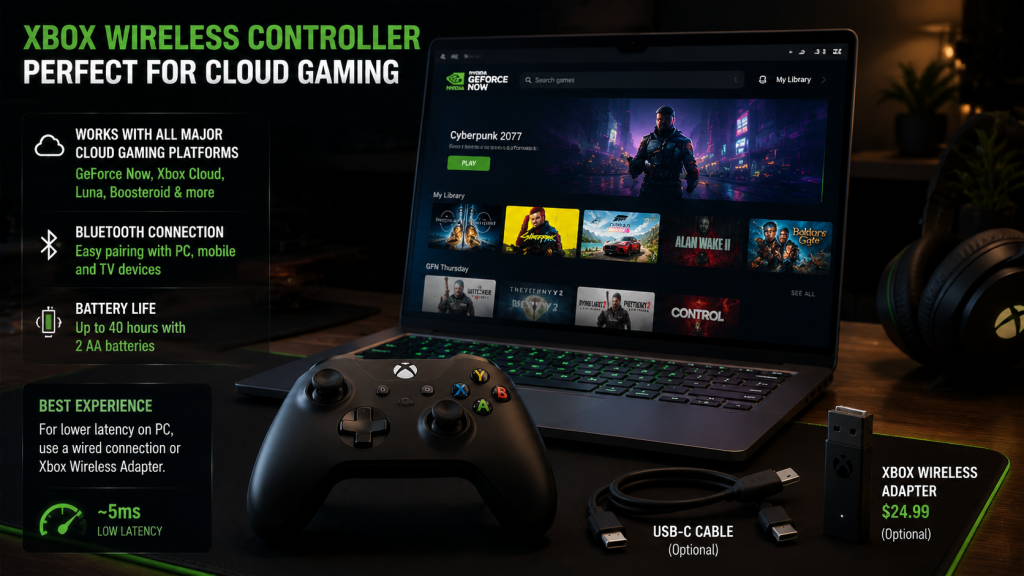
The Xbox Wireless Controller is the safest recommendation in cloud gaming. It is not the cheapest or the most premium. But it works with almost every cloud platform out of the box, and that beats any single feature.
GeForce Now supports it natively on PC, mobile, and TV. Xbox Cloud Gaming is built around it. Amazon Luna and Boosteroid both recognize it instantly. No other controller at $59.99 covers that many platforms without a third-party adapter.
Two AA batteries last roughly 40 hours. The official rechargeable pack costs $24.99 and charges through USB-C. The DualSense, by comparison, lasts 6-12 hours and needs twice as many plugin sessions.
The layout suits most hand sizes. Textured grips, a clicky D-pad, and well-tensioned sticks make long sessions comfortable. However, Bluetooth on Windows adds noticeable latency. That is fine for RPGs and single-player games. For competitive shooters like Valorant or CS2 through GeForce Now, use the Xbox Wireless Adapter ($24.99) or a USB-C cable instead.
Best Mobile: Backbone One vs Razer Kishi Ultra
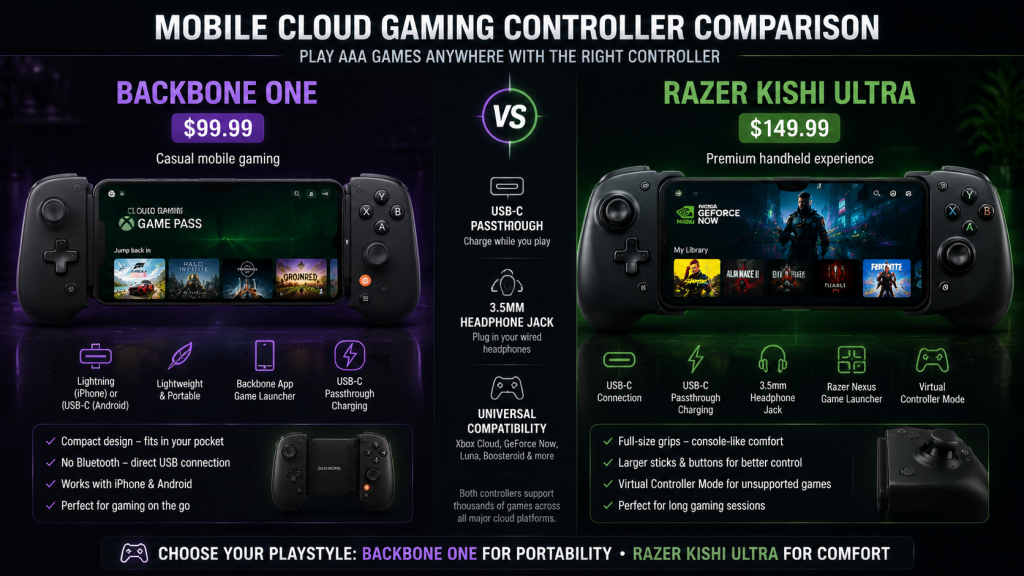
Mobile cloud gaming splits into two controller styles: clip-on controllers that turn your phone into a handheld console, and traditional gamepads with a phone mount. The Backbone One and Razer Kishi Ultra are the two best clip-on options, but they serve different buyers.
| Feature | Backbone One | Razer Kishi Ultra |
|---|---|---|
| Best for | Casual mobile gaming | Premium handheld experience |
| Connection | Lightning (iPhone) or USB-C (Android) | USB-C |
| Comfort | Good — compact, portable | Excellent — full-size grips, heavier |
| Passthrough | USB-C passthrough for charging | USB-C passthrough + 3.5mm headphone jack |
| Price | $99.99 | $149.99 |
| Weight | Light (fits in a pocket) | Heavier (stays home or in a bag) |
Backbone One: Compact and Portable
The Backbone One plugs directly into your phone’s charging port. No Bluetooth pairing. No battery to charge. The direct USB connection eliminates wireless latency entirely, which matters on 5G where your network ping already sits at 30-40ms. The Backbone app doubles as a game launcher that pulls together GeForce Now, Xbox Cloud, and Luna into one screen. For quick sessions on the go, it is the cleanest setup available.
Razer Kishi Ultra: Console Feel on Mobile
The Razer Kishi Ultra costs 50% more and earns it with better ergonomics. Full-size analog sticks, larger face buttons, and thicker grips make it feel closer to a console controller than a phone accessory. Razer also includes virtual controller mode, which forces games that only support touchscreen to recognize the Kishi as a gamepad. If you play mobile cloud gaming for more than an hour at a time, the Kishi is worth the extra money.
Both controllers work with all major cloud platforms. The choice comes down to portability versus comfort. Backbone for the commute. Kishi for the couch.
Best Budget Controllers Under $50
You do not need to spend $60-150 to get a cloud gaming controller that works well. Two options under $50 cover most needs.
8BitDo Ultimate: Best Value Under $50
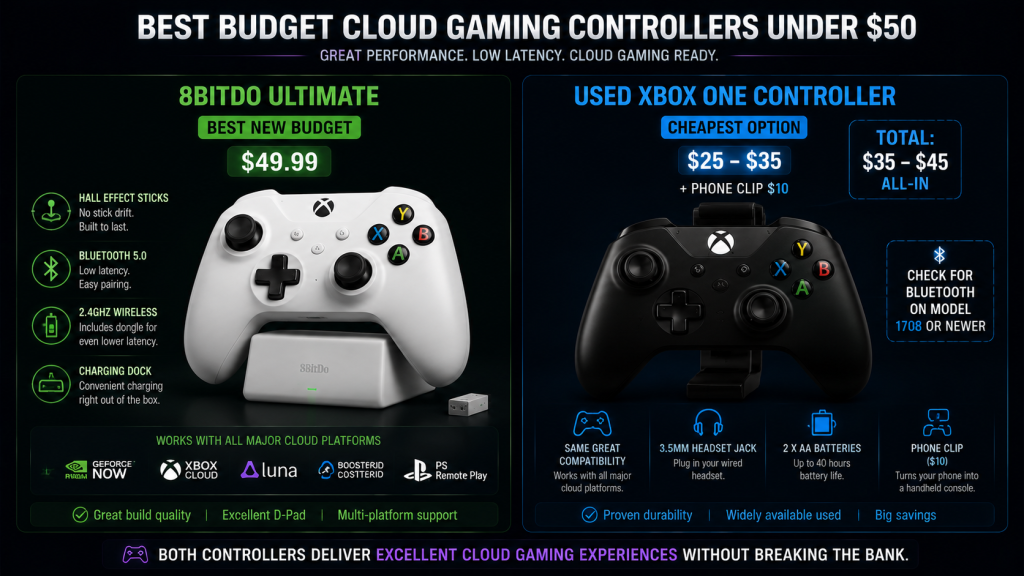
The 8BitDo Ultimate ($49.99) is the best new budget controller. It connects through Bluetooth or a 2.4GHz wireless dongle, which delivers lower latency than standard Bluetooth. The D-pad is excellent — a clicky, tactile design that feels better than what ships on controllers twice its price. Hall Effect sticks come standard, meaning the analog sensors use magnetic fields instead of physical contact. They will not develop stick drift after a year of heavy use. The charging dock is included in the box, something Microsoft and Sony charge extra for.
The used Xbox One controller is the other strong budget play. At $25-35 on eBay and used game stores, it delivers the same platform compatibility as the newer Xbox Wireless Controller. The older model lacks Bluetooth on pre-2016 units, so check the model number before buying. Look for model 1708, which added Bluetooth and a 3.5mm headphone jack. A used Xbox controller with a $10 phone clip gives you a complete mobile cloud gaming setup for under $45 total.
Between the two, the 8BitDo Ultimate is the better long-term choice because of the Hall Effect sticks and included dock. A used Xbox controller saves more money up front but may need replacing sooner.
[IMAGE: budget cloud gaming controllers under 50 dollars comparison, left side 8BitDo Ultimate 49.99 dollars with charging dock Hall Effect sticks Bluetooth and 2.4GHz dongle highlighted, right side used Xbox One controller model 1708 25 to 35 dollars with phone clip 10 dollars and check for Bluetooth label, each with price breakdown, clean comparison dark gaming aesthetic, 1200x675px 16:9 horizontal suitable for blog content]
Bluetooth vs Wired vs USB-C: Which Connection Is Best?
| Connection | Added Latency | Best Use |
|---|---|---|
| Wired USB | 1-5ms | Competitive FPS, fighting games, racing |
| USB-C (phone) | 1-5ms | Mobile cloud gaming, direct phone connection |
| Bluetooth 5.0+ | 8-15ms | Casual gaming, RPGs, action-adventure |
| Bluetooth 4.x | 15-25ms | Turn-based games only |
| 2.4GHz dongle | 3-8ms | A good middle ground — faster than Bluetooth, no cable |
For most cloud gaming, Bluetooth is good enough. An Xbox controller connected through Bluetooth 5.0 adds 8-12ms of input lag. That stacks on top of your network ping and the server render time. For a game like Baldur’s Gate 3 or Persona 6, 8ms of controller lag is invisible. You will never notice it.
For competitive games, however, wired wins. GeForce Now already adds 2-4ms of protocol overhead. Your ISP might add 20ms of network ping. Every millisecond counts in a game where dying first means losing the round. A USB-C cable drops controller latency to near zero and gives you the best chance of your inputs landing on time.
For mobile, USB-C passthrough controllers like the Backbone One and Kishi Ultra completely avoid Bluetooth and wireless latency. The controller plugs directly into the phone’s charging port. It also draws power from the phone instead of needing its own battery. On 5G, where network ping already runs 35-40ms, skipping Bluetooth saves you 10-15ms — enough to feel the difference in fast-paced games.
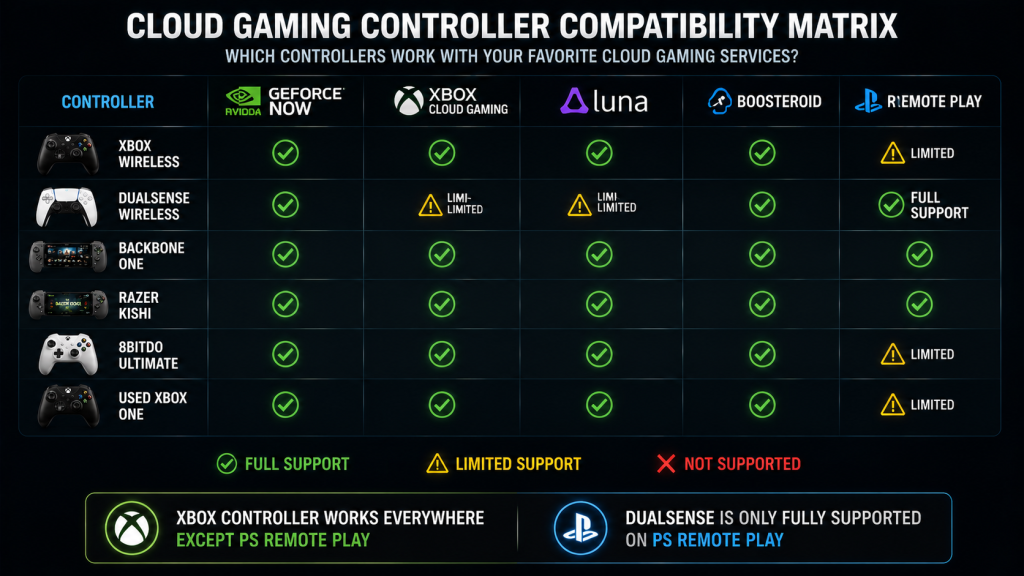
Controller Compatibility With Cloud Gaming Services
| Controller | GeForce Now | Xbox Cloud | Luna | Boosteroid | PS Remote Play |
|---|---|---|---|---|---|
| Xbox Wireless | Full support | Full support | Full support | Full support | Limited |
| DualSense | Full support | Limited | Limited | Full support | Full support |
| Backbone One | Full support | Full support | Full support | Full support | Full support |
| Razer Kishi | Full support | Full support | Full support | Full support | Full support |
| 8BitDo Ultimate | Full support | Full support | Full support | Full support | Limited |
| Used Xbox One | Full support | Full support | Full support | Full support | Limited |
The pattern is clear. Among the best cloud gaming controllers, Xbox controllers work across every cloud service except PS Remote Play, where Sony’s DualSense is the only fully supported option. Mobile-specific controllers like the Backbone and Kishi achieve universal compatibility by presenting themselves as standard gamepads over USB-C.
The DualSense is the outlier. It is the only controller that delivers haptic feedback and adaptive triggers on PS Remote Play. Switch to GeForce Now and those features stop working — the controller becomes a standard gamepad. Xbox Cloud Gaming offers even less support. Buy a DualSense only if you use PS Remote Play regularly. For everything else, an Xbox controller costs less and works everywhere.
FAQ
Do I Need a Controller for Cloud Gaming?
Technically no. But practically yes. You can use a keyboard and mouse with GeForce Now for games that support it, like shooters and strategy titles. But most cloud gaming happens on devices where a keyboard and mouse are not practical — phones, tablets, TVs, and laptops on the couch. A controller is the only input method that works across every device and every cloud platform.
Can I Use an Xbox Controller With GeForce Now?
Yes. The Xbox Wireless Controller is fully supported on GeForce Now across PC, Mac, Android, iOS, and TV apps. Bluetooth works out of the box. For lower latency on PC, use a USB-C cable or the Xbox Wireless Adapter.
Is Bluetooth Good Enough for Cloud Gaming?
For most people looking for the best cloud gaming controllers, Bluetooth 5.0 is fine. The slight added latency is not noticeable in these genres. For competitive shooters and fighting games, use a wired connection instead.
What Controller Has the Lowest Latency for Cloud Gaming?
Wired USB connections deliver the lowest latency at roughly 1-5ms of added input delay. Among wireless controllers, those with a 2.4GHz dongle like the 8BitDo Ultimate run at 3-8ms — faster than standard Bluetooth. USB-C passthrough controllers like the Backbone One and Razer Kishi Ultra also deliver near-zero latency by skipping wireless entirely. For competitive cloud gaming where every frame counts, wired USB or a direct USB-C phone controller gives you the best chance.
Can I Play Cloud Games With a Keyboard and Mouse?
On GeForce Now, yes — for PC games that natively support keyboard and mouse. On Xbox Cloud Gaming, Luna, and Boosteroid, keyboard and mouse support is limited or nonexistent. Most cloud platforms are designed around controller input first.
Who Should Buy What
| User | Best Pick | Why |
|---|---|---|
| Most users | Xbox Wireless Controller | Works on every platform, comfortable, $59.99 |
| Mobile-first players | Backbone One | USB-C removes Bluetooth lag, fits in a pocket |
| Budget buyers | 8BitDo Ultimate | Hall Effect sticks, charging dock included, $49.99 |
| PS5 owners | DualSense Wireless | Only controller with full PS Remote Play support |
Bottom Line
Picking the best cloud gaming controllers comes down to one question: where do you play most often?
For mobile-first players, the Backbone One at $99.99 is the best fit. The direct USB-C connection cuts Bluetooth latency completely, and it fits in a pocket. For bigger grips and better ergonomics, the Razer Kishi Ultra at $149.99 is a meaningful step up.
For buyers on a budget, the 8BitDo Ultimate at $49.99 delivers Hall Effect sticks and a charging dock at half the price of an Xbox controller. A used Xbox One controller at $25-35 is the cheapest way in that does not compromise on platform support.
A good controller is often the cheapest upgrade that makes cloud gaming feel like a real console. A $50-60 gamepad turns a phone into a handheld and a budget laptop into a gaming machine. That return beats any internet speed upgrade or premium cloud tier.
For more on getting your connection right, read our cloud gaming internet speed guide.
Also read: Cloud Gaming Comparison 2026: 5 Platforms Ranked | Cloud Gaming on Mobile: Which Service Actually Works? | Cloud Gaming Internet Speed Guide | Cloud Gaming on a Budget Laptop
As an Amazon Associate we earn from qualifying purchases. Xbox Wireless Controller | Backbone One | Razer Kishi Ultra | 8BitDo Ultimate | DualSense Controller