Disclosure: This post contains affiliate links. If you buy through these links, we may earn a small commission at no extra cost to you.
GTA VI pre-orders are open. The release date is locked. You have five months to get ready — and you need a GTA 6 PS5 SSD upgrade before your console runs out of space.
Here is the one thing most players are not thinking about: storage.
The PS5 ships with an 825GB SSD. After system files, you get about 667GB of usable space. GTA VI is estimated at 150-200GB based on Rockstar’s known engine scale and comparable open-world titles. That is nearly a third of your entire console storage. Gone. One game.
If you also have Call of Duty (200GB+), EA Sports FC (50GB+), and a couple of other AAA titles, you are already choosing what to delete every time a new game drops.
The fix is simple: add an internal NVMe SSD. But there is a wrinkle — the global SSD supply chain is tightening. Memory manufacturers are warning of shortages into 2027. Prices on current drives are still reasonable, but that window will not stay open forever.
Here are the three best PS5 SSD options for GTA 6, ranked by value. Buy one now, install it in ten minutes, and stop worrying about storage.
Don’t wait until November. SSD prices are already climbing.
Memory manufacturers are warning of shortages through 2027. In October, when 50 million players rush to upgrade for GTA 6, these same drives will cost $30-50 more. Lock in today’s price now.
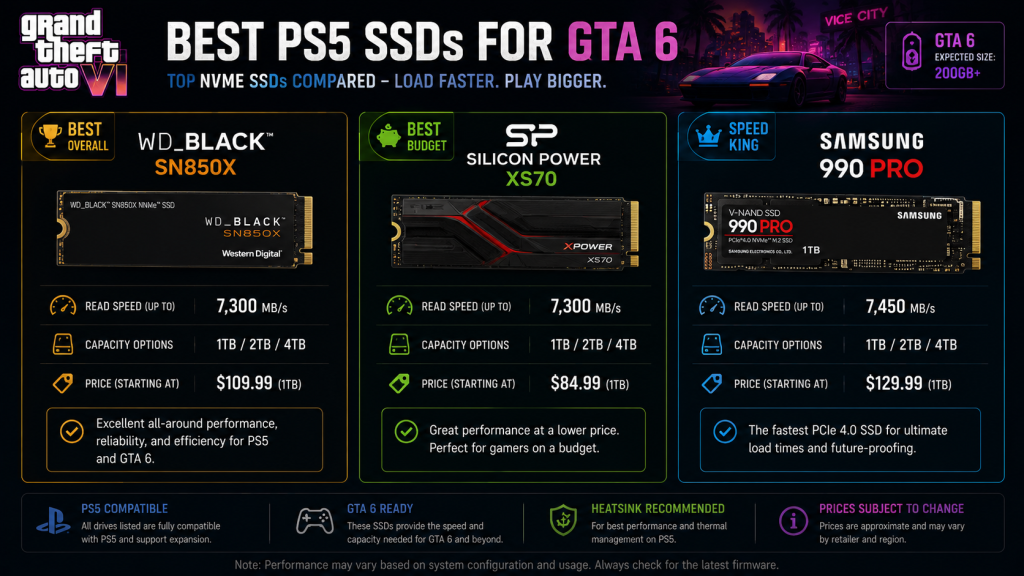
→ WD Black SN850X 2TB — Best for Most Players → Silicon Power XS70 1TB — Cheapest Option
GTA 6 PS5 SSD: Best Drives at a Glance
| Pick | Model | Capacity | Approx. Price | Best For |
|---|---|---|---|---|
| 🥇 Best Overall | WD Black SN850X | 2TB | ~$150 | Most players |
| 🥈 Budget Pick | Silicon Power XS70 | 1TB | ~$75 | One or two extra games |
| 🥉 Speed King | Samsung 990 Pro | 2TB | ~$180 | Lowest load times possible |
Prices from major US retailers (Amazon, Best Buy, Newegg), checked June 2026. Subject to change.
Why You Need Extra Storage Before November
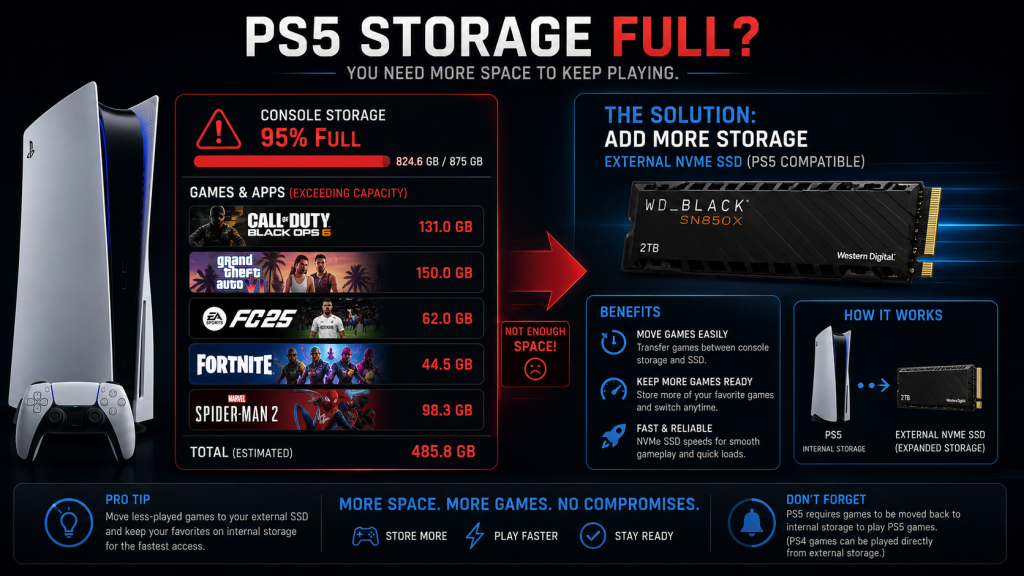
The PS5’s built-in SSD is fast, but it is not big. Sony’s decision to ship with 825GB made sense in 2020 when NVMe drives were expensive. In 2026, it is a bottleneck.
| Game | Approximate Install Size |
|---|---|
| Call of Duty: Black Ops 6 | 210 GB |
| GTA VI (estimated) | 150-200 GB |
| EA Sports FC 26 | 55 GB |
| Fortnite | 45 GB |
| Marvel’s Spider-Man 2 | 90 GB |
| Total (5 games) | ~550-600 GB |
Black Ops 6 size from Activision’s official requirements. GTA VI estimated based on GTA V (110GB final) and Red Dead Redemption 2 (150GB). Other sizes from PlayStation Store listings, June 2026.
You can fit maybe three or four AAA games on the internal drive. With GTA VI and one other big title, you are at capacity. An extra NVMe drive solves this permanently.
The SSD Shortage: Why You Should Buy Now
This is not FOMO marketing. The memory industry works in boom-and-bust cycles, and we are entering a supply-constrained phase. Multiple tech outlets reported in June 2026 that NAND flash production is falling behind demand. PC manufacturers are already seeking third-party suppliers to fill gaps. Market analysts expect consumer SSD prices to rise through late 2026 and into 2027.
If you plan to buy a GTA 6 PS5 SSD anyway, buying now locks in the current price. Waiting until October or November — when millions of other GTA VI players will be doing the same thing — means paying more for the same drive.
What to Look for in a PS5 SSD
The PS5 requires a PCIe Gen4 NVMe M.2 SSD with a heatsink. Not every drive qualifies.
| Requirement | Minimum | Recommended |
|---|---|---|
| Interface | PCIe Gen4 x4 | PCIe Gen4 x4 |
| Read speed | 5,500 MB/s | 7,000+ MB/s |
| Capacity | 250GB (Sony minimum) | 1TB or 2TB |
| Heatsink | Required | Pre-installed or aftermarket |
| Form factor | M.2 2280 | M.2 2280 |
Sony officially recommends 5,500 MB/s sequential read speed or faster. In practice, most Gen4 drives released after 2022 hit 7,000+ MB/s — well above the minimum. The PS5’s internal drive runs at 5,500 MB/s, so any NVMe that matches or beats that speed loads games just as fast.
The heatsink is not optional. The PS5’s M.2 slot has limited airflow, and a bare drive will thermal throttle under sustained load. Buy a drive with a pre-installed heatsink, or budget an extra $10-15 for a third-party heatsink.
#1 Best Overall: WD Black SN850X 2TB
The WD Black SN850X is the safe choice. It has been the most-recommended PS5 SSD for three years running, and for good reason.
| Spec | Value |
|---|---|
| Read speed | 7,300 MB/s |
| Write speed | 6,600 MB/s |
| Endurance | 1,200 TBW |
| Heatsink | Available (SN850X with heatsink model) |
| Price (2TB) | ~$150 |
Why it wins. The SN850X hits speeds well above Sony’s 5,500 MB/s minimum. Load times are identical to the internal drive. The 2TB model adds enough space for GTA VI plus six to eight other large titles. WD’s Game Mode 2.0 software (Windows only, but the drive ships in Game Mode by default) prioritizes read speeds during gameplay.
The catch. Buy the version with the heatsink pre-installed. The bare drive costs less, but adding a third-party heatsink brings the total to the same price and adds installation hassle.
Best for: Anyone who wants one drive, zero problems, and enough space for years of games.
#2 Budget Pick: Silicon Power XS70 1TB
If you just need space for GTA VI and not much else, the XS70 is the cheapest drive that still meets every PS5 requirement.
| Spec | Value |
|---|---|
| Read speed | 7,200 MB/s |
| Write speed | 6,800 MB/s |
| Endurance | 700 TBW |
| Heatsink | Included (aluminum) |
| Price (1TB) | ~$75 |
Why it wins. Under $80 for a drive that matches the internal SSD’s speed. The included aluminum heatsink is basic but effective — it keeps temperatures in check during gaming sessions without adding cost. For a drive you will fill with games and rarely write to again, the lower endurance rating is a non-issue.
The catch. 1TB fills up faster than you expect. Between GTA VI, one Call of Duty, and console clips, you will be managing storage again within a year. Also, Silicon Power is a smaller brand with shorter warranty terms than WD or Samsung.
Best for: Players who just want GTA VI to fit without deleting everything else. A stopgap that works.
#3 Speed King: Samsung 990 Pro 2TB
The 990 Pro is the fastest Gen4 drive on the market. It costs more than the SN850X, and for most players the extra speed is unnoticeable. But if you want the absolute best, this is it.
| Spec | Value |
|---|---|
| Read speed | 7,450 MB/s |
| Write speed | 6,900 MB/s |
| Endurance | 1,200 TBW |
| Heatsink | Available (990 Pro with heatsink model) |
| Price (2TB) | ~$180 |
Why it wins. Samsung’s in-house controller delivers the highest sustained read speeds of any Gen4 drive. In Digital Foundry’s PS5 storage benchmarks, the 990 Pro tied the internal drive for load times in every tested game. Samsung’s Magician software and 5-year warranty add peace of mind that budget drives cannot match.
The catch. The speed difference between the SN850X (7,300 MB/s) and the 990 Pro (7,450 MB/s) is invisible in real-world gaming. You are paying an extra $30 for a spec sheet number that does not translate to faster level loads. Buy this drive because you trust Samsung’s reliability, not because you expect noticeably faster gaming.
Best for: Players who want the top of the line and do not mind paying for the Samsung badge.
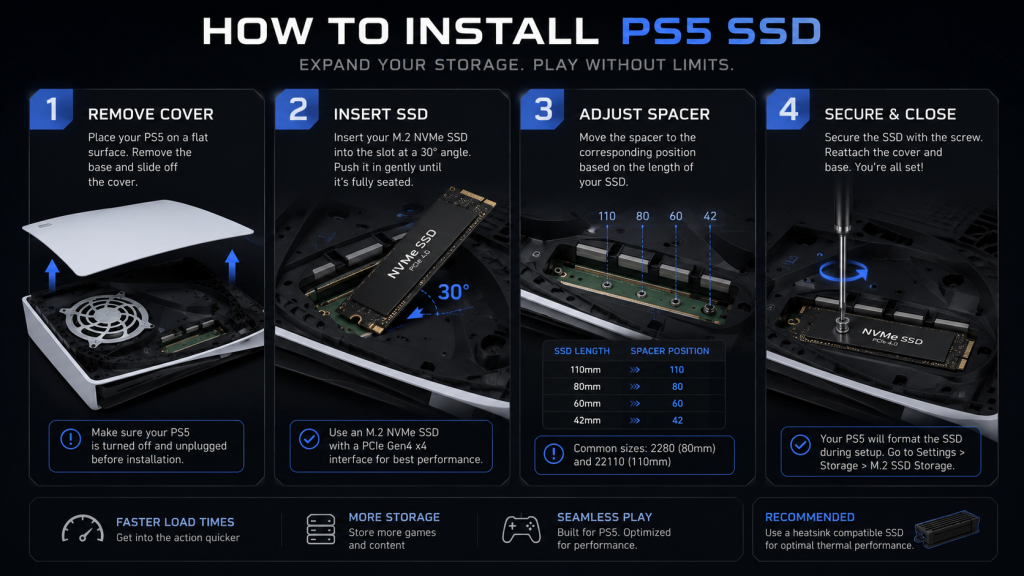
How to Install a PS5 SSD (10 Minutes, One Screwdriver)
Installing an internal NVMe is easier than it sounds. Sony designed the PS5’s M.2 slot to be user-accessible without voiding the warranty.
- Power off the PS5 completely. Unplug the power cable and wait two minutes for the capacitors to discharge.
- Remove the stand. Lay the PS5 flat with the PS logo facing down and the disc drive facing toward you.
- Slide off the outer cover. Lift the rear corner (near the ports) and slide the panel toward the front of the console. It pops off with moderate pressure — no tools required.
- Remove the M.2 slot cover. One small screw holds the metal expansion slot cover in place. Use a #1 Phillips screwdriver.
- Adjust the spacer. The PS5 ships with a spacer and screw pre-installed for the 2280 form factor. If your drive is a different size, move the spacer to match.
- Insert the SSD. Align the connector and slide the drive in at a roughly 30-degree angle. It should seat firmly without forcing.
- Secure with the screw. Replace the spacer screw to hold the drive flat against the slot.
- Replace the metal cover and outer panel. Slide the outer cover back on until it clicks.
- Power on. The PS5 will detect the new drive and prompt you to format it. This takes under ten seconds.
Once formatted, the drive appears as a separate install location. Set it as your default for PS5 games in Settings → Storage → Installation Location.
This is a summary of Sony’s official installation guide. If you are not comfortable opening your console, most electronics repair shops will do this for $20-30.
Which One Should You Buy?
| Your Situation | Buy This | Why |
|---|---|---|
| Only buying for GTA VI | Silicon Power XS70 1TB (~$75) | Cheapest way to fit the game |
| Want to stop managing storage forever | WD Black SN850X 2TB (~$150) | Best balance of price and capacity |
| Want the absolute best, money no object | Samsung 990 Pro 2TB (~$180) | Top speed and Samsung reliability |
| Already tight on budget | Wait and delete games as needed | An SSD is optional, not required |
If you plan to play GTA VI heavily for the next three to five years — and most players will — the 2TB WD Black is the smart choice. It costs half the price of a new game and means you never have to choose between GTA VI and Call of Duty. Install it once and forget about storage until the PS6.
Bottom Line
GTA VI is going to be big. The PS5’s internal storage is going to be small by comparison. A GTA 6 PS5 SSD upgrade fixes that problem permanently.
Buy one now before the shortage pushes prices up. Install it in ten minutes with a single screwdriver. Set it as your default install location. Then stop thinking about storage and focus on what actually matters — being ready when Vice City opens its doors on November 19.
Two choices, one right answer.
Buy a 2TB drive now for ~$150 and forget about storage for the life of your PS5. Or wait until October, pay ~$180-200 for the same drive, and spend five months deleting games to make room.
The installation takes ten minutes. The price difference covers your next game.
More GTA VI Guides: GTA 6 Ultimate Guide Hub →
Also read: GTA 6 PS5 vs Xbox: Which Console Is Best? | GTA VI Standard vs Ultimate: Which Edition Should You Buy? | GTA VI Cheapest Pre-Order: Save $15-20 Legally
As an Amazon Associate we earn from qualifying purchases. WD Black SN850X 2TB | Silicon Power XS70 1TB | Samsung 990 Pro 2TB | PS5 NVMe Heatsink