Disclosure: This post contains affiliate links. If you buy through these links, we may earn a small commission at no extra cost to you.
Can you run cloud gaming on a budget laptop in 2026? The short answer is yes — and the hardware bar is far lower than most people think.
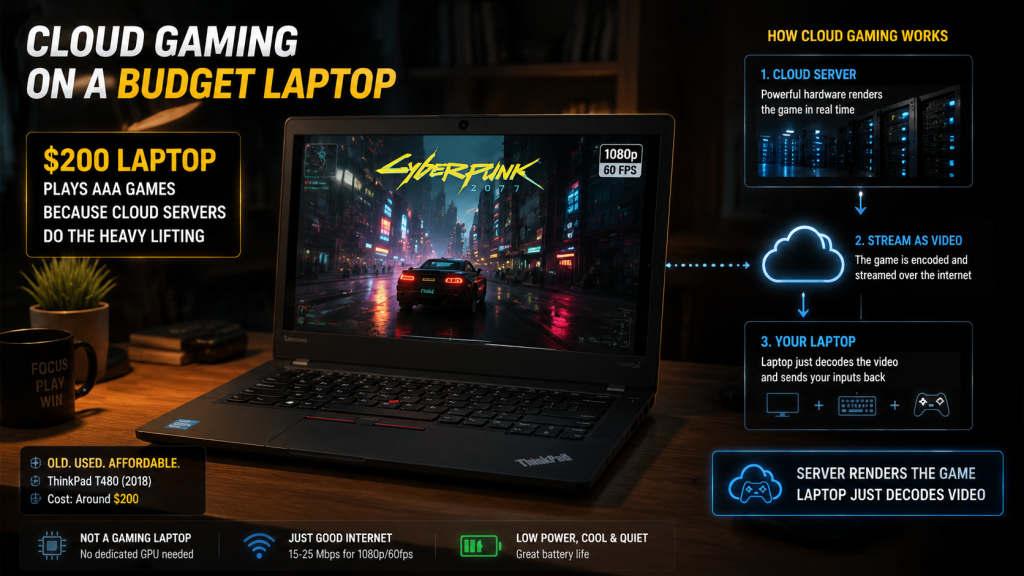
Here’s why: cloud gaming servers render the game. Your laptop just plays a video stream. That single fact changes the math for anyone stuck with a cheap or old machine.
Instead of “needs a gaming GPU,” the real requirement drops to “needs to decode video.” A $200 used ThinkPad from 2018 can play Cyberpunk 2077 at 1080p. Not because the ThinkPad is powerful — because it’s not doing the heavy lifting.
However, not every cloud service handles low-end hardware equally. Some publish official system requirements that rule out older machines. Meanwhile, others work fine on paper but struggle with common cloud gaming budget laptop issues like 2.4GHz-only Wi-Fi or insufficient RAM.
Here’s what you actually need — and what you can safely skip.
Cloud Gaming on Budget Laptops: At a Glance
| Service | Dual-Core CPU? | Old iGPU? | 4GB RAM? | Minimum Internet |
|---|---|---|---|---|
| GeForce Now | Yes (2.0GHz+) | Yes | Yes | 15 Mbps (1080p) |
| Xbox Cloud Gaming | Yes | Yes | Yes | 10 Mbps |
| Amazon Luna | Yes | Yes | Yes | 10 Mbps |
| Boosteroid | Yes (2.0GHz+) | Yes | Yes | 15 Mbps |
Sources: Official system requirements from NVIDIA, Microsoft, Amazon (Luna), and Boosteroid. All accessed June 2026.
All four services can run on dual-core processors from 2015 or newer. The real bottlenecks for cloud gaming on a budget laptop aren’t the CPU or GPU — they’re the Wi-Fi card, the RAM, and whether you’ve closed Chrome first.
What “Budget Laptop” Means for Cloud Gaming
Cloud gaming shifts rendering to a remote server. As a result, your laptop decodes a video stream — the same work it does when you watch YouTube. The hardware requirements drop dramatically compared to running games locally. That said, they don’t disappear.
CPU
Dual-core processors from 2015 or later handle video decode without trouble. NVIDIA’s official minimum for GeForce Now is a dual-core CPU at 2.0GHz, and a Celeron N4000 — commonly found in $200 Chromebooks — meets this bar. The CPU’s main job is keeping the video stream smooth, not rendering 3D graphics.
RAM
For a cloud gaming budget laptop, 4GB is the real minimum; 8GB is comfortable. Windows 11 uses 3-4GB on its own. With 4GB total, every background app needs to be closed before launching a cloud session. On the other hand, with 8GB, a browser with a few tabs plus a cloud stream runs without swapping.
Graphics
Any integrated GPU with hardware video decode works — which means Intel HD 4000 (2012) or newer. Without hardware decode, the CPU handles video decoding, and a dual-core CPU decoding 1080p at 60fps hits 100% usage quickly. Check your iGPU by opening Chrome, typing chrome://gpu, and searching “Video Decode.” If it says “Hardware accelerated,” you’re set.
Wi-Fi
This is where budget laptops most commonly fail. A 2.4GHz-only Wi-Fi card from 2015 can’t hold a stable cloud gaming connection because interference from household electronics causes stutters every few seconds. Therefore, 5GHz Wi-Fi (802.11ac or newer) is not optional. If the laptop only supports 2.4GHz, a USB Wi-Fi 5 dongle costs about $15 and fixes the issue entirely.
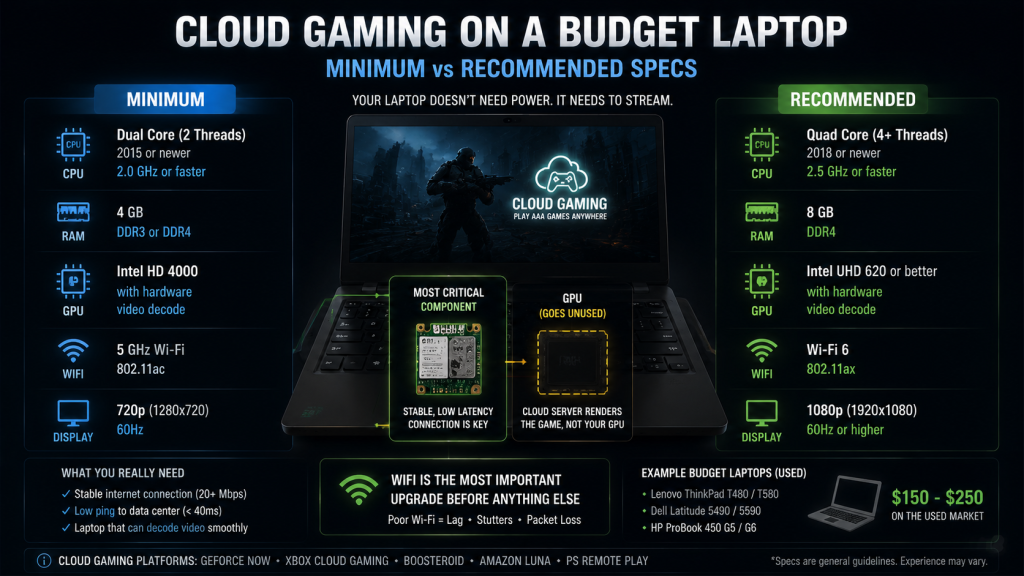
| Component | Minimum | Recommended |
|---|---|---|
| CPU | Dual-core, 2015+, 2.0GHz | Quad-core, 2018+ |
| RAM | 4GB | 8GB |
| GPU | Intel HD 4000+ (HW decode) | Intel UHD 620+ |
| Wi-Fi | 5GHz 802.11ac | Wi-Fi 6 (802.11ax) |
| Screen | 720p | 1080p |
| OS | Windows 10 / ChromeOS / macOS 10.13+ | Windows 11 / latest ChromeOS |
Sources: Official system requirements from NVIDIA, Microsoft, and Amazon. Hardware compatibility verified against Intel ARK for HD/UHD graphics decode capabilities.
GeForce Now — Highest Requirements, Best Experience
GeForce Now has the strictest official requirements: Windows 10 64-bit or newer, a dual-core CPU at 2.0GHz+, and GPU drivers from 2015 or later. Most laptops from the last eight years meet this. Older Atom and Celeron processors (N3060 and earlier) fall below the 2.0GHz threshold and may not install the app.
The service supports over 4,000 games from Steam, Epic, and Ubisoft libraries. Stream quality reaches 1080p at 60fps on the free tier, with up to 4K on the Ultimate tier ($19.99/month). The Performance tier ($9.99/month) adds RTX features and priority queue access.
Free tier limitations: queue times range from a few minutes during off-peak hours to 20+ minutes on Friday evenings (based on user reports on r/GeForceNow). Sessions cap at 60 minutes, and ads play during the queue.
Good for: Anyone with a dual-core 2015+ laptop and 5GHz Wi-Fi. The most polished experience overall.
Not for: Laptops with 2.4GHz-only Wi-Fi. Free tier users who want long gaming sessions.
Xbox Cloud Gaming — Runs on Anything With a Browser
Xbox Cloud Gaming runs entirely through a web browser at xbox.com/play. No app to install, and no GPU driver requirements beyond what Chrome or Edge already needs. The browser client is lighter than GeForce Now’s native app, which puts less pressure on weak CPUs.
Stream quality is 1080p at 60fps. Although the bitrate is lower than GeForce Now’s 75Mbps maximum, on a 14-inch laptop screen the difference is subtle.
The free offering is limited to Fortnite — the only game Microsoft provides without a Game Pass Ultimate subscription ($22.99/month). With a subscription, the full catalog spans 450+ titles.
Good for: The absolute lowest-spec laptops. Chromebooks. Testing cloud gaming without committing money upfront.
Not for: Games outside the Game Pass catalog.
Amazon Luna — Free With Prime, But Light on Games
Luna runs in a browser or through the Fire TV app. Amazon doesn’t publish explicit minimum requirements, but any device that runs Chrome or a modern browser at 1080p supports Luna. No session limits, no ads, and no queue.
The Prime tier comes free for Amazon Prime members ($14.99/month or $139/year). The catalog rotates monthly and typically includes 10-20 games. As of June 2026, Fortnite and Trackmania headline the lineup alongside a rotation of older AAA titles.
Important context: Amazon shut down Luna’s game store and “Bring Your Own Library” feature in June 2026. Games purchased through Luna are no longer accessible. Consequently, the service remains operational but the removal of store and library functions limits long-term reliability.
Good for: Existing Prime members who want casual games at no extra cost.
Not for: Non-Prime members. Anyone building a permanent game library.
Boosteroid — Wider Reach, Less Polished
Boosteroid has no free tier. The cheapest plan is $7.49/month with annual billing. It runs in a browser or through a lightweight desktop app. Official requirements: dual-core CPU, 4GB RAM, and a stable internet connection of 15 Mbps or higher.
The game catalog sits between Luna and GeForce Now in size. Furthermore, Boosteroid’s server coverage includes regions underserved by GeForce Now, including parts of Eastern Europe and South America. If GeForce Now’s nearest data center is far away but Boosteroid has one closer, the latency advantage can outweigh the less polished client experience.
Good for: Regions underserved by other services. Games not available on GeForce Now or Xbox Cloud.
Not for: Anyone wanting a free tier. The absolute lowest-spec laptops.
The Settings That Actually Matter
Before you conclude that a cloud gaming budget laptop won’t work, check these five things:
1. Wi-Fi Band
2.4GHz causes stutter because it’s too susceptible to interference. Check your adapter by opening Device Manager → Network Adapters. Look for “802.11ac” or “Wi-Fi 5” or “802.11ax / Wi-Fi 6.” If it only says “802.11n,” the card is 2.4GHz-only. A USB Wi-Fi 5 dongle costs about $15 and solves the problem.
2. Hardware Video Decode
Open Chrome, type chrome://gpu, and search “Video Decode.” “Hardware accelerated” is what you want. “Software only” means the CPU does all the work. Update your GPU drivers first. If it still says software-only, the iGPU is simply too old.
3. Background Apps
Chrome tabs, Slack, Discord, and Spotify each use 300-500MB of RAM. On 4GB systems, close everything before launching a cloud session. On 8GB, close other browsers at minimum.
4. Power Settings
Windows Battery Saver throttles Wi-Fi and CPU. Plug in and set power mode to High Performance or Balanced. Also, cloud gaming on battery drains most laptops in 1-2 hours regardless of settings.
5. Resolution
1080p at 60fps uses a 10-15 Mbps stream, while 720p at 60fps uses 5-8 Mbps. On a 13-14 inch screen at normal viewing distance, the difference is hard to notice. If the connection is borderline, drop to 720p before giving up on the service.
Best Budget Laptops for Cloud Gaming in 2026
What matters and what doesn’t when buying specifically for cloud gaming:
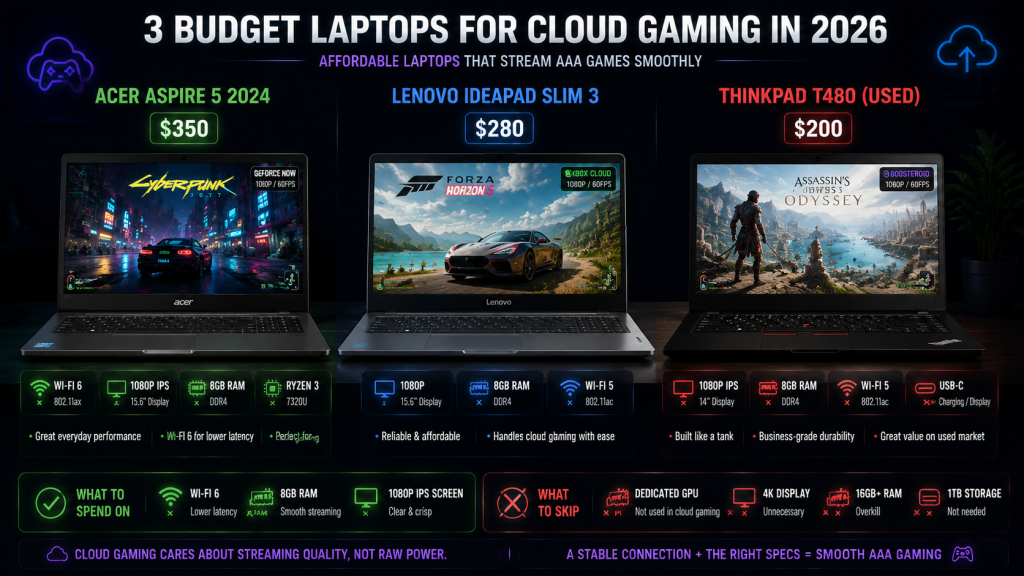
| Feature | Spend On | Skip |
|---|---|---|
| Wi-Fi card | Wi-Fi 6 (Intel AX210) | 2.4GHz-only cards |
| Screen | 1080p IPS, 14″+ | 4K (stream caps at 1080p on most services) |
| RAM | 8GB minimum | 16GB+ (unnecessary for cloud-only use) |
| Storage | 128GB SSD (OS + browser) | 1TB (no games to install) |
| GPU | Any iGPU with HW decode | Dedicated GPU (goes unused for streaming) |
Three models that meet the requirements:
| Laptop | Approx. Price | Key Specs |
|---|---|---|
| Acer Aspire 5 (2024) | ~$350 | Wi-Fi 6, 1080p IPS, 8GB RAM, Ryzen 3 |
| Lenovo IdeaPad Slim 3 | ~$280 | 1080p display, 8GB RAM, Wi-Fi 5 |
| Used ThinkPad T480 | ~$200 | 1080p IPS, 8GB RAM, Wi-Fi 5, USB-C |
Prices from major US retailers and eBay, checked June 2026. Subject to change.
A Chromebook works for cloud gaming on a budget laptop as long as it has 1080p resolution and 5GHz Wi-Fi. User reports on r/ChromebookGaming confirm that even entry-level Celeron-based models handle cloud gaming streams smoothly — as long as nothing else is running.
Bottom Line
Cloud gaming on a budget laptop isn’t a workaround — it’s the primary use case. A $200 used laptop plus a $10/month subscription delivers a better gaming experience than a $1,500 gaming laptop from five years ago.
Four things are non-negotiable for any cloud gaming budget laptop setup: 5GHz Wi-Fi, hardware video decode, 8GB RAM, and a 1080p screen. Nail those, and cloud gaming runs. Miss one — especially the Wi-Fi — and it won’t.
For anyone stuck with a cheap laptop who wants to play real games, cloud gaming is the most practical answer available in 2026. Just make sure the Wi-Fi card can handle it.
As an Amazon Associate we earn from qualifying purchases. Budget Laptops | Gaming Controllers
Also read: Cloud Gaming Comparison 2026: 5 Platforms Ranked | Free Cloud Gaming 2026: What’s Actually Free and What’s a Trap | Cloud Gaming on Mobile: Which Service Actually Works?