Disclosure: This post contains affiliate links. If you buy through these links, we may earn a small commission at no extra cost to you.
If you are reading this, you probably just typed “does vpn get you banned” into Google. Maybe you already bought a gaming VPN. Maybe a friend told you VPNs help with ping. Either way, you are worried about one thing: will my account get banned?
The short answer: using a VPN does not get you banned in most games — if you use it normally. But the long answer is more complicated. Some games have already banned players for VPN use. Others flag VPN connections as suspicious. A few run kernel-level anti-cheat that cannot tell the difference between a VPN driver and cheat software.
This guide checks every major multiplayer game’s official policy, pulls real ban reports from Reddit and forums, and puts together the most complete game-by-game VPN ban risk list available. Every claim links to its source.
Before we start: This guide covers whether using a VPN for gaming gets you banned. If you are using a VPN to cheat, boost accounts, or commit fraud — yes, you will get banned. This guide will not help you.
Why Gamers Worry About VPN Bans
The fear is real. Search “banned for vpn” on Reddit and you will find hundreds of posts. Some are false alarms. Others are not — real people lost real accounts worth hundreds of dollars in skins and games.
The problem started around 2024-2025, when game companies began deploying kernel-level anti-cheat. Riot Vanguard, Easy Anti-Cheat, BattlEye, Activision’s RICOCHET — these systems run at the deepest level of your operating system. They see every driver, every network packet, every process on your PC. A VPN driver looks nearly identical to cheat software to an algorithm that was never trained to tell them apart.
Here is what actually happens: you toggle your VPN on and off during a match. Your IP address changes. Your ping spikes. The anti-cheat sees the pattern and flags it. A human reviews it — or doesn’t, since most game companies rely on automated enforcement. Next day you log in to find your account permanently banned.
Most bans are not about VPN use alone. They are about what you do with the VPN — region-hopping, bot lobbies, or cheating. But some players have been falsely banned simply for toggling a VPN during gameplay. Their stories are below.
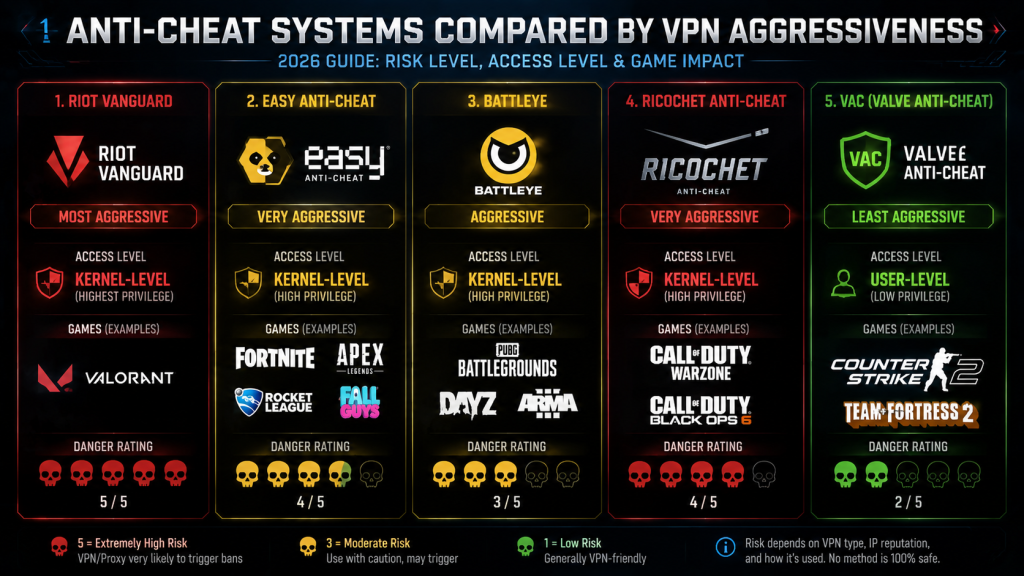
How Anti-Cheat Systems Detect VPNs
Before we get to the game list, you need to understand what you are up against. Here are the five major anti-cheat systems and how they handle VPNs:
Riot Vanguard (Valorant, League of Legends) — Kernel-level. The most aggressive on the market. Vanguard loads before Windows even starts. It can detect VPN network drivers and has flagged VPN drivers as “unauthorized third-party software” before. Real Valorant players have received permanent bans just for toggling VPN on and off during a match.
Easy Anti-Cheat / EAC (Apex Legends, Fortnite, Rust, Elden Ring) — Kernel-level. Generally more tolerant than Vanguard. EAC does not actively scan for VPNs, but unusual network patterns — frequent IP changes, high packet loss during VPN switches — can still trigger a flag.
BattlEye (Rainbow Six Siege, PUBG, Destiny 2, Escape from Tarkov) — Kernel-level. Similar to EAC in its VPN stance. BattlEye’s official position is that VPN use alone is not bannable, but using a VPN to bypass regional restrictions or evade a previous ban will get you banned.
RICOCHET (Call of Duty: Warzone, Black Ops 6) — Kernel-level + server-side AI. RICOCHET specifically monitors network behavior for signs of VPN-based matchmaking manipulation. Activision has been aggressively shadow-banning players who use VPNs to get into bot lobbies since 2024.
VAC / Valve Anti-Cheat (CS2, Dota 2, Deadlock) — User-mode. VAC does not detect or care about VPNs. Valve’s policy has always been that VPNs are fine for normal use. However, Deadlock — Valve’s newer game — has reportedly banned players after VPN connection drops during matchmaking. This suggests even Valve’s newer systems may be getting stricter.
Does VPN Get You Banned? Complete Game-by-Game Risk List
Below is every major multiplayer game, its official VPN policy, and the real risk level based on actual player reports. We rate games on a three-tier scale:
- 🔴 High Risk — Players have reported real bans. Use VPN with caution.
- 🟡 Medium Risk — VPN use may trigger flags, shadow bans, or restrictions.
- 🟢 Low Risk — VPN use is generally safe for normal purposes.
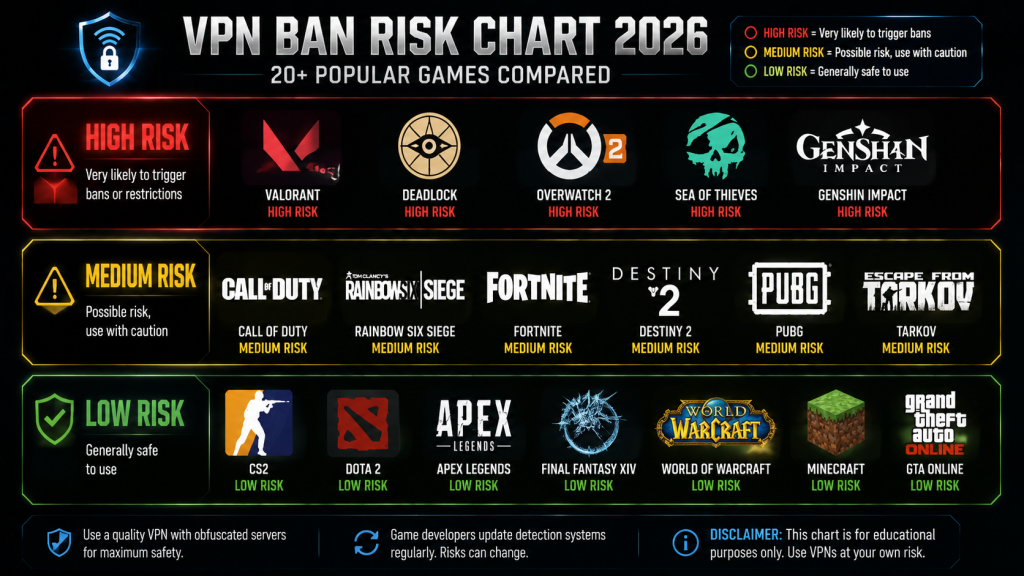
🔴 High Risk Games
These games have documented cases of players getting banned — sometimes permanently — for VPN use alone.
| Game | Anti-Cheat | What Happens | Real Case? |
|---|---|---|---|
| Valorant | Riot Vanguard | VPN toggling triggers “cheating software” flag. Permanent ban. | Yes — Russian player with 0.9 KD lost $200 in skins |
| Deadlock | Unknown (Valve) | VPN connection drop during matchmaking = permanent ban. | Yes — player who lost VPN in queue received permanent ban |
| Overwatch 2 | Blizzard Internal | System flagged VPN as “hacking.” Permanent ban. Appeals denied. | Yes — 9-year veteran, playing since 2016, received a ban |
| Sea of Thieves | Microsoft Internal | Anti-cheat detected VPN as “third-party software interference.” Permanent ban. | Yes — player received ban for using VPN to find Hourglass matches |
| Genshin Impact | Hoyoverse Mikoto | VPN for cross-region top-ups triggers warning emails. Repeat offenders get banned. | Yes — multiple user reports of warning emails |
Valorant deserves special attention. Riot Vanguard is by far the most aggressive anti-cheat in gaming. It runs at kernel level, starts with Windows, and scans everything. In one documented case, a Russian player named kiwiedka received a permanent ban for “using cheats” despite a below-average 0.9 K/D ratio and a Platinum rank that never moved. Their only suspicious behavior? Turning a VPN (the Amnezia app) on and off during a match to test ping. Vanguard detected the network driver changes and flagged the account. Riot support refused to investigate. Likewise, those $200 worth of skins on that account vanished forever.
🟡 Medium Risk Games
These games may not permanently ban you, but you can face shadow bans, competitive restrictions, or MMR penalties.
| Game | Anti-Cheat | What Happens |
|---|---|---|
| Call of Duty: Warzone / BO6 | RICOCHET | Shadow banned (limited matchmaking) for VPN bot lobby use |
| Rainbow Six Siege | BattlEye | MMR rollback + temporary ban for VPN region-swapping |
| Fortnite | EAC + BattlEye | Account restrictions in competitive modes |
| Destiny 2 | Bungie Internal | VPN detected as region-lock bypass; account actions possible |
| PUBG | BattlEye | Temporary matchmaking restrictions for cross-region VPN use |
| Lost Ark | EAC | Region-locked; VPN users risk account restrictions |
| Escape from Tarkov | BattlEye | VPN not explicitly banned, but ping limits make it risky |
| Rust | EAC | VPN use is allowed on most servers, but some community servers ban VPN IPs |
Call of Duty deserves a mention because its RICOCHET anti-cheat has been aggressively targeting VPN users since 2024. The system uses server-side AI to analyze player behavior and network patterns. If RICOCHET detects that you connect from a VPN IP range and get into unusually easy lobbies, it places you in limited matchmaking — a shadow ban state where you can only play against other suspected cheaters. This is not a permanent ban, but it effectively ruins the game. On the other hand, nobody has reported bans from using a VPN purely for privacy or security — without manipulating matchmaking.
🟢 Low Risk Games
These games either do not detect VPNs, or their developers have explicitly stated VPN use is acceptable.
| Game | Official Position |
|---|---|
| CS2 | Valve does not ban for VPN use. VAC does not detect VPNs. |
| Dota 2 | Same Valve policy — using a VPN here is safe. |
| Apex Legends | EAC generally tolerates normal VPN use. We found no known ban cases. |
| Final Fantasy XIV | VPN use does not violate the ToS. IP changes may trigger a security lockout (password reset), but this is NOT a ban. |
| World of Warcraft | Blizzard says they “allow but do not support” VPNs. |
| Minecraft | Players widely use VPNs without issue. Many server hosts use VPNs themselves. |
| GTA Online | Generally safe for normal privacy use. |
| Rocket League | Generally safe. We found no known VPN ban cases. |
| Path of Exile | Players commonly use VPNs without punishment. |
| Elder Scrolls Online | Many players use VPNs without bans. |
| All Single-Player Games | Zero risk. No one monitors your connection in a single-player game. |
Moving on to CS2 — this is the most played competitive shooter on Steam and the safest game to use a VPN with. Valve’s anti-cheat (VAC) operates at the user level, not the kernel level. It does not scan your network drivers. It does not care what IP address you connect from. As long as you are not rage-hacking, VAC leaves you alone. Best of all, Valve’s official stance has remained consistent for years: VPNs are fine for normal use. If you are using one of the VPNs recommended in our gaming VPN comparison guide, your CS2 account is safe.
Real Stories: Players Who Got Banned for VPN Use
These are not hypothetical scenarios. Every case below comes from a public forum post where the player shared their experience. Links to original sources are provided so you can read them yourself.
Case 1: Valorant — $200 in Skins, Gone
A Valorant player with the username kiwiedka posted on Discord that they had received a permanent ban for “using third-party cheats.” Their stats: 0.9 K/D, Platinum rank — hardly the profile of a cheater. They had spent approximately $200 on weapon skins. What triggered the ban? During one match, they toggled their VPN (Amnezia app) on and off several times to test how it affected ping — from 20ms to 80ms and back. Vanguard detected the network behavior as suspicious. Riot support responded with a boilerplate message: “We have confirmed that your account used cheats.” They provided no further explanation. Riot closed the appeal.
This is not an isolated case. Search “VPN” in any Valorant subreddit and you will find dozens of similar stories.
Case 2: Deadlock — Banned During Matchmaking Queue
A Deadlock player reported on the official PlayDeadlock forums that they were waiting in the matchmaking queue with a VPN enabled. Suddenly, their internet connection dropped and the VPN disconnected. The game client closed. When they restarted it, their account had received a permanent ban. Other users in the thread noted that Deadlock had recently removed the ability to change regions via VPN — which suggests the developers tightened the game’s anti-cheat. A VPN disconnection during matchmaking was enough to trigger a permanent ban.
In addition, this case concerns me the most because the player did nothing wrong. They were not region-hopping, not cheating — just sitting in a queue with a VPN running for privacy.
Case 3: Sea of Thieves — 3rd Party Software Flag
A Sea of Thieves player posted on the official forums about getting falsely flagged for cheating while using a device-wide VPN. They played the Hourglass PvP mode and used the VPN to help find matches. The game detected the VPN as “third-party software interfering with game files.” Despite the fact that Sea of Thieves’ Code of Conduct does not explicitly prohibit VPNs, support rejected the appeal. Moderators then locked the forum thread with the note: “We do not discuss disciplinary actions on the forums.”
Case 4: Overwatch 2 — 9-Year Veteran Banned
A Blizzard forum user who had played Overwatch since 2016 reported a permanent ban for “hacking.” They suspect the VPN they used — which they described as necessary for their network setup — was the trigger. Despite noting that well-known streamers also use VPNs without issue, Blizzard permanently banned their account and denied all appeals. After multiple attempts, the ban status changed to “unappealable” — meaning no human would ever review the case again.
Free VPNs are the most dangerous option here. Thousands of people share those IP addresses, many doing things that get flagged. When a game server sees an IP with a prior flag for cheating, botting, or fraud — even from a different user — your account gets caught in the crossfire. For gaming VPNs that minimize this risk with dedicated IPs and obfuscation, see our best gaming VPN guide.
How to Use a VPN for Gaming Without Getting Banned
If you need a VPN for gaming — whether for privacy, DDoS protection, or ping improvement — here are five methods that significantly reduce your ban risk:
1. Use Split Tunneling
Split tunneling lets you route only specific apps through the VPN while your game connects directly to the internet. This is the single safest way to use a VPN and game on the same PC.
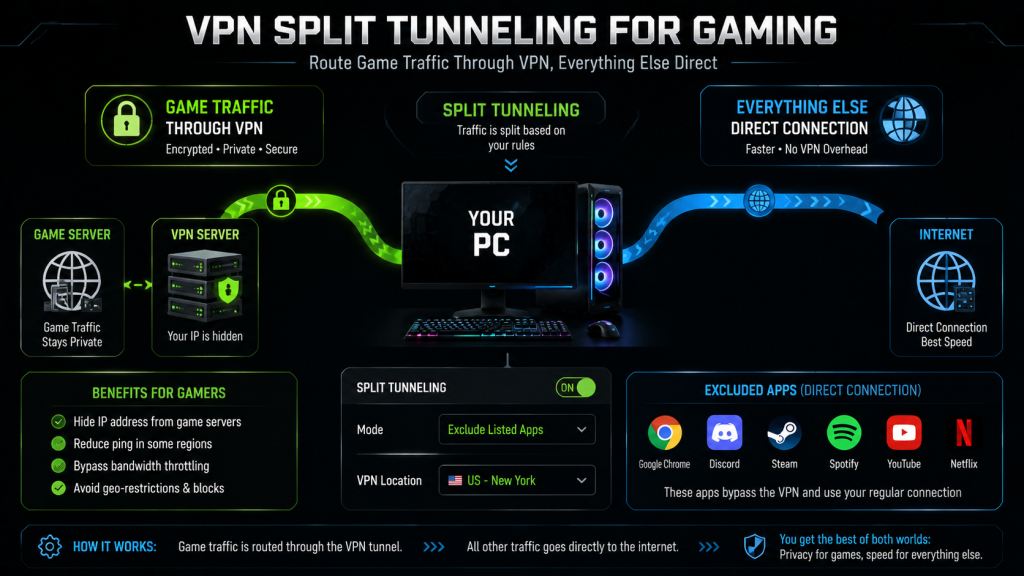
Most good VPNs — including NordVPN, Surfshark, and ExpressVPN — have split tunneling built into their Windows apps. Simply add your game’s .exe file to the exclusion list, and the game will never touch the VPN connection.
2. Get a Dedicated IP Address
A dedicated IP means an IP address that belongs only to you — nobody else uses it. Game servers flag dedicated IPs less often because they never appear in shared blacklists. NordVPN and CyberGhost offer dedicated IPs as a paid add-on (typically $3-5/month extra). It costs more, but if you own valuable game accounts and skins, it is cheap insurance.
3. Use Obfuscated Servers
Obfuscation re-wraps your VPN traffic to look like normal HTTPS browsing. This makes it harder for deep packet inspection — used by some anti-cheat systems — to detect that you are using a VPN at all. NordVPN calls this “Obfuscated Servers”; ExpressVPN uses “Lightway Turbo” protocol which includes built-in obfuscation.
Despite the technical-sounding name, enabling obfuscation is usually one click in your VPN app settings.
4. Never Toggle VPN During a Match
This is the number one cause of false bans. When you switch your VPN on or off mid-game, your IP address changes instantly. Your ping spikes. The anti-cheat sees a sudden network disruption and flags it as suspicious behavior. If you need to turn your VPN on or off, close the game first. Restart it after the VPN connection is stable.
5. Avoid Free VPNs Completely
Free VPNs make money by selling your data — but for gaming, the bigger problem is their IP addresses. Millions of people use free VPN IPs for everything from streaming to spam to actual cheating. Game companies maintain blacklists of these IP ranges. Connecting to a game server through a free VPN IP basically announces “I am using a VPN.”
Our gaming VPN comparison guide covers paid VPNs that work well for gaming, with pricing starting as low as $1.75/month.
What to Do If You Get Banned for VPN Use
If you received a false ban and you believe your VPN caused it, here is what to do:
- Do not panic and do not spam appeals. One well-written appeal beats ten angry ones.
- Be honest about using a VPN. Explain which VPN you use, why you use it, and that you did not cheat.
- Provide evidence. Screenshots of your VPN app showing the date and server. Ping test results. Anything that proves you used a VPN — not a cheat.
- Mention your account history. If you have played for years with no prior offenses, say so. Game companies show more willingness to reconsider when the account has a clean history.
- If they deny the first appeal, try once more — then wait. Some companies limit the number of appeals before the case reaches permanent closure.
In addition, if you live in California or the EU, you have data rights under CCPA and GDPR. One Reddit user — a lawyer — reinstated their account after submitting a formal data access request to Reddit’s privacy team. The company reviewed the account rather than processing the data request, and lifted the ban. This approach is unusual, but it has worked before.
Games Where VPN Is Completely Safe
Not every game is hostile to VPNs. Many MMOs and cooperative games have no issue with VPN use at all. Here is a quick list of games where you can use a VPN without any worry:
- CS2 and Dota 2 — Valve’s anti-cheat does not scan for VPNs
- Final Fantasy XIV — Using a VPN does not violate any rule; just enable 2FA to avoid security lockouts
- World of Warcraft — Blizzard says “allowed but unsupported”
- Minecraft — VPNs are widely used by players and server hosts
- Path of Exile — Common practice, no punishment
- Elder Scrolls Online — VPN use is common and not banned
- GTA Online — Safe for normal privacy use
- Any single-player game — No online connection = no risk
If you mainly play these games and just want better privacy or lower ping, check out our best VPN for gaming low ping guide for a full comparison of the top options.
The Bottom Line
Does VPN get you banned? In most games — no. In Valorant, Deadlock, Overwatch 2, Sea of Thieves, and Genshin Impact — yes, it can, and it has happened to real players.
The safest approach: only use a VPN with games that explicitly allow it. When you do use a VPN for gaming, use split tunneling, a dedicated IP, and never toggle the VPN during a match. If you are looking for a VPN that minimizes ban risk, our gaming VPN guide compares the best options with dedicated gaming servers and split tunneling support.
For most gamers, the risk is low — but the cost of being wrong (losing an account worth hundreds of dollars in games and skins) is high enough that you should take it seriously.
As an Amazon Associate we earn from qualifying purchases. Gaming Routers | Ethernet Cables