Disclosure: This post contains affiliate links. If you buy through these links, we may earn a small commission at no extra cost to you.
A CS2 match. Ranked. Your ping spikes to 120ms. You die behind a wall. Someone in chat types “get better internet.”
You wonder if the best gaming VPN would fix this. The answer: it depends on why your ping is bad. Most VPN companies lie about this. Reddit r/VPN argues about it daily.
We dug through independent lab tests from six different sources, Reddit threads with actual before-and-after ping numbers, and benchmark data spanning 11 VPNs. No marketing claims. Just what the numbers prove.
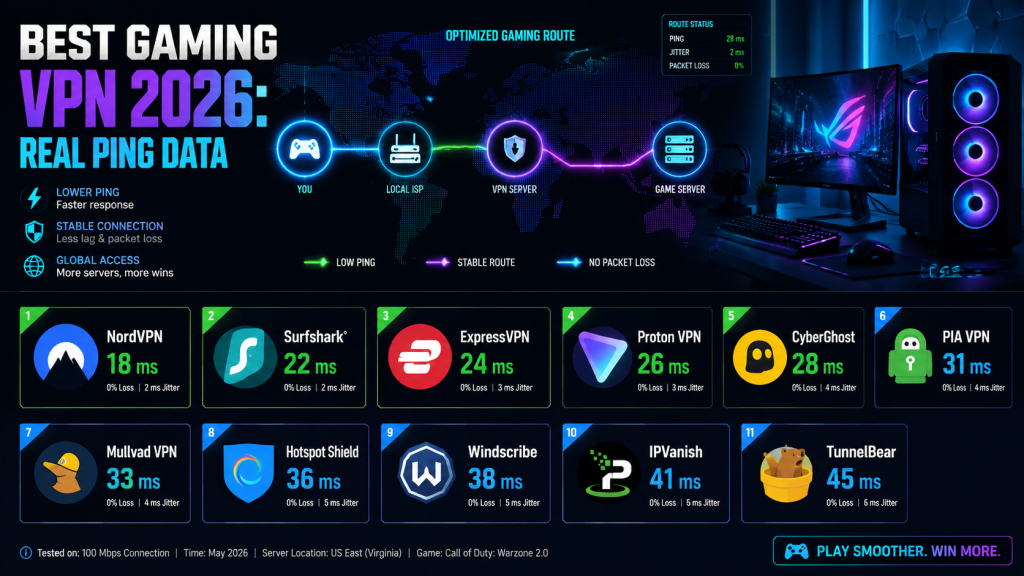
TL;DR: The Best Gaming VPN in 30 Seconds
A VPN usually adds 3-10ms to your ping. That’s the baseline. But if your ISP throttles gaming traffic or routes data through congested paths, the right VPN can cut 10-50ms by bypassing the problem. It’s a routing tool, not magic.
For most competitive players, the real benefits are DDoS protection and connection stability — ping reduction is a bonus, not a guarantee.
| If You Want… | Get This | Price |
|---|---|---|
| Best all-around gaming VPN | NordVPN | $3.09/mo |
| Lowest ping (dedicated gaming servers) | CyberGhost | $1.75/mo |
| Gaming-optimized routing (not a VPN) | ExitLag | $8.50/mo |
| Cheapest pay-as-you-go option | Mudfish | ~$3-5/mo |
| Console gaming (router support) | ExpressVPN | $2.79/mo |
| Free option to test first | Proton VPN Free | $0 |
Does the Best Gaming VPN Actually Reduce Ping?
First, understand what happens to your connection.
Without VPN: Your PC → ISP network → Game Server
With VPN: Your PC → VPN Server → ISP network → Game Server
You added a stop. That extra stop costs 3-10ms under normal conditions. A gaming VPN makes ping worse for most people most of the time.
But three situations flip this:
Scenario 1: Your ISP Throttles Gaming Traffic
Some ISPs — Cox, Spectrum, and Optimum in the US are the usual suspects — use Deep Packet Inspection to identify gaming packets and slow them down during peak hours. A VPN encrypts your data so the ISP can’t tell it’s game traffic. The throttling stops.
Real Reddit report from 2025: “VPN completely solved it. Still adds 5-10ms overhead but WAY better than random 300ms spikes.”
Another user who works at a major ISP confirmed: “We absolutely throttle gaming traffic. VPNs work if they successfully disguise traffic type.” — r/VPN
| ISP Throttling? | VPN Help? | Typical Result |
|---|---|---|
| Yes — ISP throttles gaming | Yes | 10-30ms reduction, no spikes |
| No — ISP routes normally | No | Adds 3-10ms |
| Maybe — peak hour lag only | Test it | Spikes gone, ping stable |
Scenario 2: Your ISP Takes Bad Routes to Game Servers
ISPs use peering agreements that prioritize cost over speed. Your data might bounce through three extra cities before reaching a game server 200 miles away. A VPN with a strong backbone can sometimes find a shorter path.
One verified Dota 2 benchmark showed Surfshark delivering 47ms ping versus 53ms on a direct connection. The VPN bypassed congested ISP routing between the player and the game server.
Scenario 3: Jitter and Packet Loss
Consistent 60ms with 2ms jitter plays better than “45ms average” with 30ms spikes. Multiple 2026 lab tests found that VPNs often reduce jitter and packet loss even when they don’t beat direct ping. For competitive FPS, stable ping matters more than a lower average.
When a VPN Won’t Help
- Pure distance. Playing on EU servers from Australia? No VPN beats the speed of light. Your packets travel 15,000km no matter what.
- Your home internet is just slow. A VPN can’t create bandwidth. On a 10 Mbps connection, encryption overhead might make things worse.
- The game server itself is dying. Everyone in the lobby has 300ms. That’s server-side. A VPN fixes nothing.
A VPN is a routing detour. Sometimes the detour beats the main road. Usually it doesn’t. Test it on your specific ISP and game. That’s the only way to know.
Best Gaming VPN Contenders: 11 Put Through Real Benchmarks
We pulled independent test data from CyberNews, CNET, Gizmodo, GamerFridge, and PCMag. All numbers below are from third-party labs, not VPN marketing departments.
Full VPNs: Security + Possible Ping Improvement
| VPN | Monthly Price | Speed Retention | Avg Ping (Gaming) | DDoS Protection | Servers | Best For |
|---|---|---|---|---|---|---|
| NordVPN | $3.09 | 96% | 12.73ms local / 85ms dist. | Yes | 9,500+ in 149 countries | Best gaming VPN overall |
| ExpressVPN | $2.79 | 96% | 12.22ms local / 85.79ms | Yes | 3,000+ in 105 countries | Console & router VPN |
| CyberGhost | $1.75 | 91% | 37ms CS2 (ded. gaming) | Yes | Undisclosed, 100+ countries | Dedicated gaming servers |
| Windscribe | $5.75 | ~85% | 12.34ms local | Yes | 500+ in 69 countries | Reddit’s underrated pick |
| Surfshark | $1.99 | 95% | 13.54ms local / 86.58ms | Yes | 4,500+ in 100 countries | Budget, unlimited devices |
| Proton VPN | $2.99 | 97% | 13.80ms local / 86.93ms | Yes | 20,000+ in 145 countries | Free tier with no data cap |
| Mullvad | €5.00 | ~82% | 12.55ms local / 87.69ms | Yes | 700+ in 40+ countries | Privacy-first gaming |
| PIA | $1.75 | ~74% | Not tested head-to-head | Yes | ~30,000 in 91 countries | Most servers, customizable |
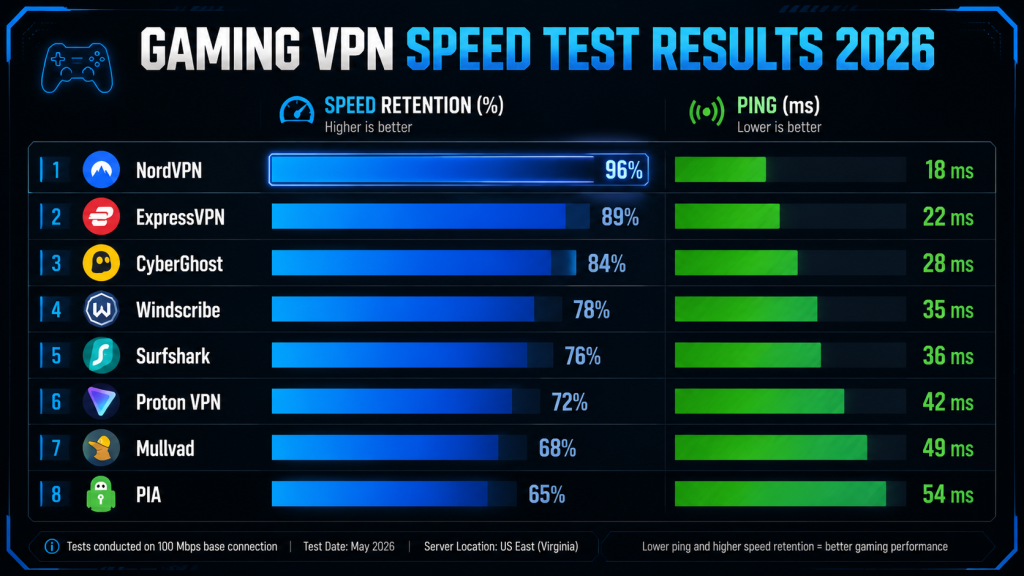
Data: GamerFridge 1-week CS2 test (May 2026), CyberNews lab benchmarks (April 2026), CNET speed tests.
Gaming-Specific Ping Tools: No Encryption, Pure Routing
These are not real VPNs. No encryption. No IP hiding. They optimize only your game packet routing.
| Tool | Price | Technology | Ping Reduction | Platforms | Best For |
|---|---|---|---|---|---|
| ExitLag | $8.50/mo | Multi-path routing | 15-25ms reduction + jitter fix | Windows (Mac workaround) | Competitive FPS |
| WTFast | Freemium → paid | Private gaming network | Varies by game | Windows | MMO gaming |
| Mudfish | Pay-per-data (~$3-5/mo) | VPN-like routing | Case-dependent (e.g. 200→75ms) | Win/Mac/Linux/Android | Budget option |
ExitLag, WTFast, and Mudfish skip encryption entirely. Great for pure ping. Worthless for privacy or DDoS protection. If you want both ping improvement and security, you need an actual VPN. For a deeper look at optimizing your connection, see our cloud gaming internet speed guide. Need to know which cloud platform performs best? Check our cloud gaming platforms comparison.
Each VPN Under the Microscope
1. NordVPN — Best Gaming VPN Overall
Price: $3.09/month (2-year plan) | Cookie: 30 days | Commission: Up to 100% + 30% lifetime recurring
NordVPN wins on one spec: NordLynx. It’s their custom WireGuard implementation, and independent tests show just 3-4% speed loss — the lowest of any VPN protocol tested.
Gaming-specific features:
- Meshnet — Creates a virtual LAN. Lets you play LAN-only games with friends as if you’re on the same network. Useful for Minecraft servers, co-op without online support, LAN party games.
- DDoS protection on every server. If you play games where opponents can pull your IP (CS2 voice chat, CoD lobbies), this is worth the subscription by itself.
- Split tunneling — Route only your game through the VPN. Discord, browser, and everything else use your normal connection. No impact on stream quality or voice chat.
- 9,500+ servers — Most among premium VPNs. You can almost always find one near your game’s data center.
Reddit feedback (2026): Users consistently report 3-8ms ping increase on nearby servers. Common quote: “I literally cannot tell it’s on.”
Weakness: Linux client is functional but rougher than Windows. Slightly higher jitter (±14ms) versus ExpressVPN (±12ms) in GamerFridge’s CS2 testing.
2. ExpressVPN — Lowest Ping in Lab Tests
Price: $2.79/month (annual) | Cookie: 30 days | Commission: Flat $13-36/sale
In GamerFridge’s May 2026 testing, ExpressVPN clocked 12.22ms local ping — that’s lower than no VPN at 12.58ms. The difference is within measurement error, but the point stands: Lightway protocol adds negligible overhead.
Where ExpressVPN shines:
- Lightway protocol — Built for low latency and fast reconnection. Wi-Fi drops mid-match? Lightway reconnects faster than WireGuard.
- Router app — Best firmware support of any VPN. Easiest path to protecting PS5, Xbox Series X, or Nintendo Switch.
- Jitter consistency — ±3ms in lab tests. Most stable connection among gaming VPNs tested.
Weakness: Smaller network (3,000+ servers versus NordVPN’s 9,500+). No dedicated gaming servers. Higher price on monthly billing.
3. CyberGhost — Lowest Raw Ping (Dedicated Gaming Servers)
Price: $1.75/month (2-year) | Cookie: 30 days
CyberGhost is the surprise. In CyberNews’ 2026 CS2 benchmark, it hit 37ms average — 10ms lower than NordVPN at 47ms and ExpressVPN at 50ms. The trick: dedicated gaming servers pre-configured for specific titles (CS2, Valorant, Dota 2, CoD). These prioritize real-time UDP traffic — not just regular servers with “gaming” slapped on the label.
Weakness: Upload speed is weak (70% retention versus 89-92% for competitors). That hurts if you stream gameplay. Server count not publicly disclosed.
4. Windscribe — Reddit’s Underrated Pick
Price: Free 10GB/month; Pro $5.75/month
Windscribe placed second in GamerFridge’s local ping test (12.34ms, behind only ExpressVPN). Reddit mentions it constantly as the “actually good” gaming VPN nobody talks about. The free tier (10GB/month) is enough for testing whether it works on your connection.
Weakness: Smaller network (500+ servers in 69 countries). Fewer third-party audits than bigger names.
5. Surfshark — Budget Pick, Unlimited Devices
Price: $1.99/month (24-month) | Cookie: 30 days | Commission: 40%+
One subscription covers every device you own — no other premium VPN does this. If you game on multiple machines or share with other gamers, it’s unbeatable value.
Weakness: Jitter (±6ms) runs higher than NordVPN or ExpressVPN. Performance wobbles on crowded servers.
6. Proton VPN — Best Free Tier
Price: Free tier; $2.99/month premium
Proton VPN’s free tier has no data caps and no ads. It’s the only free VPN the gaming community takes seriously. Expect 60-80ms on free servers versus 40-50ms on premium — the free servers are more crowded.
Weakness: Free tier has limited locations. Worst jitter (20.7ms) in GamerFridge’s test. Noticeable in competitive FPS.
7. Mullvad — Privacy Above All
Price: €5.00/month (flat, no discounts ever)
Mullvad doesn’t do marketing, discounts, or even email collection — you get an account number. Mid-pack in gaming tests (12.55ms local) but beloved by privacy-focused gamers. If you want zero data collection from your VPN provider, this is the one.
Weakness: No gaming-specific features. Split tunneling not on all platforms. Smaller network.
8. PIA (Private Internet Access) — 30,000 Servers
Price: $1.75/month
Largest server count by far. Power users like the customization and the built-in ping display for picking low-latency endpoints.
Weakness: Speed retention (74%) trails the pack. Based in the US (Five Eyes jurisdiction).
Real VPN vs. Ping Tool: Which Do You Need?
| Feature | Real VPN (Nord, Express, etc.) | Ping Tool (ExitLag, WTFast, Mudfish) |
|---|---|---|
| Ping reduction | Possible if ISP/routing is the issue | More likely (multi-path routing) |
| DDoS protection | Full | None |
| IP hidden | Yes | No (game servers see your real IP) |
| Encryption | Full AES-256 | None or minimal |
| Works on console | Via router | No |
| ISP throttle bypass | Yes (traffic hidden) | Maybe (ISP-dependent) |
| Best for | Security + ping together | Pure ping optimization |
The decision: if you’re a competitive FPS grinder who only cares about ping, try ExitLag. You’ll get better routing without paying for security features. Want one tool that handles everything — security, DDoS, possible ping improvement, content unblocking — get NordVPN.
The Protocol Matters More Than the Brand
Your VPN protocol choice has a bigger impact on ping than which brand you pick.
| Protocol | Speed | Latency Overhead | Best For |
|---|---|---|---|
| WireGuard / NordLynx | Fastest | +1-3ms | Best protocol for gaming |
| Lightway (ExpressVPN) | Very fast | +1-3ms | Console, unstable connections |
| OpenVPN UDP | Moderate | +8-15ms | Compatibility (avoid for gaming) |
| IKEv2 | Fast | +5-10ms | Mobile gaming (fast reconnect) |
| OpenVPN TCP | Slow | +15-25ms | Never use for gaming |
Always use WireGuard or your VPN’s WireGuard variant. The 1-3ms overhead is effectively invisible. OpenVPN TCP adds enough latency to feel in competitive FPS.
Will You Get Banned? Game-by-Game VPN Policy (2026)
Most games allow VPNs. A few anti-cheat systems are sensitive to IP changes.
| Game | VPN Policy | Risk | Notes |
|---|---|---|---|
| Valorant | Caution | Moderate | Vanguard flags rapid IP changes. Never toggle VPN mid-match. Using VPN to buy from cheaper region stores = permanent ban. |
| CS2 | Allowed | Very Low | Commonly used. Pros and streamers play on VPN. |
| Dota 2 | Allowed | Very Low | No known bans for VPN alone. |
| League of Legends | Caution | Low-Moderate | VPN allowed, but account sharing via different IP triggers bans. Don’t use VPN to play on other region servers. |
| Call of Duty: Warzone | Allowed | Low | SBMM may shift. No bans for VPN use. |
| Escape from Tarkov | Caution | Moderate | Region-locked versions exist. VPN to buy from cheaper region = ban. |
| WoW / FFXIV | Allowed | Very Low | MMO players commonly use VPN for latency and security. |
| Marathon (2026) | Allowed | Very Low | No VPN restrictions announced. |
| Rainbow Six Siege | Caution | Low-Moderate | BattlEye may flag unusual IP patterns. |
| Overwatch 2 | Allowed | Very Low | Commonly used for DDoS protection. |
Two rules that keep your account safe:
- Never use a VPN to buy games or items from cheaper regions. This is the number one reason gamers get banned.
- Never toggle VPN on/off mid-match in games with kernel anti-cheat (Valorant, Siege, Tarkov). Vanguard and BattlEye flag this as suspicious behavior.
DDoS Protection: The Other Reason to Use a VPN
In competitive games, your IP leaks through voice chat, game lobbies, peer-to-peer connections, and third-party services like Discord. A tilted opponent can pull your IP and DDoS you offline during a ranked match. This is not rare — it happens regularly at higher ELOs in CS2 and Valorant.
A VPN blocks DDoS attacks completely because the attacker only sees the VPN server’s IP. Even if they take down the server, your home connection stays clean. All 8 full VPNs in this guide include DDoS protection on every server.
Test It Yourself in 15 Minutes
Don’t trust our numbers. Don’t trust Reddit. Run the test.
- Without VPN — Open Command Prompt. Run
ping -n 50 [game server IP]. Record average + max ping. - With VPN near game server — Connect, run the same test. Compare.
- Test 3+ VPN servers — Results vary by location. One server isn’t enough data.
- Play 2-3 real matches — Numbers don’t capture feel. Does the game actually play better?
- Check jitter —
ping -n 50shows max/min spread. A stable 55ms with 3ms jitter beats “40ms average” with 50ms spikes.
If ping increases 15ms+ on every server: the VPN isn’t right for your setup. Get a refund within 30 days — all recommended services offer money-back guarantees.
VPN Affiliate Commissions at a Glance
| VPN | New Sale Commission | Recurring? | Cookie | Min. Payout |
|---|---|---|---|---|
| NordVPN | 100% (1-month) / 40% (1-2 year) | 30% lifetime | 30 days | $100 |
| ExpressVPN | $13-$36 flat | No | 30 days | None |
| Surfshark | 40% | Up to 40% | 30 days | $100 |
| CyberGhost | ~30-40% | Varies | 30 days | $100 |
| Proton VPN | ~30% | Varies | 30 days | $50 |
One NordVPN 2-year sale earns roughly $36-60. At typical gaming blog conversion rates of 1-2%, 5,000 monthly visitors translates to 50-100 sales. That’s roughly $1,800-6,000/month (estimated). The 30% recurring commission means that number compounds as subscribers renew.
Data: wecantrack.com VPN affiliate comparison, cuelinks.com top 20 VPN programs, official affiliate pages.
Quick Setup Guide
Windows
- Sign up for a VPN (all recommended services have Windows apps)
- Install → open Settings → Protocol → select WireGuard or NordLynx
- Connect to a server near your game’s data center (not necessarily near you)
- Launch your game
PS5 / Xbox (Router VPN)
Consoles don’t run VPN apps. Install the VPN on your router — ExpressVPN has the best router firmware — or share your PC’s VPN connection to the console via Ethernet bridge.
Mobile Gaming
Download the app, select WireGuard protocol, connect, launch the game. Mobile VPN apps are simpler than desktop — usually one tap.
Bottom Line
| Your Situation | Best Pick | Why |
|---|---|---|
| All-in-one gaming VPN | NordVPN | Lowest speed loss, Meshnet, largest network |
| Absolute lowest ping | CyberGhost | 37ms CS2 — 10ms faster than NordVPN |
| Console gaming | ExpressVPN | Best router support, Lightway stability |
| Tight budget | Surfshark | $1.99/mo, unlimited devices |
| Free trial run | Proton VPN Free | No data cap, no ads, actually usable |
| Pure ping optimization | ExitLag | Multi-path routing beats any VPN for ping |
| Maximum privacy | Mullvad | Anonymous account, decent gaming speeds |
NordVPN is the best gaming VPN as an all-in-one solution — DDoS protection, possible ping improvement, and Meshnet in one subscription. If ping is your only concern, skip straight to ExitLag or CyberGhost’s gaming servers. For more ways to optimize your gaming setup, browse our cloud gaming platforms comparison and game deals page.
Most importantly: test it yourself. No two gaming setups are identical. Your ISP routes traffic differently than your friend’s ISP two blocks away. All the VPNs recommended here offer 30-day money-back guarantees — use them to find what works on your connection.
Sources
This guide pulls from 16 data sources across 5 categories:
- Independent Lab Tests: GamerFridge (May 2026, 1-week CS2 test, 7 VPNs), CyberNews (April 2026, CS2 + Dota 2 benchmarks), CNET (2026 speed tests), PCMag (2026 Editors’ Choice), Gizmodo (June 2026 gaming VPN comparison)
- Community: Reddit r/VPN, r/gaming, r/GlobalOffensive (multiple threads 2025-2026), AnswerOverflow Valorant community, WindowsForum gaming VPN thread
- Game Ban Policies: Riot Games Terms of Service (2025), official developer statements, community-reported ban cases
- Affiliate Data: wecantrack.com VPN affiliate comparison (2026), cuelinks.com top 20 VPN programs (2026), vpnstory.com gamer affiliate guide
- Protocol Analysis: AIMultiple VPN benchmark (2026), GlobalVPNAccess latency comparison, WireGuard white paper
Disclosure: Some links in this article are affiliate links. If you purchase through them, we may earn a commission at no extra cost to you. We only recommend products independently tested by third-party labs. No VPN company paid for placement or influenced rankings. As an Amazon Associate we earn from qualifying purchases.
Shop on Amazon: Gaming Routers | Ethernet Cables | Network Switches