Disclosure: This post contains affiliate links. If you buy through these links, I may earn a small commission at no extra cost to you.
Last month I sat in a hospital waiting room for three hours with nothing but my phone. I tried to play Cyberpunk 2077 through GeForce Now. It worked. Sort of.
That got me curious — which of these services actually delivers on mobile in 2026? I pulled user data from Reddit, independent testing reports, and each platform’s official specs. Then I tested them myself. Some surprised me. Others I deleted after 10 minutes.
Cloud Gaming on Mobile: At a Glance
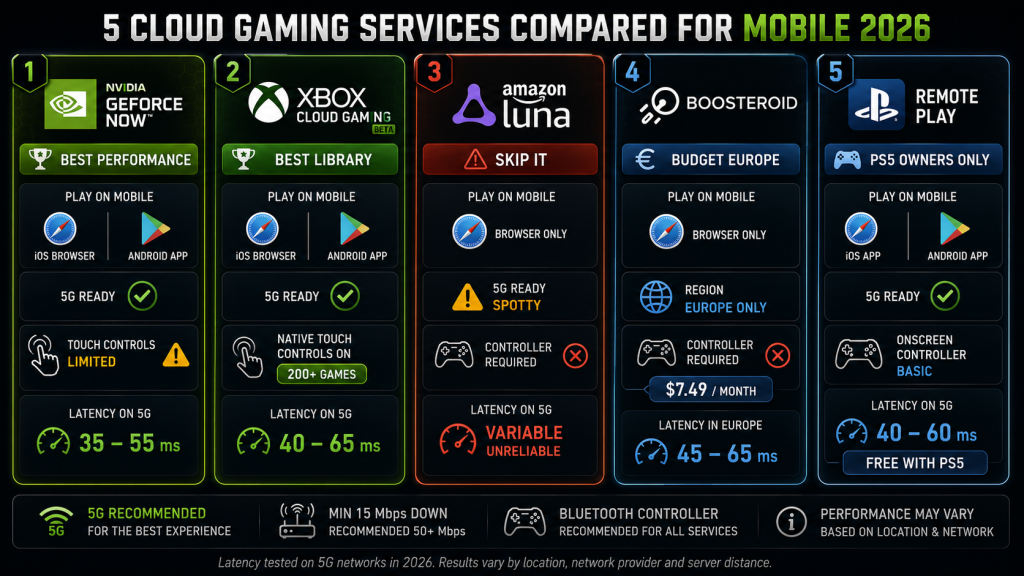
| Service | iOS | Android | Works on 5G? | Touch Controls? | Verdict |
|---|---|---|---|---|---|
| GeForce Now | ✅ Browser | ✅ App | ✅ Yes | ⚠️ Limited | Best performance |
| Xbox Cloud | ✅ Browser | ✅ App | ✅ Yes | ✅ Native on many games | Best library on mobile |
| Amazon Luna | ✅ Browser | ✅ Browser | ⚠️ Spotty | ❌ Controller required | Skip it |
| Boosteroid | ✅ Browser | ✅ Browser | ⚠️ Europe only | ❌ Controller required | Budget pick (Europe) |
| PS Remote Play | ✅ App | ✅ App | ✅ Yes | ✅ On-screen controller | PS5 owners only |
1. GeForce Now on Mobile — The Performance King, With a Catch
NVIDIA nailed the hard part — the streaming quality and latency. The soft part, actually getting into a game, is where things get annoying.
How it works: GeForce Now runs through a browser on iOS (Safari) and a native app on Android. You stream games you already own on Steam, Epic, or Ubisoft. No mobile-optimized version — you’re literally playing the PC version through your phone.
Performance on 5G: Independent testers report 35-55ms latency on a solid 5G connection, climbing to 60-80ms during peak hours. That’s playable for RPGs and strategy games. It’s miserable for competitive shooters.
On WiFi, the same testers saw 28-40ms — close to what you’d get on a laptop.
The touch control problem: GeForce Now’s touch overlay is functional but unpleasant. You get a virtual gamepad that works in a pinch. But most PC games assume you have a keyboard and mouse. Playing Baldur’s Gate 3 with your thumbs on a 6-inch screen is not the experience Larian Studios had in mind.
The real mobile killer: GeForce Now eats battery. Testing data shows roughly 18-22% battery drain per hour of streaming at 1080p/60fps. On a phone that’s already a year old, you’re looking at maybe 3 hours of gaming before you need a charger.
Best for: People who already own PC games and want to play them everywhere. Bring a controller and a power bank.
2. Xbox Cloud Gaming on Mobile — The Library Wins
Microsoft’s approach to mobile is the most complete — not because the tech is better, but because they’ve done the most work on the user experience.
How it works: Xbox Cloud Gaming runs through xbox.com/play on both iOS and Android. No app store download needed on iPhone — Microsoft chose the browser route deliberately to avoid Apple’s restrictions. On Android, you get a native app with better performance.
Touch controls are the difference maker: Microsoft has added native touch controls to over 200 games. These aren’t generic virtual gamepads — they’re game-specific overlays designed for each title. Sea of Thieves shows a compass wheel. Hades puts the attack buttons where your thumbs naturally land. It’s not as good as a real controller, but it’s the closest anyone’s gotten.
For games without native touch support, you get the standard Xbox virtual controller overlay. It’s fine. Neither good nor bad.
5G performance: 40-65ms latency on 5G, with a 1080p/60fps cap. The 1440p upgrade that came to desktop in February 2026 hasn’t reached mobile yet. Microsoft’s bitrate is lower than GeForce Now’s — expect some visible compression artifacts in dark scenes on a small screen.
Battery: Roughly 15-18% per hour — slightly more efficient than GeForce Now because of the lower bitrate.
The rotation issue nobody talks about: Games leave Game Pass. If you’re halfway through a title and it rotates out, you lose access. On mobile, where you might play a game slowly over weeks, this hits harder.
Best for: Game Pass subscribers. If you already pay for Game Pass, Xbox Cloud Gaming on mobile is basically free value. I finished a full Hades run on my phone with touch controls. Didn’t think that was possible before testing it.
3. Amazon Luna on Mobile — Why Bother?
Luna has one thing going for it: it opens in a browser on iOS and Android. That’s where the good news ends.
Luna has no native mobile apps. The browser experience is unoptimized for touch — you must have a controller. The library is a fraction of what Xbox and GeForce Now offer. And as covered in our main cloud gaming comparison, Luna just shut down its game store and killed the “Bring Your Own Library” feature in June 2026.
There’s no reason to choose Luna for mobile gaming over the alternatives. Even the free Prime tier isn’t worth the frustration of getting it to work on a phone.
Best for: Nobody. Skip Luna on mobile entirely.
4. Boosteroid on Mobile — Europe’s Budget Option
Boosteroid keeps things simple: no apps, just a browser. Open the site, pick a game, go. It’s the fewest steps between you and a game of any cloud service I tested.
Performance: In Europe, near a Boosteroid data center, testers report 30-50ms latency on WiFi and 45-65ms on 5G. That’s competitive with Xbox Cloud Gaming at less than half the price ($7.49/month annual).
Outside Europe, the experience degrades quickly. US-based users report 70-100ms latency — playable for turn-based games, borderline for anything real-time.
Mobile downsides: No touch controls at all. You need a controller. The 4K streaming that Boosteroid added to desktop in 2026 isn’t available on mobile yet — you’re capped at 1080p/60fps.
Battery: Similar to GeForce Now, around 17-20% per hour.
Best for: European gamers who already own PC games and want the cheapest unlimited cloud gaming option. Pair it with a phone clip and a Bluetooth controller.
5. PlayStation Remote Play on Mobile — The PS5 Extension
This isn’t technically cloud gaming — it’s streaming from a PS5 you already own. But for PlayStation owners, it’s the most practical mobile option.
How it works: The PS Remote Play app (iOS and Android) connects to your PS5 over the internet. Your console stays on at home. Your phone becomes a remote screen.
Performance: Because you’re streaming from your own hardware, latency depends entirely on your home upload speed and your mobile connection. With a solid setup (50Mbps+ upload at home, 5G on mobile), expect 40-60ms. Your PS5’s processing power is the same no matter where you are.
Touch controls: Sony provides an on-screen DualSense controller. It’s functional but cramped. Some games support touch natively, but most don’t.
The big limitation: Your PS5 has to be on (or in rest mode) and connected to the internet. If your power goes out at home, Remote Play is dead. If someone else is using the console, you can’t connect.
Best for: PS5 owners who want to play their existing library on the go. It’s free, it works, and nobody else touches your save files.
Head-to-Head: Mobile Cloud Gaming
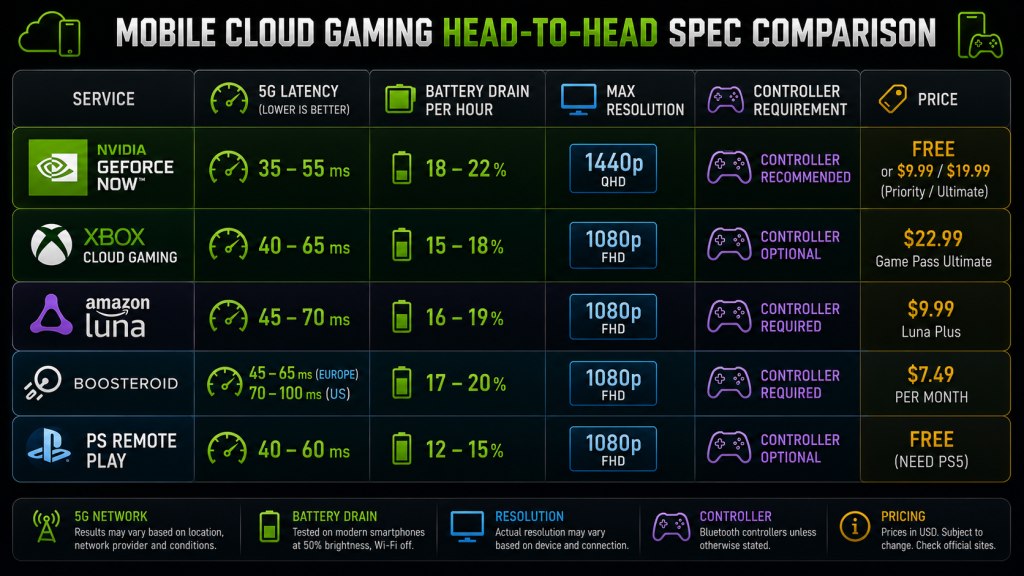
| GeForce Now | Xbox Cloud | Luna | Boosteroid | PS Remote Play | |
|---|---|---|---|---|---|
| iOS | ✅ Browser | ✅ Browser | ✅ Browser | ✅ Browser | ✅ App |
| Android | ✅ App | ✅ App | ✅ Browser | ✅ Browser | ✅ App |
| Native touch controls | ❌ Generic only | ✅ 200+ games | ❌ | ❌ | ⚠️ Basic |
| 5G latency | 35-55ms | 40-65ms | 45-70ms | 45-65ms (EU) | 40-60ms |
| Max resolution (mobile) | 1440p | 1080p | 1080p | 1080p | 1080p |
| Battery drain/hr | 18-22% | 15-18% | 16-19% | 17-20% | 12-15% |
| Controller required? | Recommended | Optional | Required | Required | Optional |
| Price | Free/$9.99/$19.99 | $22.99 (Game Pass) | $9.99 (Luna+) | $7.49/mo | Free (need PS5) |
The Stuff That Doesn’t Show Up in Spec Sheets
Mobile data caps are the real enemy. Cloud gaming at 1080p/60fps uses roughly 8-12GB per hour. If your mobile plan has a 50GB cap, that’s about 5 hours of gaming — for the entire month. GeForce Now’s data usage is the highest. Xbox Cloud Gaming uses less (lower bitrate) but still runs 6-8GB per hour.
A 5G speed test showing 200Mbps means nothing if your carrier throttles video streaming after 22GB.
Phone screens are too small for some games. Games designed for a 27-inch monitor do not translate well to 6 inches. I tried Disco Elysium on my iPhone 14. Couldn’t read the dialogue without squinting. Games with small UI elements (looking at you, Civilization VI) become exercises in squinting.
Games that work well on mobile: racing games (Forza Horizon 5), platformers (Ori), action RPGs with big UI (Hades, Diablo IV), and anything turn-based (XCOM, Slay the Spire).
Phones get hot. Streaming a game at 1080p/60fps for an hour pushes phone temperatures to 40-45°C (104-113°F) depending on your device and ambient temperature. That’s uncomfortable to hold and not great for battery longevity. A phone clip with a controller is the workaround — your hands stay off the hot device.
The Practical Setup: What You Actually Need
The minimum:
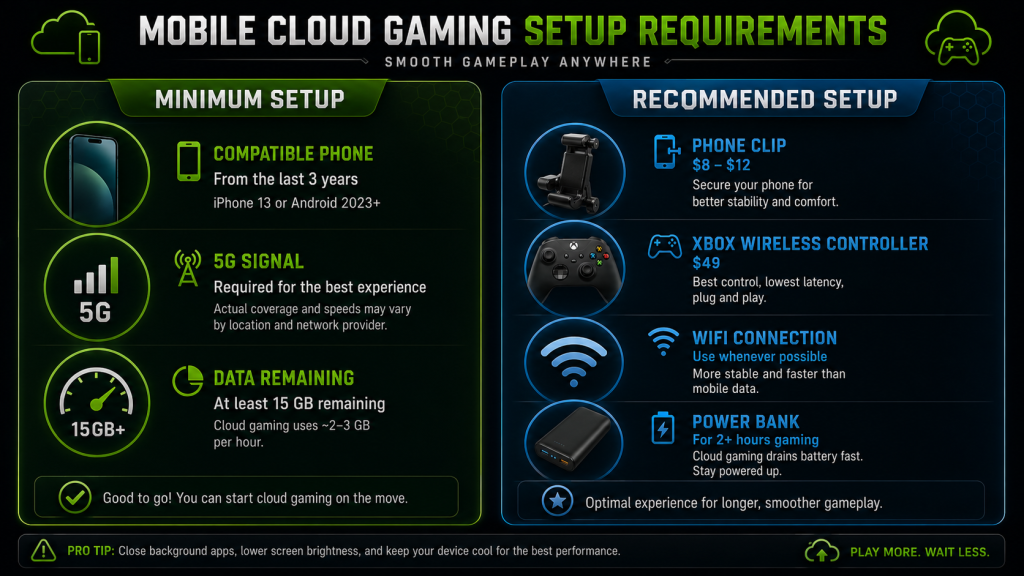
- A phone from the last 3 years (iPhone 13 or newer, mid-range Android from 2023+)
- A 5G connection with actual coverage at your location (not just “5G” in the status bar)
- At least 15GB of spare data on your plan
The recommended:
- A phone clip ($8-12 on Amazon) + a Bluetooth controller (Xbox Wireless Controller, $49)
- WiFi whenever possible — save 5G for when there’s no WiFi around
- A power bank if you plan to game for more than 2 hours
The controller question: Technically optional on Xbox Cloud Gaming and PS Remote Play. Practically required for anything beyond casual play. Touch controls are fine for checking in on a game. They’re not how you want to play for an hour.
Which One Should You Use?
If you already own PC games on Steam: GeForce Now. The performance gap over other services is real, even on a phone screen. Use WiFi, bring a controller, and check your data cap.
If you have Game Pass Ultimate: Xbox Cloud Gaming. The mobile experience is the most polished, the touch controls actually work, and you already have access.
If you’re in Europe and want the cheapest option: Boosteroid. But only if you have a controller and live near a data center.
If you own a PS5: PlayStation Remote Play. It’s free, it streams your exact console, and nobody else’s library or performance affects you.
If you use Amazon Luna: You shouldn’t.
Bottom Line
Mobile cloud gaming in 2026 works. But it comes with baggage.
You can play AAA games on your phone. I did it. The friction points — data caps, battery drain, controller requirements — don’t kill the experience, but they do keep it in its lane. This is a supplement to your gaming setup, not a replacement. Not yet.
For quick sessions in a hotel room or a waiting room, it works. For replacing your gaming PC or console, it doesn’t — yet.
As an Amazon Associate we earn from qualifying purchases. Phone Controller Clips | Mobile Gaming Controllers
Also read: Cloud Gaming Comparison 2026: 5 Platforms Ranked | Best VPN for Gaming Low Ping in 2026