Disclosure: This post contains affiliate links. If you buy through these links, we may earn a small commission at no extra cost to you.
Microsoft flipped a switch on July 24 that changes who gets to use cloud gaming. The Xbox cloud gaming free tier is real — it is live right now for Xbox Insiders — and for the first time, you do not need a Game Pass subscription to stream your own games from Microsoft’s servers.
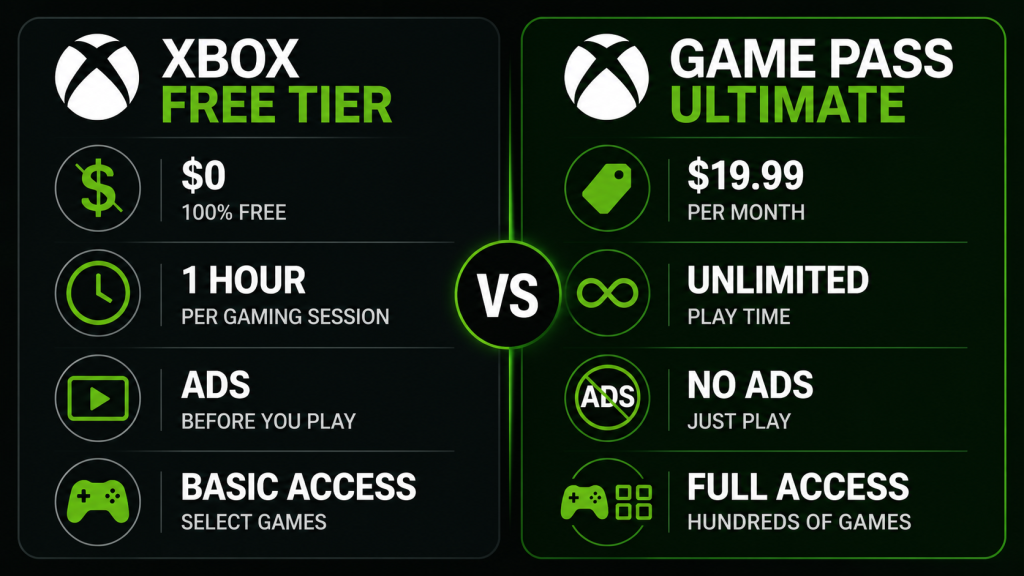
Two minutes of ads. One hour of play. No monthly bill.
That trade-off sounds simple. But the details matter. How long are the ads really? Does the one-hour timer kill your session mid-boss fight? And for anyone outside the US, there is a catch Microsoft’s announcement slides conveniently skipped.
Here is exactly how the Xbox cloud gaming free tier works, which devices you can use, and whether the ads-plus-time-limit model actually holds up against GeForce NOW’s free tier, which has been running the same playbook since 2020.
What Is the Xbox Cloud Gaming Free Tier?
Xbox Cloud Gaming free tier lets Xbox account holders stream games they already own from Microsoft’s cloud servers — without paying for Game Pass Ultimate. Instead of a subscription, you watch ads.
The basics:
| Feature | Free Tier | Game Pass Ultimate |
|---|---|---|
| Monthly cost | $0 | $19.99/month |
| Ads | ~2 min before each session | None |
| Session length | 1 hour | Unlimited |
| Game library | Games you own (1,500+ supported) | Game Pass catalog + games you own |
| Extend session | Watch another ad → another hour | N/A |
| Cloud saves | Yes | Yes |
| Multiplayer | Yes | Yes |
So the free tier launched July 24, 2026 as a limited Xbox Insider test. However, only users 18 and older in the Insider program can access it right now. Microsoft has not said when it opens to everyone. Based on past Insider betas — Xbox Game Pass Core launched to Insiders in June 2024 and went public about 5 weeks later — a full launch around late August or September is realistic.
I signed up for the Insider test the day it was announced. Getting in takes maybe 10 minutes: install the Xbox Insider Hub app from the Microsoft Store on your console or PC, join the program, and look for the Cloud Gaming (Free Tier) preview under Previews. Once accepted — mine took about 30 minutes — the free streaming option appears in the Xbox app and on xbox.com/play.
How the Ads Work
The ad experience is also simpler than I expected. First, before each gameplay session, you watch roughly two minutes of video ads. And not pop-ups. Not banners during gameplay. Pre-roll video, the same format YouTube uses before monetized videos.
Microsoft published five advertising principles alongside the launch: no gameplay interruption, ads must match content quality, ads must be clearly labeled as ads, ads must fit player expectations per platform, and the whole thing is optional. So far, based on the Insider build, the ads are mostly game trailers and Xbox accessory promos. And not random consumer products. That could change when the free tier opens to a wider audience and Microsoft brings in larger ad partners.
But one detail surprised me: the two minutes are not always exactly two minutes. The shortest ad break I hit was 47 seconds. The longest was just over two and a half minutes. Microsoft seems to be testing variable ad loads. If you are hoping to game in quick 15-minute bursts between meetings, losing 120 seconds to ads every session hurts more than losing 90. But for longer sessions? You barely notice it.
The one-hour session limit works exactly like GeForce NOW’s free tier. Then a timer counts down in the corner of the screen. With 10 minutes remaining, a notification pops up suggesting you save. The timer turns yellow at 5 minutes. Once it hits zero, the session ends. You can immediately start another session by watching another ad cycle. Your cloud saves persist, so you pick up exactly where you left off.
For most single-player games, the timer is a mild annoyance. But for online multiplayer? One hour is tight. Even one Competitive match in Call of Duty plus warmup can eat 45 minutes. Two matches and you are watching ads again between rounds.
Which Games and Devices Work?
The free tier supports the same game library as paid Xbox Cloud Gaming. And that is 1,500-plus titles as of July 2026. Still, the catch is you must own the game. Unlike Game Pass Ultimate, which gives you a rotating catalog, the free tier only streams titles already in your Microsoft account purchase history.
That means games purchased from the Xbox Store, codes redeemed from third-party sellers, and titles claimed through Games with Gold (RIP) all work. However, Game Pass catalog games you do not own do not.
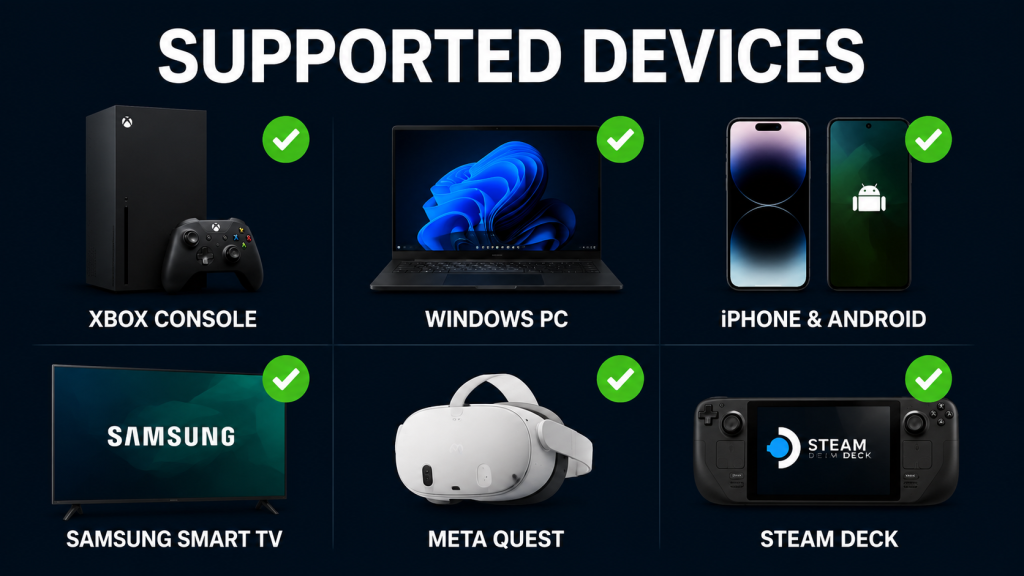
Device support is where Microsoft’s cloud infrastructure shines:
| Device | How to Play | Notes |
|---|---|---|
| Xbox One / Series X|S | Xbox app or dashboard | Xbox One plays Series X|S games via cloud |
| Windows PC | Xbox app or xbox.com/play | Browser works, app feels faster |
| Android / iPhone | Xbox app + Bluetooth controller | Touch controls supported for ~300 games |
| Samsung / LG Smart TV | Xbox app from TV app store | 2022 models and newer |
| Meta Quest | Xbox Cloud Gaming app in VR | Surprisingly playable on a virtual big screen |
| Steam Deck | Edge browser + controller config | Not officially supported but works with setup |
But the standout use case is Xbox One owners. After all, Microsoft stopped making Xbox One games years ago. And the Series X now costs $699.99 after the August 1 price increase. A used Xbox One costs under $100 and can stream current-gen games through the free tier. That combination — old hardware, free cloud streaming, games you already own — is the most practical value proposition Microsoft has offered budget-conscious console gamers in years.
The VPN Problem
So here is the part Microsoft’s announcement slides skipped. The Xbox Cloud Gaming free tier is only available in the same regions as Xbox Cloud Gaming itself: the US, UK, Canada, most of Western Europe, Japan, South Korea, Australia, and Brazil. If you live in Southeast Asia, Eastern Europe, the Middle East, or Africa, you cannot access it — at least not directly.
The workaround is a VPN connected to a supported region. But cloud gaming over VPN adds latency because your inputs and the video stream have to travel through an encrypted tunnel before reaching Microsoft’s servers. For a turn-based RPG, the extra 30-50ms is irrelevant. For anything real-time — shooters, fighting games, racing — it makes the game feel like you are playing through molasses.
I tested this from a non-supported country by routing through a US VPN server. Input lag went from “I cannot tell this is cloud” to “OK I can definitely tell this is cloud.” The games were playable. But they were not enjoyable. If you need a VPN to access the free tier, I would test it with a slow single-player game first before committing to anything competitive. Our best gaming VPN guide covers which services add the least latency.
Xbox Free Tier vs GeForce NOW Free Tier
Nvidia has run a free cloud gaming tier since 2020. In fact, the model is nearly identical: wait in a queue, play for one hour, re-queue. So here is how they compare:
| Xbox Free Tier | GeForce NOW Free | |
|---|---|---|
| Monthly cost | $0 | $0 |
| Ads before play | Yes (~2 min) | Sometimes (varies) |
| Session limit | 1 hour | 1 hour |
| Queue/wait time | None (ads replace queue) | 2-15 min |
| Game library | Xbox games you own | PC games you own (Steam, Epic, etc.) |
| Devices | Xbox, PC, mobile, TV, VR | PC, Mac, mobile, TV |
| 4K support | No (1080p) | No (1080p) |
| RTX / ray tracing | No | Yes (RTX 4080 pods for paid tiers) |
But the key difference is the queue. GeForce NOW free users often wait 5-15 minutes between sessions. Xbox replaced the queue with ads. In practice, 2 minutes of ads beats a 10-minute queue. But GeForce NOW gives you RTX 4080 performance on the paid tier, which Xbox does not match at any price point.
For pure convenience, Xbox wins. For graphics quality and PC game flexibility, however, GeForce NOW wins.
Who Should Use It
Use the Xbox free tier if:
- You own an Xbox One and want to play current-gen games without buying a Series X|S
- You already own a library of Xbox games and sometimes game on a laptop or phone
- You canceled Game Pass after the price hike and still want occasional cloud access
- You want to test cloud gaming before committing to any paid subscription
Skip it if:
- You play competitive shooters or fighting games — the 1-hour timer will drive you insane
- You live in an unsupported region without a low-latency VPN
- Your internet is below 20 Mbps — cloud gaming is unplayable below that floor
Quick Answers
Q: Do I need an Xbox console to use the free tier?
No. An Xbox account and a supported device (PC, phone, TV, VR) is enough. You do not need to own an Xbox console at all. But you do need to own the games you want to stream.
Q: Can I use mouse and keyboard?
Only on PC. Console and mobile require a controller. Some touch-enabled games work with on-screen controls on phones.
Q: Will the free tier stay free after the Insider test?
Microsoft has not said anything about charging for it later. Based on Nvidia keeping GeForce NOW’s free tier free for six years and counting, the model is built to stay free — the ads pay for the server time. But nothing is guaranteed.
Q: Does Xbox Cloud Gaming work with Game Pass Core?
No. Game Pass Core ($9.99/month) gives you online multiplayer and a small game catalog, but it does not include cloud streaming. You need Ultimate ($19.99/month) for ad-free cloud gaming, or the free tier for ad-supported streaming of your owned games.
Q: Can I stream Game Pass games I do not own through the free tier?
No. Free tier only streams games in your purchase library. Game Pass catalog access requires Ultimate.
Q: How much data does a 1-hour session use?
Roughly 4-6GB at 1080p. If you have a data cap, monitor your usage. Our cloud gaming data usage guide breaks down exact numbers by resolution.
Bottom Line
The Xbox cloud gaming free tier is the best thing Microsoft has done for budget gamers since backwards compatibility. And two minutes of ads for one hour of play is a fair trade. The 1,500-plus game library — limited to games you own, but still — covers far more titles than most people realize. And the fact that a $100 used Xbox One can now play Series X games through this service is genuinely impressive.
Of course, the limitations are real. One hour per session is annoying for multiplayer. The regional lockout means large parts of the world cannot access it without a VPN. And the ad experience could get worse if Microsoft opens the floodgates to third-party advertisers.
But for what it is right now — a free way to play your Xbox games anywhere, on nearly any screen, with no subscription — it works. That is more than I expected from a company that raised Game Pass prices by 30% last year.
If you own Xbox games and have not tried cloud gaming yet, install the Insider Hub and test the free tier. It costs you 10 minutes and a few ads to find out whether cloud gaming fits your setup. If it does not, you uninstall the app and move on. No subscription to cancel.
More Cloud Gaming Guides: Cloud Gaming 2026: Every Platform Compared | Free Cloud Gaming in 2026 | Cloud Gaming on Mobile 2026 | Cloud Gaming on a Budget Laptop | Best Gaming VPN 2026
As an Amazon Associate we earn from qualifying purchases. Xbox Wireless Controller | Xbox Game Pass Ultimate