Disclosure: This post contains affiliate links. If you buy through these links, we may earn a small commission at no extra cost to you.
You have already picked a cloud gaming service. Maybe GeForce NOW Ultimate. Maybe Xbox Game Pass. The next question is simpler and more annoying at the same time: what do you actually play it on?
Your laptop works. Your phone works. But neither feels right for a two-hour session. If you are going to treat cloud gaming as a real gaming platform, you need one of the best cloud gaming devices built for the screen you want to play on.
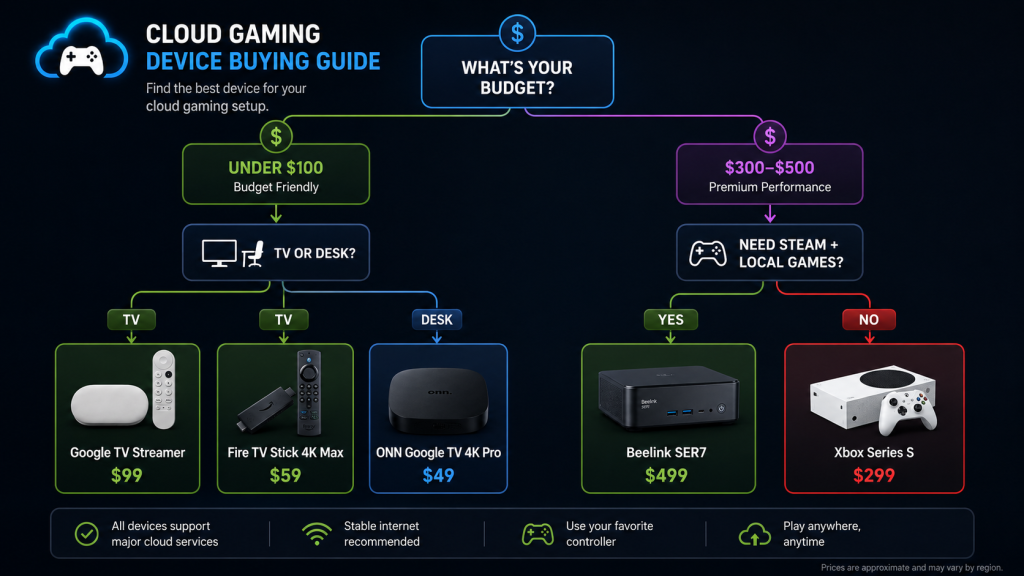
This guide walks through every cloud gaming device worth buying in 2026. Budget picks under $100. Mid-range streamers. Mini PCs for people who want Steam, cloud, and local all on one box. Plus the accessories that make every setup better.
Quick Answer: Best Cloud Gaming Devices by Budget
| Budget | Best Pick | Price | Best For |
|---|---|---|---|
| Under $100 | Google TV Streamer | $99 | Living room GeForce NOW |
| Under $100 | Fire TV Stick 4K Max | $59 | Xbox Cloud Gaming + Luna |
| Mid-Range | NVIDIA Shield TV Pro | $199 | AI upscaling + Plex + gaming |
| Mid-Range | Apple TV 4K | $129 | Apple users, PS Remote Play |
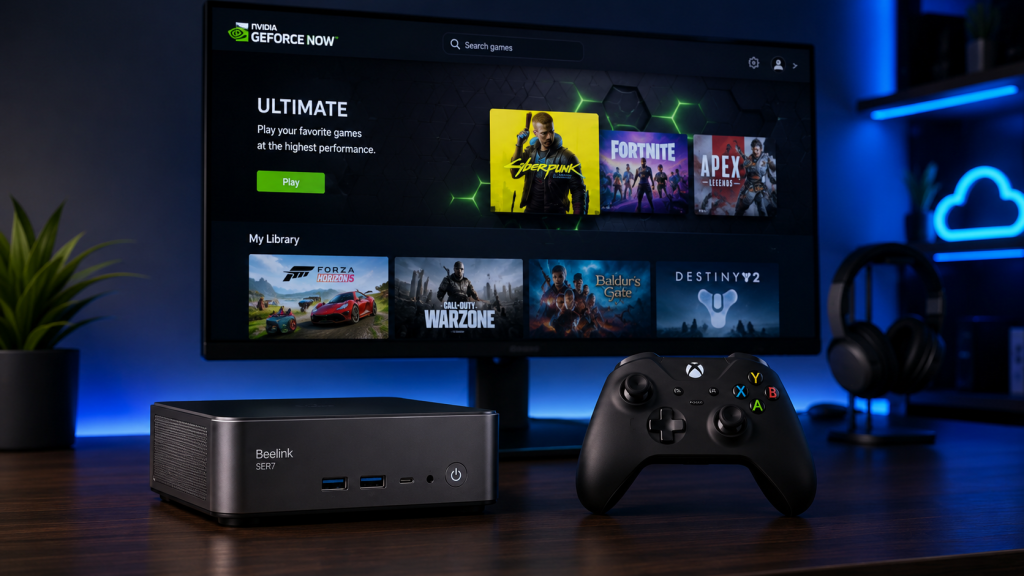
| Premium | Beelink SER7 Mini PC | $499 | Steam + all cloud services + local games |
| Premium | Minisforum UM780 XTX | $519 | 4K 120fps, every platform |
In short: if you just want to stream games on a TV, a $59 to $99 streaming stick handles it. If you want Steam, keyboard-and-mouse games, and 4K 120fps, however, you want a mini PC. Everything in between comes down to which ecosystem you live in.
Who Should Buy a Device Specifically for Cloud Gaming?
Not everyone needs a dedicated device. So before you spend money, figure out which bucket you fall into.
Casual players
You play two or three hours a week. You already own a smart TV from the last three years. If so, odds are your TV already runs GeForce NOW or Xbox Cloud Gaming natively. Check our smart TV cloud gaming guide first. You might need nothing at all.
Console replacement
You want a living room box that boots straight into cloud gaming. One remote. One controller. No PC behavior. As a result, a Google TV Streamer or Fire TV Stick gets closest to this console-like experience for under $100.
Frequent travelers
You move between hotels, Airbnbs, and relatives’ houses. A streaming stick plugs into any HDMI port and connects to hotel Wi-Fi. A mini PC is overkill here. A $59 Fire TV Stick in your carry-on bag gives you Xbox Cloud Gaming on any TV with an HDMI port.
Families with multiple TVs
You have a main TV in the living room and a second TV in the bedroom or kids’ room. Cloud gaming on a $40 to $60 streaming stick turns the secondary TV into a gaming station without buying a second console.
Budget gamers
You want access to AAA games without spending $500 on hardware. A $59 streaming stick plus a $35 controller plus a $16.99 Game Pass Ultimate subscription gets you 400-plus games. Total upfront cost: under $100.
Best Budget Devices (Under $100)
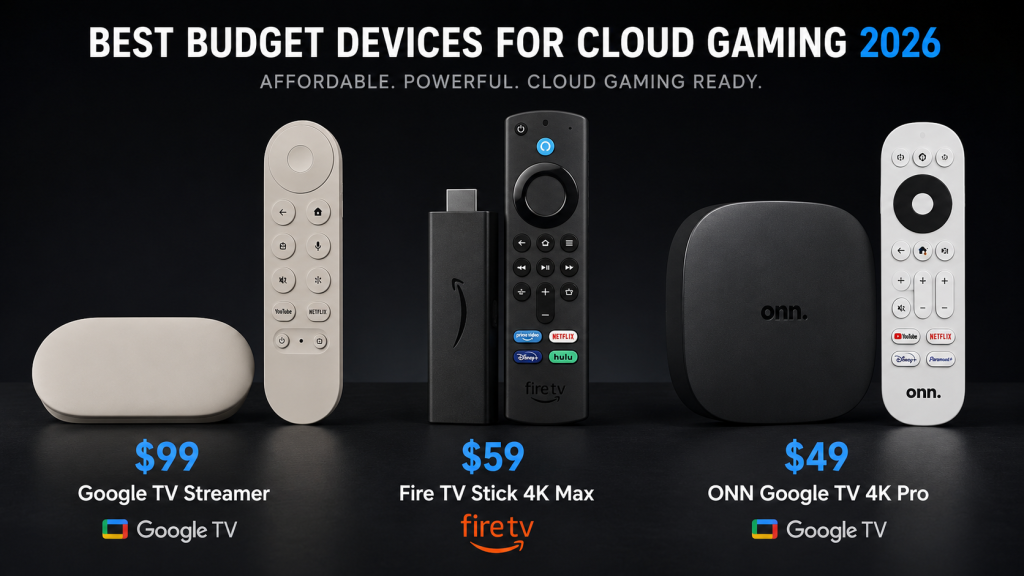
Three streaming devices stand out in the budget tier. Specifically, each has a clear winner depending on which cloud service you use.
| Device | Price | Best Cloud Service | Resolution | Controller Support |
|---|---|---|---|---|
| Google TV Streamer | $99 | GeForce NOW | 4K 60fps | Bluetooth |
| Fire TV Stick 4K Max | $59 | Xbox Cloud Gaming, Luna | 4K 60fps | Bluetooth |
| ONN Google TV 4K Pro | $49 | GeForce NOW | 4K 60fps | Bluetooth |
Google TV Streamer ($99)
The Google TV Streamer replaced Chromecast in late 2024 and it is the best budget cloud gaming device for GeForce NOW users, since the GeForce NOW app installs directly from the Google Play Store. No sideloading. No browser workarounds. Just download, sign in, pair a controller, and play.
The Streamer has a faster processor than the old Chromecast and 4GB of RAM, which helps with menu navigation speed. It also supports Wi-Fi 6, which matters for cloud streaming stability. Ethernet requires a separate USB-C hub with an Ethernet port, sold separately for about $20.
Who it is for: GeForce NOW users who want a simple $99 living room setup.
Who it is not for: Xbox Cloud Gaming users. No native Xbox app on Google TV as of July 2026. The browser workaround exists but performance varies by game.
Fire TV Stick 4K Max ($59)
At $59, the Fire TV Stick 4K Max is the cheapest way to get Xbox Cloud Gaming on a TV, because the Xbox app is available natively through the Amazon Appstore. Meanwhile, Amazon Luna runs at full performance since the whole experience is optimized for Fire OS.
The caveat, however, is hardware. The Stick 4K Max has a quad-core processor and 2GB of RAM. Menu navigation feels slower than on the Google TV Streamer. Bluetooth controller latency is roughly 2 to 5ms higher than on a Samsung TV, based on controller latency measurements from Digital Foundry’s 2024 cloud gaming roundup. That 5ms gap is not noticeable in single-player games. In competitive shooters, it adds up.
Wi-Fi 6E support is included, which is surprising at this price. The processor caps the experience more than the Wi-Fi chip does.
Who it is for: Xbox Game Pass Ultimate subscribers on a tight budget. Also the best pick for Amazon Luna users.
Who it is not for: GeForce NOW priority users who want the smoothest menu and loading experience.
ONN Google TV 4K Pro ($49)
Walmart’s ONN brand makes the cheapest Google TV device that runs cloud gaming without issues. Available at Walmart in the US for $49. The GeForce NOW app installs from the Play Store. The processor is slower than the Google TV Streamer and the remote feels cheap. Even so, for $49, it streams cloud games at 1080p 60fps without dropping frames, and that is the only thing that matters at this price.
Only available in the US and Canada.
Who it is for: GeForce NOW users with a sub-$50 budget.
Who it is not for: Anyone outside North America. International availability is nonexistent.
Best Mid-Range Devices
NVIDIA Shield TV Pro ($199)
The Shield TV Pro is five years old and still holds its price at $199. That tells you something.
It runs Android TV with full Google Play Store access. GeForce NOW installs natively with 4K HDR and 7.1 surround sound support. Specifically, the Shield has two features no other streaming device matches: AI upscaling and lossless audio passthrough.
The AI upscaling sharpens 1080p cloud streams to near-4K on a 4K TV. This matters because Xbox Cloud Gaming and Boosteroid streams top out at 1080p. On a 55-inch 4K TV, 1080p looks soft. NVIDIA’s upscaler, however, cleans up edges, text, and distant detail. In fact, the Shield is the only device that does this in real time.
The downside, of course: the Tegra X1+ processor is old. Android updates are slow. The device feels less snappy than newer Android TV hardware. And $199 is steep for a streaming box in 2026 when mini PCs start at $150.
Who it is for: Home theater owners who want a single device for Plex, lossless audio, and cloud gaming. People who will use the AI upscaling on 1080p streams daily.
Who it is not for: Anyone who just wants to play games. A Google TV Streamer at $99 does 90 percent of the gaming job.
Apple TV 4K ($129)
The Apple TV 4K is a strange recommendation for cloud gaming. Apple does not allow GeForce NOW, Xbox Cloud Gaming, or Amazon Luna on tvOS. Instead, the cloud gaming options are PS Remote Play and Steam Link. Both stream from hardware you already own, not from a remote server.
So why include it? Two reasons. First, if you own a PS5, PS Remote Play on Apple TV with a DualSense controller is a smooth experience with very low latency on the same home network. The A15 chip decodes the stream fast enough that input lag on a wired Apple TV plus wired PS5 setup is under 5ms of added latency.
Second, GeForce NOW is reportedly coming to Apple TV via a Safari-based web app in late 2026, based on code found in tvOS 20 beta releases. If and when that ships, the Apple TV 4K instantly becomes one of the best cloud gaming streamers. After all, the A15 chip is more powerful than any Android TV processor on the market right now.
For now, though, buy an Apple TV for cloud gaming only if you are already deep in Apple’s ecosystem and use PS Remote Play heavily.
Who it is for: PS5 owners in Apple households who want to stream their console to a second TV.
Who it is not for: Anyone who wants GeForce NOW or Xbox Cloud Gaming today. The hardware can do it. The App Store policy will not let it.
Best Premium Setup: Mini PC
A mini PC is the answer for people who want one box that runs everything: GeForce NOW, Xbox Cloud Gaming, Amazon Luna, Boosteroid, plus local Steam games, plus emulators, plus a web browser, plus keyboard and mouse support. No streaming stick does all of this.
| Mini PC | Price | CPU | GPU | Best For |
|---|---|---|---|---|
| Beelink SER7 | $499 | Ryzen 7 7840HS | Radeon 780M | All cloud + light local gaming |
| Minisforum UM780 XTX | $519 | Ryzen 7 7840HS | Radeon 780M | 4K 120fps cloud + OCuLink eGPU |
| GMKtec K8 Plus | $349 | Ryzen 7 8845HS | Radeon 780M | Budget mini PC, all services |
All three run Windows 11 out of the box. Each one includes Wi-Fi 6 and Ethernet. They also support 4K 120fps output over HDMI 2.1. The key spec, however, is the Radeon 780M integrated graphics, which handles AV1 decoding (lower bitrate at the same quality on GeForce NOW Ultimate) and plays most local games at 1080p medium settings.
The mini PC advantage over a streaming stick is simple: GeForce NOW Ultimate at 4K 120fps with Reflex, plus Steam for local games, plus Discord, plus a web browser for Xbox Cloud Gaming with keyboard and mouse, plus any controller you want over Bluetooth or 2.4GHz. By comparison, a $59 Fire TV Stick cannot do half of that.
The disadvantage, meanwhile: price. At $349 to $519, a mini PC costs more than an Xbox Series S. So if all you do is stream cloud games, a $99 Google TV Streamer does the same streaming job. The mini PC earns its price when you want Steam, keyboard-and-mouse games, and cloud all on one machine.
Who it is for: People who want a single box for cloud gaming, Steam, and PC tasks. Anyone who plays keyboard-and-mouse games like Age of Empires, Cities Skylines, or Counter-Strike through GeForce NOW.
Who it is not for: Living room only, controller only, streaming only users. Buy a $59 to $99 streaming stick instead.
Smart TV vs Streaming Device
If your TV runs cloud gaming apps natively, do you need a separate streaming device? Sometimes yes.
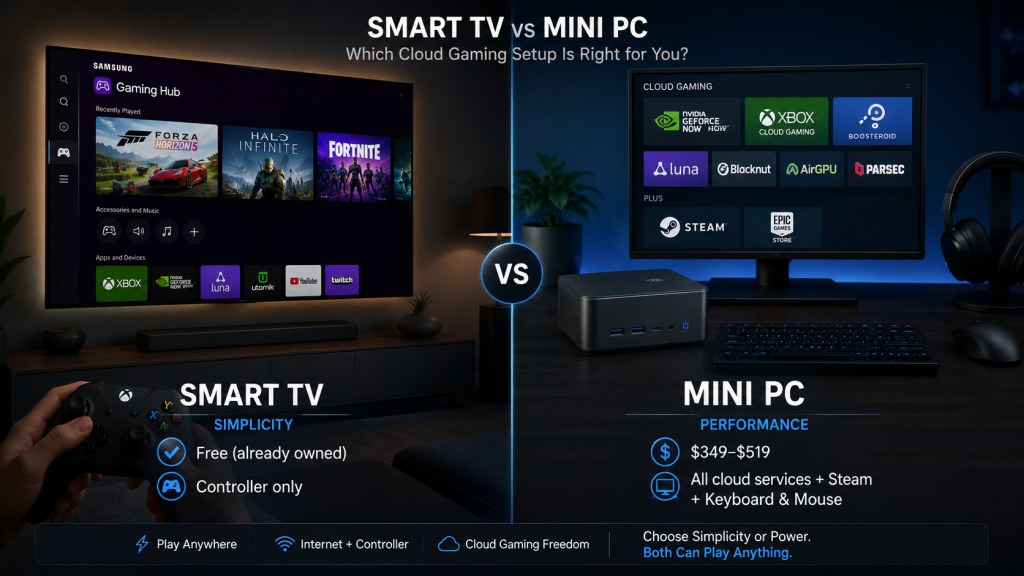
| Smart TV (Built-in) | External Streaming Device | |
|---|---|---|
| Cost | Free (already owned) | $49 to $199 |
| Setup | Zero | Plug in, configure |
| Updates | Depends on TV brand | Regular app updates |
| Performance | Tied to TV processor | Often faster processor |
| Portability | Stuck to one TV | Take it anywhere |
| Ethernet | TV dependent | USB-C hub or built-in |
| Controller Latency | Varies by TV Bluetooth version | Usually better Bluetooth |
The built-in cloud gaming apps on 2022 and later Samsung and LG TVs work well. If your TV is from 2022 or later and has Gaming Hub or the LG Game Optimizer, you are covered. Our cloud gaming on smart TV guide has the full breakdown.
However, you buy a separate device in these cases: your TV is older than 2022, your TV’s built-in processor struggles with menus, you want to take cloud gaming to different TVs, or you want a specific feature like NVIDIA AI upscaling that only the Shield TV Pro offers.
For most people with a recent TV, the built-in apps work. Instead, spend the $59 to $199 on a controller and a Game Pass subscription.
Mini PC vs Console
A $499 mini PC versus a $299 Xbox Series S. Both stream cloud games. Both play local games. Which one makes sense?
| Mini PC ($349-$519) | Xbox Series S ($299) | |
|---|---|---|
| Cloud Gaming Services | All (GeForce NOW, Xbox, Luna, Boosteroid) | Xbox Cloud Gaming only |
| Local Games | Steam, Epic, GOG, emulators | Xbox Store, Game Pass |
| Keyboard & Mouse | Native | Limited game support |
| 4K Streaming | GeForce NOW 4K 120fps | 1080p cloud, 1440p local |
| Portability | Fits in a bag, needs monitor/TV | Fits in a bag, needs monitor/TV |
| Non-Gaming Use | Full Windows PC | Media apps only |
The Xbox Series S is the better deal at $299 if you live inside the Xbox ecosystem. Game Pass library, cloud streaming access, and local installs for the games you play most. The user experience is polished. No driver updates. No Windows notifications popping up mid-game.
By contrast, the mini PC wins when you want GeForce NOW Ultimate at 4K 120fps (the Series S cannot do this), Steam access for games not on Xbox, keyboard-and-mouse gaming, and a full PC for non-gaming tasks.
One practical combo: a $299 Xbox Series S for the living room plus a $59 Fire TV Stick for the bedroom TV. Total cost under $360 for two-room cloud gaming. That beats a single $499 mini PC for most households.
For more on how these services compare, see our cloud gaming platform comparison.
Should You Buy a Chromebook?
A lot of Reddit threads ask this question, so here is the short answer.
A Chromebook runs GeForce NOW through the Chrome browser or the Android app. Performance is fine. The screen on a $200 to $300 Chromebook is usually a 14-inch 1080p IPS panel, which looks better than streaming to a phone but worse than streaming to a TV or monitor.
However, the real problem with Chromebooks as cloud gaming devices is the form factor. Laptop ergonomics work for desk use. They do not work for couch gaming. So if you primarily play at a desk and also need a cheap laptop for browsing, a $249 Chromebook handles GeForce NOW adequately. The cheapest cloud gaming options include some Chromebook models that work well.
If you only want a cloud gaming device, a $59 to $99 streaming stick on a TV is a better experience than hunching over a 14-inch Chromebook screen.
Buy a Chromebook if: you need a laptop anyway and cloud gaming is a secondary use.
Skip the Chromebook if: cloud gaming is the main goal. Get a streaming stick or mini PC.
Recommended Accessories
These accessories improve any cloud gaming setup because each one fixes a specific problem.
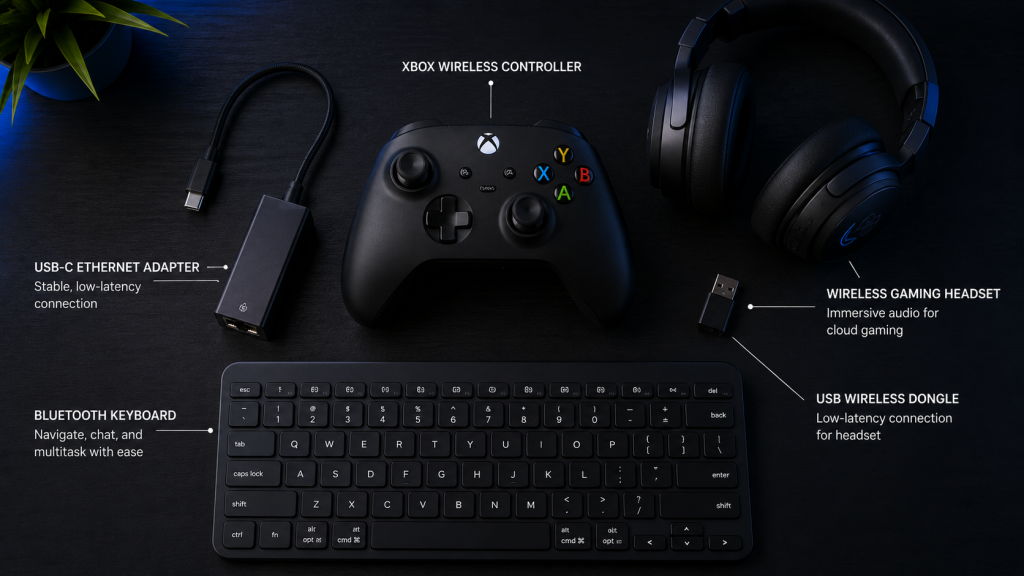
Xbox Wireless Controller ($49-$59)
The default controller for cloud gaming. Every service maps its layout to Xbox buttons. Zero configuration. Pairs over Bluetooth to every device on this list. The 2024 revision adds Bluetooth 5.3 with faster wake-from-sleep.
Ethernet Adapter ($15-$20)
Most streaming sticks lack an Ethernet port. A USB-C hub with Ethernet costs $15 to $20 and eliminates Wi-Fi jitter. In practice, wired internet cuts latency by 5 to 15ms compared to 2.4GHz Wi-Fi and reduces packet loss to near zero. Worth it even if you only use Ethernet for ranked sessions.
For data on how much internet you actually use, check our cloud gaming data usage guide.
Bluetooth Keyboard and Mouse
GeForce NOW supports keyboard and mouse on Windows, macOS, and Android TV. In particular, games like Age of Empires IV, Cities Skylines, and Counter-Strike are unplayable on a controller. Any Bluetooth keyboard and mouse pair works. No need for gaming-branded peripherals.
Gaming Headset
Cloud gaming audio latency is negligible on all five major services. Any USB or 3.5mm headset works. Bluetooth headsets add roughly 100 to 200ms of audio delay on most streaming devices, so stick to wired or 2.4GHz wireless headsets with a USB dongle.
FAQ
Can I use any Android TV for cloud gaming?
Most Android TV and Google TV devices from 2022 onward support GeForce NOW through the Play Store. Xbox Cloud Gaming requires a browser workaround or sideloading. Performance varies by processor. Budget Android TV boxes with 1GB of RAM struggle with cloud gaming apps. Stick to the devices listed in this guide.
Is Apple TV good for cloud gaming?
Not right now. Apple’s App Store policy blocks GeForce NOW, Xbox Cloud Gaming, and Amazon Luna. PS Remote Play and Steam Link work. A Safari-based web app for GeForce NOW is reportedly coming in late 2026, based on tvOS 20 beta findings. For real cloud gaming today, skip the Apple TV.
Do I need Wi-Fi 6 for cloud gaming?
Wi-Fi 6 helps in crowded Wi-Fi environments (apartment buildings, shared houses). It reduces latency spikes when multiple devices share the same network. For a single-family home with one or two active devices, Wi-Fi 5 is sufficient. The internet speed requirements guide breaks down the numbers.
Is Ethernet worth it for cloud gaming?
Yes, for competitive games and ranked play. Ethernet eliminates Wi-Fi jitter and packet loss. The latency improvement is 5 to 15ms on average. That is the difference between a shot registering and a shot ghosting. For single-player games, Wi-Fi is fine.
What is the absolute cheapest cloud gaming setup?
A $49 ONN Google TV 4K Pro plus a $35 used Xbox One controller plus GeForce NOW free tier. Total upfront cost: $84. You get one-hour sessions at 1080p with ads and queue times. It works, and it costs less than one new AAA game.
Can I play cloud games on an old TV?
Yes, as long as the TV has an HDMI port. Any streaming stick listed in this guide plugs into HDMI. The TV’s age does not matter. A 10-year-old 1080p TV with an HDMI port works the same as a new 4K TV for cloud gaming purposes. The streaming device handles all the processing.
Which device has the lowest controller latency?
NVIDIA Shield TV Pro over Ethernet with a wired controller has the lowest measured latency among streaming devices. For wireless, Samsung and LG TVs from 2024 onward with Bluetooth 5.3 average 5 to 10ms of controller latency. Older devices with Bluetooth 4.2 average 12 to 18ms.
Do I need 4K support on the device for cloud gaming?
Only if you subscribe to GeForce NOW Ultimate and own a 4K TV or monitor. Xbox Cloud Gaming streams at 1080p regardless of device capability. Amazon Luna and Boosteroid also cap at 1080p. The only service that benefits from a 4K-capable device is GeForce NOW Ultimate.
Conclusion: Pick Based on Your Service
The device you need depends entirely on which cloud service you pay for.
GeForce NOW users: Google TV Streamer ($99) for living room TV. Beelink SER7 ($499) for desk setup with keyboard and mouse.
Xbox Game Pass Ultimate users: Fire TV Stick 4K Max ($59) for budget living room. Xbox Series S ($299) if you want local installs plus cloud.
Amazon Luna users: Fire TV Stick 4K Max ($59). The whole experience is optimized for Fire OS.
Multi-service users: Mini PC. The only device that runs all four major services plus Steam without compromises.
PS5 owners in Apple homes: Apple TV 4K ($129) for PS Remote Play around the house.
Start with the service. Then pick the device that runs it best. Most people overthink the hardware and underthink the subscription. After all, a $59 Fire TV Stick with Game Pass Ultimate delivers more fun than a $499 mini PC with a free cloud tier and queue times.
Next: best cloud gaming controllers and how much speed you actually need for a smooth experience.