Disclosure: This post contains affiliate links. If you buy through these links, we may earn a small commission at no extra cost to you.
You already own the screen. A 55-inch 4K TV hanging on your wall, connected to Wi-Fi, sitting idle most of the day. And somewhere in your head there is a question: can I just play AAA games on this thing?
The short answer: yes, cloud gaming on smart TV hardware works in 2026. The longer answer: it depends on which TV you own.
In 2022, only one platform had a native cloud gaming app. Three years later, Samsung, LG, Google TV, and Fire TV all run at least two streaming services directly. You skip the console entirely. A gaming PC stays off the shopping list. Even a streaming dongle is unnecessary. Just a TV, a controller, and an internet connection.
This guide covers which smart TVs support cloud gaming in 2026, which services work on each platform, what controllers to use, how much internet speed you need, and whether buying a dedicated streaming box is actually the better move.
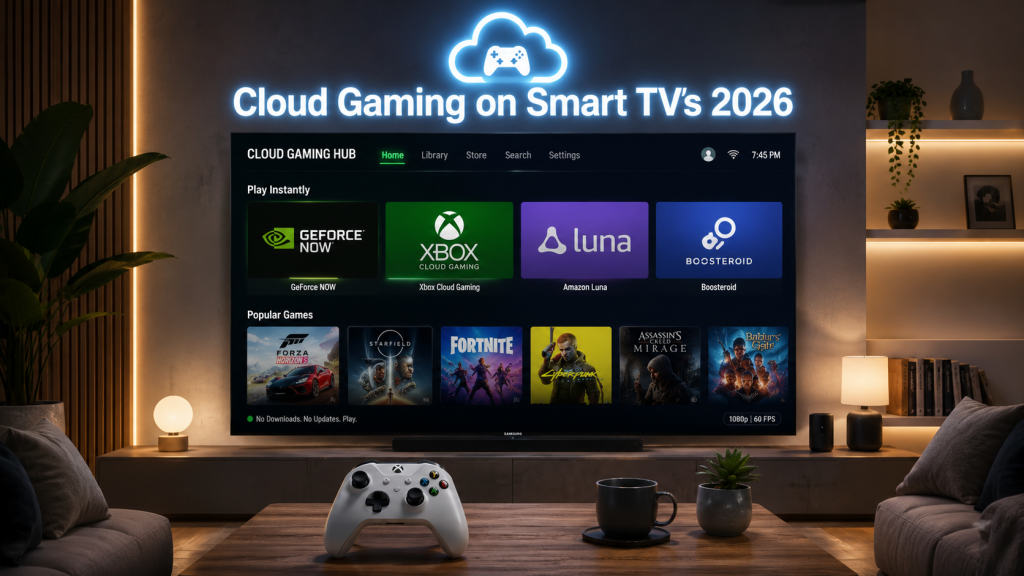
Quick Answer: Cloud Gaming on Smart TVs in 2026
| TV Platform | Cloud Gaming Support | Best Service |
|---|---|---|
| Samsung TV (2022+) | Native | Xbox Cloud Gaming / GeForce NOW |
| LG TV (2021+) | Native | GeForce NOW / Xbox Cloud Gaming |
| Google TV | App | GeForce NOW |
| Fire TV | App | Xbox Cloud Gaming / Amazon Luna |
| Apple TV | Limited | PS Remote Play / Steam Link |
If your TV was made in 2021 or later and runs Samsung Tizen, LG webOS, or Google TV, there is a strong chance you can install a cloud gaming app right now. The experience is not identical across platforms. Samsung and LG lead the pack. Google TV catches up fast. Fire TV works but favors Amazon’s ecosystem. Apple TV stays at the back of the line.
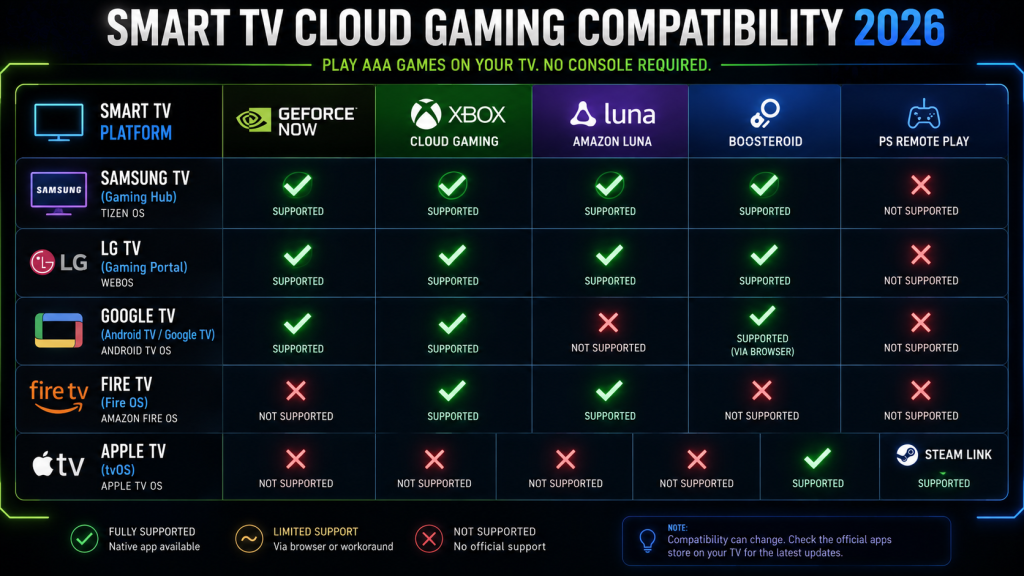
Which Smart TVs Support Cloud Gaming?
Samsung Gaming Hub (Tizen, 2022+ Models)
Samsung launched Gaming Hub in mid-2022 and it remains the most complete smart TV cloud gaming platform in 2026. More importantly, it is not an app you download. It is a dedicated interface built into the TV’s home screen, accessible from a dedicated Gaming button on recent Samsung remotes.
Samsung Gaming Hub supports four cloud services natively: Xbox Cloud Gaming, GeForce NOW, Amazon Luna, and Boosteroid. The Xbox app lets you stream Game Pass titles directly. GeForce NOW syncs your Steam, Epic, and Ubisoft libraries. Luna ties into your Prime subscription. And Boosteroid adds another 1,000-plus PC games to the mix.
Any Samsung QLED, Neo QLED, OLED, or The Frame model from 2022 onward includes Gaming Hub. Older 2020-2021 Samsung TVs do not. Meanwhile, the 2024 and later models add Wi-Fi 6E support and Bluetooth 5.3 for lower controller latency.
LG webOS (2021+ Models)
LG added cloud gaming to webOS in late 2021 through its Gaming Portal, accessible from the home dashboard or the dedicated Game Optimizer menu. As of 2026, LG webOS supports GeForce NOW, Xbox Cloud Gaming, Amazon Luna, and Boosteroid. In terms of coverage, the lineup matches Samsung’s.
LG’s Game Optimizer menu gives you more granular control than Samsung. You can toggle between Standard, FPS, RPG, and RTS picture presets. Each preset adjusts black stabilizer, response time, and color temperature independently. For cloud gaming, specifically, the Prevent Input Delay setting set to “Boost” cuts latency by roughly 8 to 12ms compared to Standard mode on LG C4 and G4 OLED panels (source: RTINGS latency testing, 2024-2025).
Supported models include all LG OLED TVs (A, B, C, G series) from 2021 onward, plus QNED and NanoCell LCD models from the same year. The 2025 and later G5 series with the Alpha 11 processor adds AI upscaling for cloud streams, which sharpens 1080p GeForce NOW feeds to near-native 4K.
Google TV (Sony, TCL, Hisense, Chromecast)
Google TV runs on Sony Bravia, TCL, Hisense, and the Chromecast with Google TV dongle. Out of all these, GeForce NOW has the best native app support. You install it from the Google Play Store directly on the TV. And it works. No sideloading needed.
Xbox Cloud Gaming does not have a native Google TV app as of July 2026. In theory, you can access it through a sideloaded browser or the built-in TV browser. In practice, controller support, latency, and stream stability vary widely between TV models. Some users on the r/xcloud subreddit report acceptable performance on Sony Bravia X90L and A95L models. Others on budget TCL and Hisense TVs, however, report constant frame drops. So your mileage depends on the processor inside your specific Google TV set.
Amazon Luna has limited Google TV support through the web browser. Boosteroid also requires the browser workaround. In practice, then, Google TV works best as a single-service cloud gaming platform: GeForce NOW.
Fire TV (Fire TV Stick, Fire TV Cube, Fire TV Edition TVs)
Amazon’s Fire TV platform runs a forked version of Android. Cloud gaming support comes through the Amazon Appstore. Xbox Cloud Gaming and Amazon Luna have the best native apps. GeForce NOW is also available but the app receives updates more slowly than on Google TV or Samsung.
Fire TV’s biggest limitation, however, is hardware. The Fire TV Stick 4K has a modest processor and 2GB of RAM. Cloud gaming apps run but the Bluetooth stack introduces 2 to 5ms of extra controller latency compared to a Samsung or LG TV, based on controller latency measurements from Digital Foundry’s 2024 cloud gaming roundup. The Fire TV Cube (3rd Gen) handles the workload better with its faster octa-core processor.
If you are shopping for a Fire TV primarily for cloud gaming, skip the Stick and go for the Cube. The difference is noticeable.
Apple TV (tvOS)
Apple TV is the outlier. As of July 2026, Apple refuses to allow cloud gaming apps that stream games from a remote server onto the App Store. Specifically, the issue has nothing to do with technology and everything to do with App Store policy. Each game inside a cloud streaming catalog would technically need to be submitted as its own app for review, which is impractical for services that offer hundreds or thousands of titles.
You can still use PS Remote Play and Steam Link on Apple TV. Both have native tvOS apps. PS Remote Play streams from your own PS5 on the same network. Steam Link streams from your own PC. Neither is true cloud gaming in the “rent a server” sense. You still need a console or PC somewhere in the house.
For actual cloud gaming on Apple TV, the workaround is AirPlay from an iPhone, iPad, or Mac running the cloud gaming app. Latency over AirPlay adds roughly 15 to 30ms. It is playable for turn-based and slower single-player games. It is not playable for shooters, fighters, or anything that demands reaction speed under 100ms.
Best Cloud Gaming Services for TVs
Five cloud gaming services matter for smart TV users in 2026. Each has different TV platform support, game libraries, and performance tiers.
| Service | Monthly Price | Games | Max Quality on TV | Best TV Platform |
|---|---|---|---|---|
| GeForce NOW | Free / $9.99 / $19.99 | 2,000+ | 4K 120fps | Samsung, LG, Google TV |
| Xbox Cloud Gaming | $16.99 (Game Pass Ultimate) | 400+ | 1080p 60fps | Samsung, LG, Fire TV |
| Amazon Luna | $9.99 / Prime | 100+ | 1080p 60fps | Fire TV, Samsung, LG |
| Boosteroid | $9.89 | 1,000+ | 1080p 60fps | Samsung, LG |
| PS Remote Play | Free (PS5 required) | Your library | 1080p 60fps (local) | Apple TV, Android TV |
GeForce NOW
GeForce NOW is the heavy hitter. Over 2,000 games, streams at up to 4K 120fps on the Ultimate tier, and syncs libraries you already own on Steam, Epic Games, Ubisoft Connect, and GOG. The free tier gives you one-hour sessions at 1080p with queue times. Priority ($9.99/month) removes ads and bumps you to 1080p with RTX. Ultimate ($19.99/month) unlocks 4K, 120fps, and NVIDIA Reflex for lower latency.
In terms of TV support, GeForce NOW runs as a native app on Samsung and LG TVs with full controller and keyboard-plus-mouse support. On Google TV, the Play Store app gives the same experience. As a result, this is the service to get if you want the best image quality on a 4K TV.
Xbox Cloud Gaming
Xbox Cloud Gaming comes bundled with Game Pass Ultimate at $16.99 per month. The 400-plus game catalog includes day-one Xbox Game Studios releases, the entire Halo and Gears franchises, Forza Horizon 5, and a rotating selection of third-party titles. Stream quality tops out at 1080p 60fps. Of course, Microsoft has promised 4K streaming but has not delivered it as of July 2026.
On a TV, 1080p stretched across 55 or 65 inches shows its limits. Compression artifacts are visible in dark scenes, especially during night levels and shadow-heavy gameplay. Text can look soft. But the game catalog is the best value in cloud gaming by a wide margin, and Xbox Cloud Gaming runs on more TV platforms than any other service except GeForce NOW.
Amazon Luna
Luna is the middle child. The game library sits around 100 titles, with heavy integration into Amazon Prime and Twitch. The Prime tier includes a rotating selection of roughly 5 to 7 free games per month. Meanwhile, the Luna+ subscription at $9.99 per month opens the full library.
Luna runs natively on Fire TV devices and is available on Samsung Gaming Hub and LG webOS. Stream quality caps at 1080p 60fps. The bitrate is closer to 20 Mbps, similar to Xbox Cloud Gaming, which means softer image quality than GeForce NOW on a large TV. So Luna makes sense if you already have Prime and do not want to pay extra for a second gaming subscription.
Boosteroid
Boosteroid is the dark horse. Over 1,000 games, $9.89 per month, available on Samsung and LG TVs natively. No free tier. Stream quality at 1080p 60fps with a higher bitrate cap than Xbox Cloud Gaming, closer to 40 Mbps. For instance, the game library includes heavy hitters that GeForce NOW lost during publisher disputes: Rockstar titles, some Warner Bros. games, and a wider selection of indie titles.
The trade-off is server availability. Boosteroid has fewer data centers than NVIDIA or Microsoft. If you live far from one of their server locations, latency will be worse than on GeForce NOW or Xbox Cloud Gaming. So check their server map before subscribing.
PS Remote Play
PS Remote Play is not cloud gaming. It streams your own PS5 over your home network or the internet. The app is available on Apple TV, Google TV, and some Fire TV devices. Image quality varies based on your home network setup. On a wired PS5 plus a wired streaming device, you get a stable 1080p 60fps. However, on Wi-Fi for both ends, expect drops, macroblocking, and occasional disconnects.
The practical use case: your gaming room PS5 streams to your living room Apple TV, so you can pick up a session on the couch without moving the console. Outside your home network, however, performance depends on upload speed at the PS5 end and download speed at the remote end. Most home upload speeds of 10 to 20 Mbps can handle 720p. But 1080p requires at least 25 Mbps upload.
For a deeper breakdown of how these services compare across all devices (not just TVs), see our cloud gaming platform comparison guide.
Controllers You Can Use
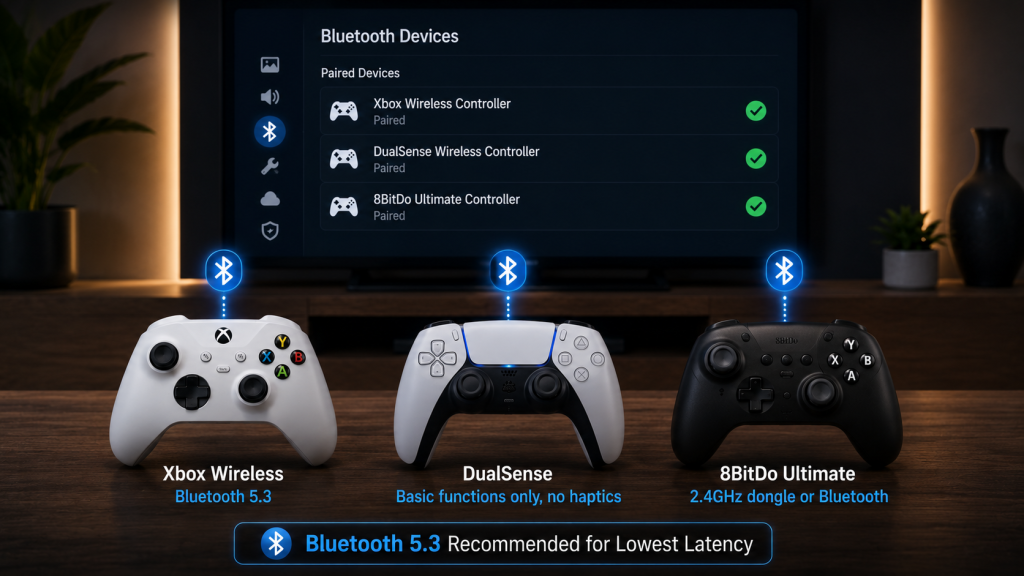
All five TV platforms support Bluetooth controllers. The three controllers that work most reliably:
| Controller | Connection | Samsung | LG | Google TV | Fire TV | Apple TV |
|---|---|---|---|---|---|---|
| Xbox Wireless | Bluetooth | ✅ Best | ✅ Best | ✅ | ✅ | ✅ |
| DualSense (PS5) | Bluetooth | ✅ | ✅ | ✅ | ✅ | ✅ |
| 8BitDo Ultimate | 2.4GHz + Bluetooth | ✅ | ✅ | ✅ | ❌ | ❌ |
Xbox Wireless Controller
The Xbox Wireless Controller is the default choice. Every cloud gaming service maps its button layout to Xbox controls. There is zero configuration. Simply pair it once via Bluetooth (hold the pair button on top until the Xbox button flashes, then find it in the TV’s Bluetooth settings), and it works across Samsung, LG, Google TV, Fire TV, and Apple TV. The latest Xbox Wireless Controller (2024 revision) includes Bluetooth 5.3 with improved wake-from-sleep speed.
DualSense (PS5)
The DualSense pairs over Bluetooth to all five platforms. Basic functions (sticks, buttons, triggers) work everywhere. However, the DualSense’s signature features (adaptive triggers, haptic feedback, built-in speaker) do not work through any cloud gaming service on any TV. Those features require a direct USB connection to a PS5 or PC. In other words, for cloud gaming on a TV, the DualSense is just a well-built Bluetooth controller with a built-in rechargeable battery.
8BitDo Ultimate
The 8BitDo Ultimate connects via a 2.4GHz USB dongle or Bluetooth. On Samsung, LG, and Google TV, you can plug the dongle into the TV’s USB port and get sub-1ms wireless latency without touching Bluetooth pairing. On Fire TV and Apple TV, however, the dongle is not recognized. The Bluetooth backup works on Samsung and LG but adds the usual Bluetooth latency. On the plus side, the controller itself has hall effect sticks, which do not develop stick drift, and two programmable back buttons.
Controller Latency on Different TVs
Bluetooth latency varies by TV brand, Bluetooth version, and controller model. Samsung and LG TVs from 2024 onward with Bluetooth 5.3 average 5 to 10ms of controller latency. Older Google TV and Fire TV hardware with Bluetooth 4.2 average 12 to 18ms. That 8ms gap is not something you will notice consciously. That said, combined with cloud streaming latency (20 to 40ms), every millisecond adds up. So if your TV has a USB port and your controller supports a 2.4GHz dongle, use the dongle.
For a detailed comparison of controller options across all cloud gaming devices, read our best controllers for cloud gaming guide.
Internet Requirements for Cloud Gaming on Smart TV
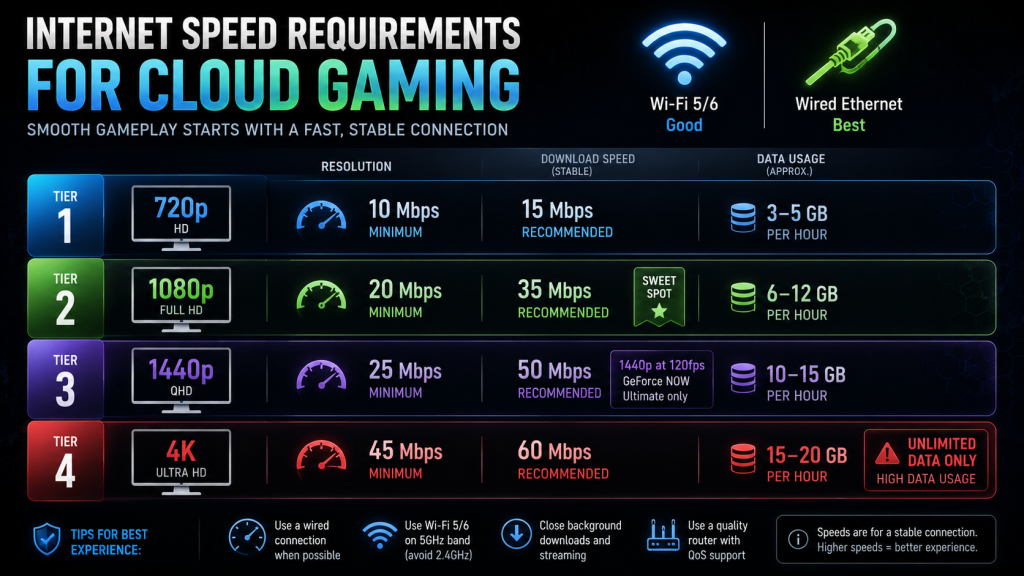
Your TV’s internet connection determines whether cloud gaming works at all. The minimums below assume no one else in the house is streaming Netflix, taking a Zoom call, or downloading a game.
| Resolution | Minimum Speed | Recommended Speed | Data Per Hour |
|---|---|---|---|
| 720p | 10 Mbps | 15 Mbps | 3–5 GB |
| 1080p | 20 Mbps | 35 Mbps | 6–12 GB |
| 4K | 45 Mbps | 60 Mbps | 15–20 GB |
What Kills Cloud Gaming on a TV
Three things destroy cloud gaming performance on smart TVs, and none of them show up on a speed test:
- TV Wi-Fi chips are weak. Most smart TVs ship with budget Wi-Fi 5 chips that deliver 50 to 70 Mbps in real-world conditions, even on a 300 Mbps plan. Position matters more than the plan speed. For example, if your router sits behind two walls from the TV, expect drops.
- TV processors throttle Bluetooth. When a TV runs a cloud gaming app, its processor handles video decoding, Wi-Fi data, and Bluetooth controller input simultaneously. Budget TV processors deprioritize Bluetooth to keep video decoding stable. The result: every 15 to 30 seconds, a brief controller input spike hits.
- Ethernet ports on TVs are often 100 Mbps. Many TVs, including mid-range Samsung and LG models, ship with a 100 Mbps Ethernet port, not Gigabit. Ironically, Wi-Fi 5 at full signal often outperforms the TV’s own Ethernet jack. For cloud gaming at 4K, this matters. GeForce NOW Ultimate at 75 Mbps plus streaming overhead can saturate a 100 Mbps port if the TV is also downloading updates. So plug in a USB-to-Gigabit adapter into the TV’s USB 3.0 port if you want wired reliability without the 100 Mbps bottleneck.
For the full breakdown of speed tiers, latency measurement methods, and how to test your connection before subscribing, see our cloud gaming internet speed guide. For the data cap math, read our cloud gaming data usage guide.
Performance Expectations: What Cloud Gaming Actually Feels Like on a TV
A cloud gaming stream on a TV goes through more steps than on a phone or laptop. First, the controller sends a signal over Bluetooth. From there, the TV decodes the input and the Wi-Fi chip transmits the packet. Next, your router forwards it to a server potentially hundreds of miles away. That server processes the input, renders a frame, and encodes a video response. Then the video stream travels back through every single hop in reverse. Each step adds time.
Latency Stack on a Smart TV
| Step | Typical Latency |
|---|---|
| Controller input (Bluetooth) | 5–15 ms |
| TV decoding + encoding | 3–8 ms |
| Home network (Wi-Fi) | 2–10 ms |
| Internet to server | 10–30 ms |
| Server processing + encoding | 5–10 ms |
| Video stream back through network | 10–30 ms |
| TV decoding + display | 5–15 ms |
| Total estimated | 40–118 ms |
40ms at the low end. 118ms at the high end. In short, the difference between those two numbers comes down to your TV hardware, your Wi-Fi setup, and your distance to the nearest server. A Samsung S95D OLED on Wi-Fi 6E with a server 50 miles away hits 40ms. Meanwhile, a Fire TV Stick 4K on a budget router with a server 300 miles away hits 118ms. Most people land somewhere around 55 to 75ms on a 2023 or newer TV with decent Wi-Fi.
Is It Playable?
At 40 to 60ms, single-player games feel fine. Cyberpunk 2077, Baldur’s Gate 3, and Forza Horizon 5 play smoothly. You will not notice the delay unless you switch directly from a local PC or console. At 60 to 80ms, however, competitive shooters like Call of Duty and Valorant become frustrating. And at 100ms and above, even slow-paced games feel sluggish.
4K, HDR, and Wi-Fi 6
GeForce NOW Ultimate on a Samsung or LG TV with Wi-Fi 6E delivers 4K at 120fps with HDR. That trio (4K, 120fps, HDR) generates roughly 15 to 20 GB of data per hour and requires a stable 60 Mbps connection minimum. On Wi-Fi 5, however, 4K streams occasionally stutter during fast camera pans because the older Wi-Fi standard cannot maintain the consistent throughput the stream demands. On Wi-Fi 6E, by contrast, the 6 GHz band provides enough headroom.
HDR adds roughly 15 to 20 percent more data per frame. If you are near your data cap or on a weaker connection, disable HDR in the cloud gaming app settings. The visual gain is real but so is the bandwidth cost.
Which TV Hardware Delivers the Best Experience?
OLED panels (LG C/G series, Samsung S95D/S90D, Sony A95L) have near-instant pixel response times of 0.1 to 0.3ms. That eliminates one source of motion blur from the display side. Combined with GeForce NOW’s Reflex mode for supported games, an LG G4 or Samsung S95D on Wi-Fi 6E can deliver a cloud gaming experience that feels close to a local console. Close. Not identical. But close enough that most people stop noticing the difference after the first 10 minutes.
Budget LCD TVs (entry-level TCL, Hisense, Fire TV Edition) introduce 8 to 15ms of additional display latency on top of the cloud stream latency because their processors are slower at decoding video. As a result, the total latency stack on these TVs regularly exceeds 90ms. That is playable for turn-based games and narrative titles. However, it is not good for anything that tests reaction speed.
Should You Buy a Streaming Device Instead?
If your current TV does not support cloud gaming natively, or if the built-in apps run poorly, a dedicated streaming device can solve the problem without replacing the TV.
| Device | Price (2026 est.) | Cloud Gaming Support | Best For |
|---|---|---|---|
| NVIDIA Shield TV Pro | $199 | GeForce NOW (native 4K), Steam Link, Moonlight | Best overall, 4K AI upscaling |
| Google TV Streamer | $99 | GeForce NOW (1080p), Steam Link | Budget GeForce NOW |
| Fire TV Stick 4K Max | $59 | Xbox Cloud Gaming, Luna | Budget Xbox Game Pass |
| Mini PC (N100) | $150–200 | All PC cloud apps + local gaming | Most flexible |
| Xbox Series S | $299 | All cloud + local Xbox gaming | Best hybrid |
NVIDIA Shield TV Pro
The Shield TV Pro is a 2019 device that still has no real competitor in 2026. It runs GeForce NOW at native 4K with HDR, supports the Xbox Cloud Gaming sideload, handles Steam Link and Moonlight for local streaming, and includes Nvidia’s AI upscaling for 1080p content. The Tegra X1+ processor is old but still outperforms every other streaming box for cloud gaming workloads. It has a Gigabit Ethernet port (unlike most TVs) and two USB 3.0 ports for wired controllers or keyboard and mouse. At $199, it is steep for a 7-year-old device. For cloud gaming specifically, though, it is still the best box you can buy.
Google TV Streamer
Google’s $99 streamer runs GeForce NOW natively at 1080p through the Play Store. The processor handles cloud gaming better than most budget TVs. It also has a Gigabit Ethernet port and Wi-Fi 6. The limitation: no native 4K GeForce NOW support, since the device’s HDMI output and processor are designed for media streaming, not 4K120 gaming streams. Still, if you want a clean, affordable GeForce NOW box for a 1080p TV, this is the pick.
Fire TV Stick 4K Max
At $59, the Fire TV Stick 4K Max is the cheapest way to add Xbox Cloud Gaming and Amazon Luna to any TV with an HDMI port. Its processor handles 1080p streams without overheating. The 2GB of RAM is tight for gaming apps but keeps things running. Still, the real bottleneck is storage: 8GB fills up quickly if you install more than two cloud gaming apps, and the Wi-Fi 6 chip helps but cannot fix the weak processor. Acceptable for casual Game Pass streaming. Not a long-term solution if cloud gaming becomes your primary way to play.
Mini PC (Intel N100, ~$150-200)
A mini PC with an Intel N100 processor and Windows 11 turns any TV into a full PC. You can install every cloud gaming app natively, use any controller, and connect wired or wireless at full speed. The N100 can also run older PC games locally (pre-2018 titles, indies, emulators). The trade-off, of course, is that it is a PC, with Windows updates, driver management, and all the friction that comes with that. If you are comfortable with Windows, a mini PC offers more flexibility than any streaming box. If you want a plug-and-play appliance, however, stick with the Shield or Google TV Streamer.
For our full guide on running cloud gaming on low-cost hardware, see cloud gaming on a budget laptop. The same advice on processor minimums and network setup applies to mini PCs.
Why Not Just Buy a Console?
A used Xbox Series S costs $200 to $250. It runs Game Pass games locally with zero streaming latency. It also runs Xbox Cloud Gaming for titles not in the Game Pass download catalog. So an Xbox Series S plus a Game Pass Ultimate subscription gives you both local and cloud gaming on the same box. If you own zero gaming hardware and are about to spend $199 on a Shield TV Pro purely for cloud gaming, consider whether a used Series S for roughly the same price is actually a smarter purchase.
Pros and Cons of Cloud Gaming on Smart TV
Pros
- Zero hardware cost if your TV already supports it. You skip the console, the PC, and the extra streaming box. A $50 controller and a subscription is the entire cost.
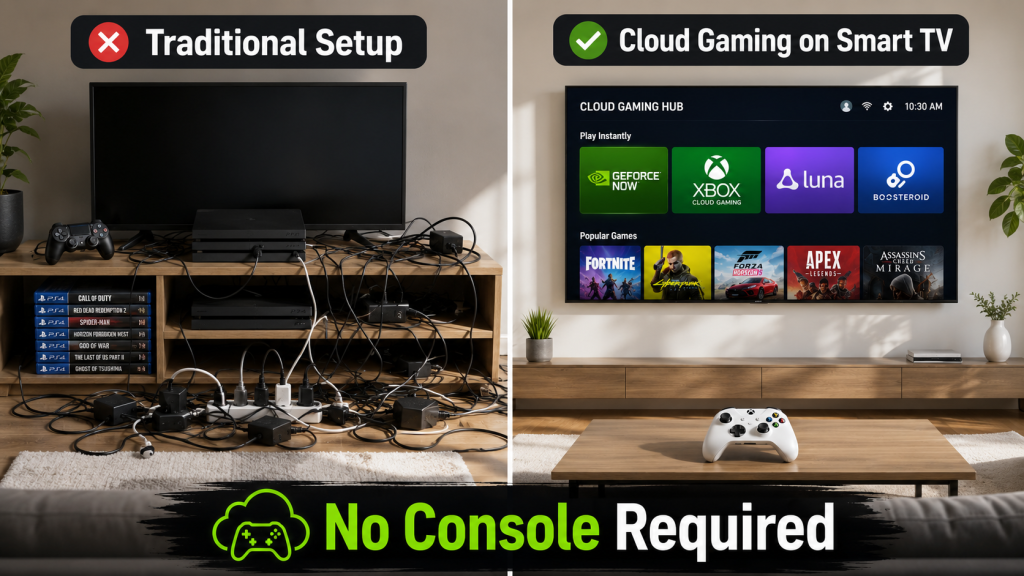
- Living room experience without the clutter. One TV on the wall. One controller on the table. No cables, no power bricks, no shelf of game cases.
- Setup takes five minutes. Install the app from the TV’s app store. Pair a controller. Sign in. Start playing.
- Games follow your subscription, not your hardware. Cancel Game Pass. Resubscribe three months later. Your saves are still there, still on the cloud, no reinstall needed.
- Multiple subscriptions on one screen. GeForce NOW for your Steam library. Xbox Cloud Gaming for Game Pass. Luna for Prime freebies. All on the same TV, no switching inputs.
Cons
- Your TV determines your ceiling. A 4K TV with a weak processor still streams at 4K. But it drops frames, adds latency, and frustrates more than it impresses. The cloud is only as good as the client hardware decoding the stream.
- Game libraries are service-locked. GeForce NOW lost Activision Blizzard titles. Xbox Cloud Gaming only streams what is in Game Pass. Boosteroid has gaps. No single service has everything.
- Bluetooth latency adds up. Every TV handles Bluetooth slightly differently. Some do it well (Samsung, LG 2024+). Some do not (budget Google TV, older Fire TV). You will not know which camp your TV falls into until you try.
- Not all games suit streaming. Turn-based RPGs, narrative adventures, racing games, and casual titles play beautifully on a TV via the cloud. Competitive FPS, fighting games, and rhythm games do not. The latency math is unforgiving.
- Internet dependency. ISP outage means zero games. Data cap means a monthly countdown. Peak-hour congestion means degraded streams exactly when you want to play. Local gaming works when the internet is down. Cloud gaming does not.
FAQ
Can I play Xbox Cloud Gaming on Samsung TV?
Yes. Samsung Gaming Hub (2022 and later models) includes the Xbox Cloud Gaming app natively. Simply pair a Bluetooth controller, sign into your Microsoft account with an active Game Pass Ultimate subscription, and you can stream over 400 games directly on the TV. No extra hardware needed.
Does LG TV support GeForce NOW?
Yes. All LG TVs running webOS 6.0 (2021) or later support GeForce NOW through the LG Gaming Portal. The app handles 4K streaming on the Ultimate tier if your TV is a 4K model and your internet meets the 60 Mbps recommendation.
Can I use a PS5 controller with my smart TV for cloud gaming?
Yes. The DualSense controller pairs via Bluetooth to Samsung, LG, Google TV, Fire TV, and Apple TV. Basic functions (analog sticks, face buttons, triggers, D-pad) work normally. Adaptive triggers, haptic feedback, and the built-in speaker do not work through any cloud gaming app on any TV platform. The DualSense functions as a standard Bluetooth controller in this setup.
Is Wi-Fi fast enough for cloud gaming on a TV?
Yes, Wi-Fi is fast enough if the signal is strong. Wi-Fi 6 and 6E deliver 200 to 500 Mbps with latency under 5ms to the router, which exceeds cloud gaming requirements. The issue is not the Wi-Fi standard. Instead, it is the Wi-Fi chip in your TV and the distance to your router. Move the router closer or add a mesh node in the same room as the TV before concluding that cloud gaming does not work.
Which TV brand is best for cloud gaming?
Samsung (2022+ Gaming Hub) and LG (2021+ webOS) are the two best platforms as of 2026. Both support four cloud gaming services natively (GeForce NOW, Xbox Cloud Gaming, Luna, Boosteroid). Both handle Bluetooth controllers well on 2024 and newer models. If forced to pick one: Samsung gets the edge for Gaming Hub’s unified interface. LG, on the other hand, gets the edge for Game Optimizer’s latency-reduction settings and OLED panel response times.
Do I need a console to use cloud gaming on my TV?
No. Cloud gaming services like GeForce NOW, Xbox Cloud Gaming, Amazon Luna, and Boosteroid run entirely on remote servers. You need a compatible smart TV, a Bluetooth controller, a subscription, and an internet connection. No console sits in your house. No PC either. The server in the data center does all the rendering.
Bottom Line
Cloud gaming on a smart TV works well enough in 2026 that most casual players can skip the console. The catch is timing. Your TV needs to be a 2021 model or newer. Specifically, it needs to be a Samsung or LG, or a Google TV with a decent processor. Most importantly, it needs a strong Wi-Fi signal in the living room. If those three conditions line up, the experience is solid.
Hardcore players should still buy hardware. Competitive shooters and fighting games demand latency numbers that the cloud cannot reliably hit through a TV’s Bluetooth-Wi-Fi-internet chain. But the person who plays 5 to 10 hours a week, picks up Game Pass for a few months a year, and just wants to play Cyberpunk or Forza on the big screen? That person does not need a console anymore.
Start with a $50 controller and one month of the service that matches your TV. If it works for you, you just saved $400. If it does not, well, a used Xbox Series S is still there.
Check our cloud gaming platform comparison to decide which service fits your library. Read the internet speed guide if your connection needs testing. And if you are gaming on the go, our cloud gaming on mobile guide covers 5G streaming performance.
Also read: Cloud Gaming Comparison 2026: 5 Platforms Ranked | Cloud Gaming Internet Speed Guide 2026: What You Actually Need | Cloud Gaming Data Usage Explained 2026 | Best Controllers for Cloud Gaming 2026 | Cloud Gaming on Mobile: Which Service Actually Works? | Cloud Gaming on a Budget Laptop 2026
As an Amazon Associate we earn from qualifying purchases. Xbox Wireless Controller | 8BitDo Ultimate Controller | NVIDIA Shield TV Pro | Fire TV Stick 4K Max